144
○○○○○○○○○○○○○○○○○○○○○○○○○○○○○○○○○
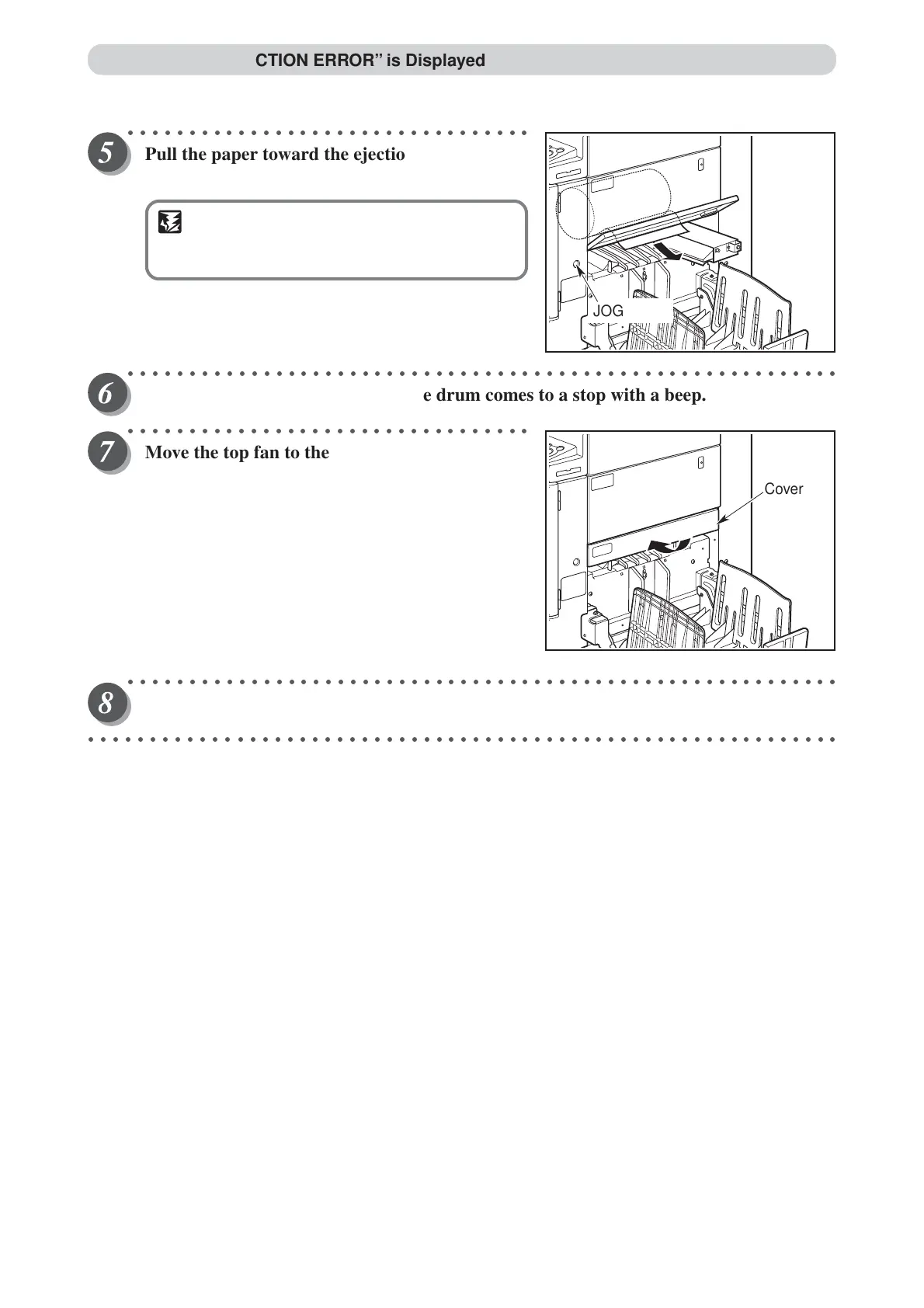
Pull the paper toward the ejection side while
pressing the JOG switch to peel the paper off.
IMPORTANT
• Make sure that the peeled paper does not
stick to your clothing.
○○○○○○○○○○○○○○○○○○○○○○○○○○○○○○○○○○○○○○○○○○○○○○○○○○○○○○○○○○
Hold the JOG switch down until the drum comes to a stop with a beep.
○○○○○○○○○○○○○○○○○○○○○○○○○○○○○○○○○
Move the top fan to the set position, and close
the cover.
○○○○○○○○○○○○○○○○○○○○○○○○○○○○○○○○○○○○○○○○○○○○○○○○○○○○○○○○○○
Make another plate.
○○○○○○○○○○○○○○○○○○○○○○○○○○○○○○○○○○○○○○○○○○○○○○○○○○○○○○○○○○○○○
When “PLATE EJECTION ERROR” is Displayed
Cover
JOG switch



 To Next Page