92
Fine Start “Startup Time Setting”
This function allows you to specify whether or not fine-start mode is used (The default setting is “OFF”).
The Fine Start Mode automatically checks the time elapsed since the printer was last used and the room
temperature, and then selects the optimal operational settings to ensure the first page is printed clearly and
vividly.
IMPORTANT
•When the Fine Start mode is functioning, it may take longer than usual for the first page to
be printed out following platemaking.
• When the temperature is below 10°C, the first few pages printed out may not be imaged
perfectly even when the Fine Start mode is ON.
○○○○○○○○○○○○○○○○○○○○○○○○○○○○○○○○○○○○○○○○○○○○○○○○○○○○○○○○○○
Open the panel cover.
○○○○○○○○○○○○○○○○○○○○○○○○○○○○○○○○○
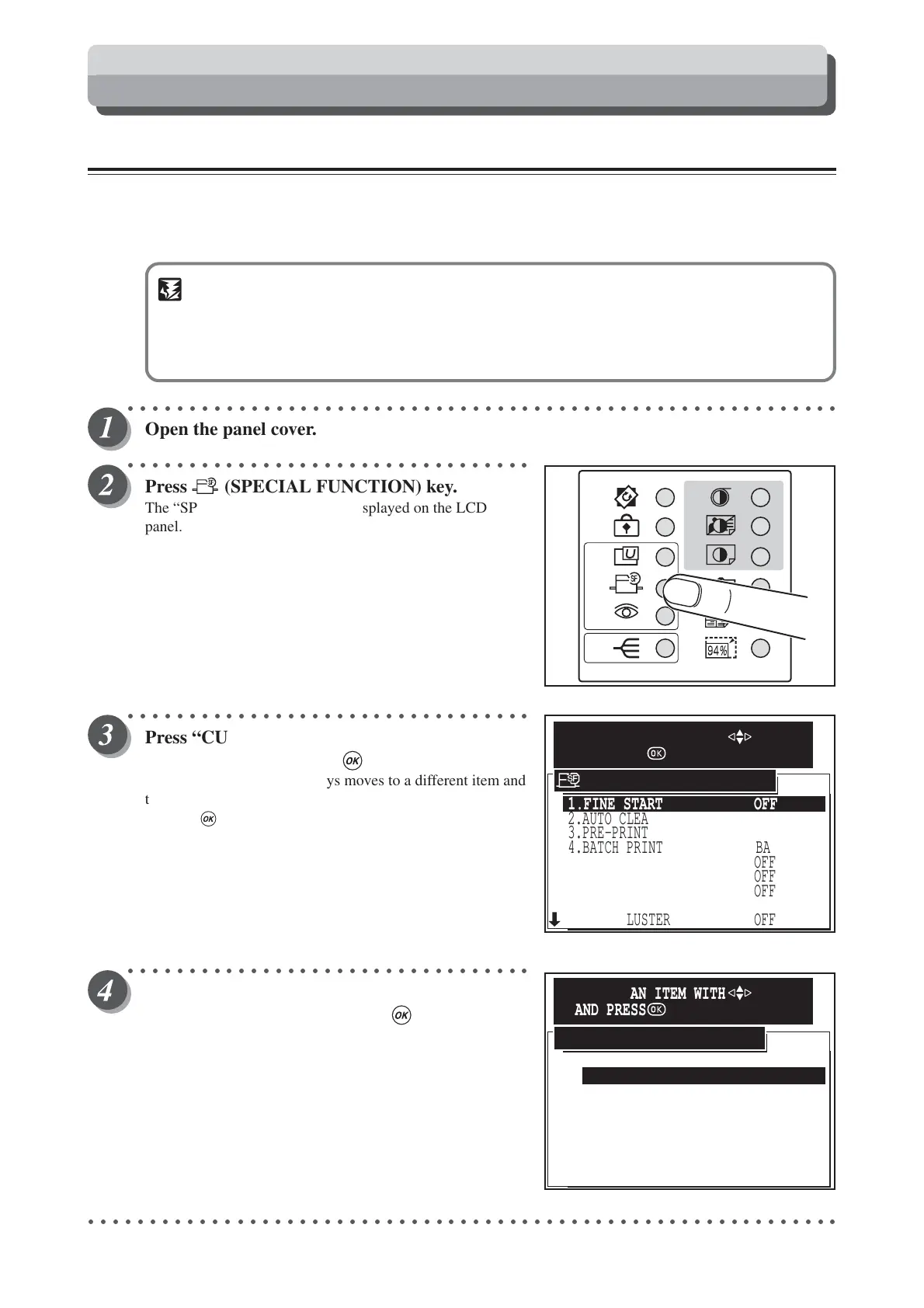
Press (SPECIAL FUNCTION) key.
The “SPECIAL FUNCTION” is displayed on the LCD
panel.
○○○○○○○○○○○○○○○○○○○○○○○○○○○○○○○○○
Press “CURSOR” keys to select “FINE
START”, and then press (OK) key.
Each press of “CURSOR” keys moves to a different item and
that item is displayed highlighted.
Pressing (OK) key set the highlighted item.
○○○○○○○○○○○○○○○○○○○○○○○○○○○○○○○○○
Press “CURSOR” keys to select “AUTO
SELECTION”, and then press (OK) key.
○○○○○○○○○○○○○○○○○○○○○○○○○○○○○○○○○○○○○○○○○○○○○○○○○○○○○○○○○○○○○
AUTO SELECTION
CANSEL
ENABLE IN NEXT JOB
FINE START
SELECT AN ITEM WITH
AND PRESS
2.AUTO CLEAR
5.AUTO POWER OFF
6.AUTO LCD OFF
7.LONG MODE
8.INK CIRCULATION
9.TAPE CLUSTER
3.PRE-PRINT
4.BATCH PRINT
1.FINE START OFF
OFF
OFF
OFF
OFF
BATCH
0 PRINTS
OFF
SPECIAL FUNCTION
SELECT AN ITEM WITH
AND PRESS
Special Functions






 To Next Page