4
Miscellaneous Functions
93
○○○○○○○○○○○○○○○○○○○○○○○○○○○○○○○○○
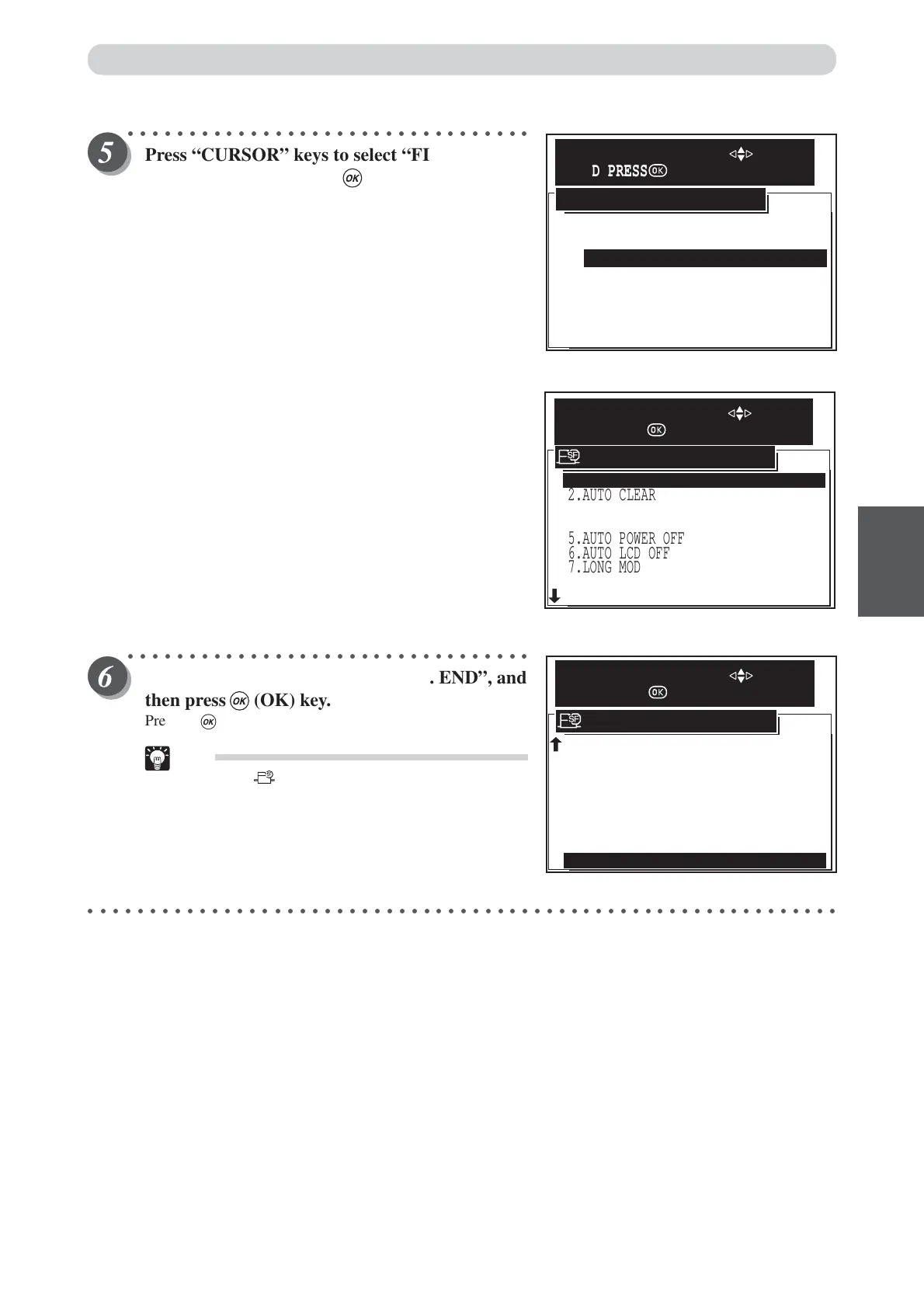
Press “CURSOR” keys to select “FINE
START”, and then press (OK) key.
AUTO: The machine operates with conditions appropri-
ate for the amount of time that has elapsed.
6 HOUR: The machine operates with maximum conditions
if 6 or more hours has elapsed. If less than 6
hours has elapsed, fine start does not function.
12 HOUR: The machine operates with maximum conditions
if 12 or more hours has elapsed. If less than 12
hours has elapsed, fine start does not function.
OFF: The fine start mode is set OFF.
CANCEL: The fine start mode screen is canceled.
The “FINE START” setting in the “SPECIAL FUNCTION
Screen” changes to "6 HOURS" (when 6 hours is set).
○○○○○○○○○○○○○○○○○○○○○○○○○○○○○○○○○
Press “CURSOR” keys to select “12. END”, and
then press (OK) key.
Pressing (OK) key set the fine start function.
Tip
• Pressing (SPECIAL FUNCTION) key set the
fine start function also.
○○○○○○○○○○○○○○○○○○○○○○○○○○○○○○○○○○○○○○○○○○○○○○○○○○○○○○○○○○○○○
AUTO
12 HOURS
OFF
CANSEL
6 HOURS
AUTO SELECT AFTER
SELECT AN ITEM WITH
AND PRESS
2.AUTO CLEAR
5.AUTO POWER OFF
6.AUTO LCD OFF
7.LONG MODE
8.INK CIRCULATION
9.TAPE CLUSTER
3.PRE-PRINT
4.BATCH PRINT
1.FINE START 6 HOURS
OFF
OFF
OFF
OFF
BATCH
0 PRINTS
OFF
SPECIAL FUNCTION
SELECT AN ITEM WITH
AND PRESS
4.BATCH PRINT
9.TAPE CLUSTER
11.DRUM SIZE
BATCH
5.AUTO POWER OFF OFF
6.AUTO LCD OFF OFF
OFF
7.LONG MODE
8.INK CIRCULATION
10.DOUBLE FEED DETECTION
12.END
SPECIAL FUNCTION
SELECT AN ITEM WITH
AND PRESS
OFF
OFF
A3
Special Functions






 To Next Page