62
○○○○○○○○○○○○○○○○○○○○○○○○○○○○○○○○○○○○○○○○○○○○○○○○○○○○○○○○○○○○○
Proceed with steps 1 to 4 of the sequence described in “Basic Printmaking” (
aa
aa
a page 32).
Place the documents on the are platen glass.
○○○○○○○○○○○○○○○○○○○○○○○○○○○○○○○○○○○○○○○○○○○○○○○○○○○○○○○○○○○○○
○○○○○○○○○○○○○○○○○○○○○○○○○○○○○○○○○○○○○○○○○○○○○○○○○○○○○○○○○○
Open the panel cover.
○○○○○○○○○○○○○○○○○○○○○○○○○○○○○○○○○
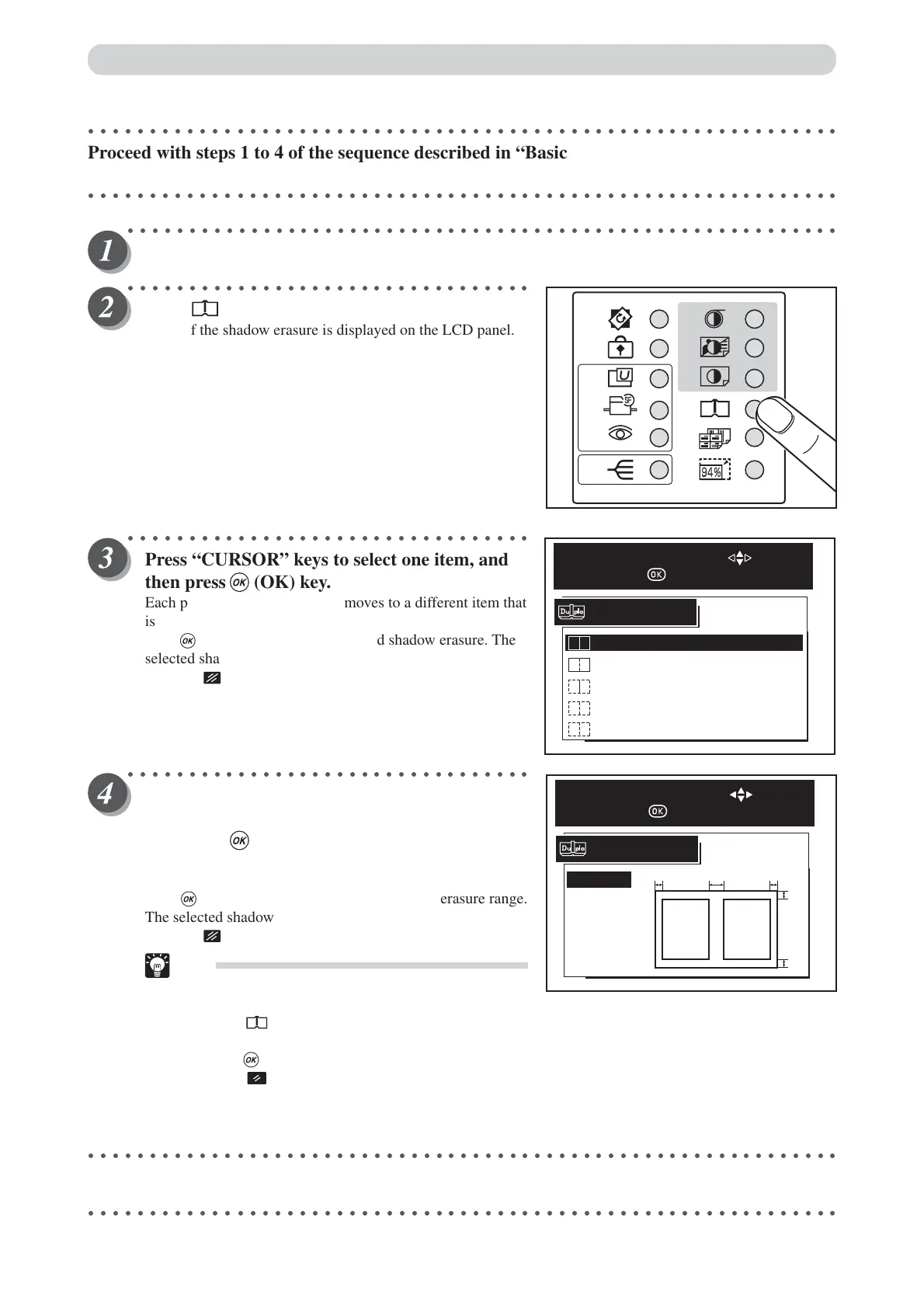
Press (BOOK SHADOW ERASER) key.
A list of the shadow erasure is displayed on the LCD panel.
○○○○○○○○○○○○○○○○○○○○○○○○○○○○○○○○○
Press “CURSOR” keys to select one item, and
then press (OK) key.
Each press of “CURSOR” keys moves to a different item that
is displayed highlighted. After moving to the desired item,
press (OK) key to select the desired shadow erasure. The
selected shadow erasure is set.
Pressing (CANCEL) key redisplays the main screen.
○○○○○○○○○○○○○○○○○○○○○○○○○○○○○○○○○
“FREE ERASURE” sets up the range of “A”,
“B”, “C” further with “CURSOR” keys, and
then press (OK) key.
Each press of “CURSOR” keys moves number of items.
Select the range that is 0 to 99mm with “CURSOR” keys.
Press (OK) key to select the desired shadow erasure range.
The selected shadow erasure is set.
Pressing (CANCEL) key redisplays the main screen.
Tips
•To exit “Book Sadow Erase Mode”, use one of
the following teo methods:
• Press (BOOK SHADOW ERASER) key
and select OFF with “CURSOR” keys, and then
press (OK) key
• Press (ALL CLEAR) key. In this case, all
settings are reset to standard mode
(a page 26).
○○○○○○○○○○○○○○○○○○○○○○○○○○○○○○○○○○○○○○○○○○○○○○○○○○○○○○○○○○○○○
Start platemaking and printing. (
aa
aa
a See steps 5 to 8 of “Basic Printmaking” page 32.)
○○○○○○○○○○○○○○○○○○○○○○○○○○○○○○○○○○○○○○○○○○○○○○○○○○○○○○○○○○○○○
Book Shadow Eraser Mode
CENTER & OUTLINE
OFF
FREE
OUTLINE
CENTER
SHADOW ERASURE
SELECT AN ITEM WITH
AND PRESS
CANCEL
A=0mm
B=0mm
B=0mm
FREE ERASURE
SELECT AN ITEM WITH
AND PRESS
BB
C
C
A






 To Next Page