87 / 97
Introduction Manual ENC66
eckelmann.de
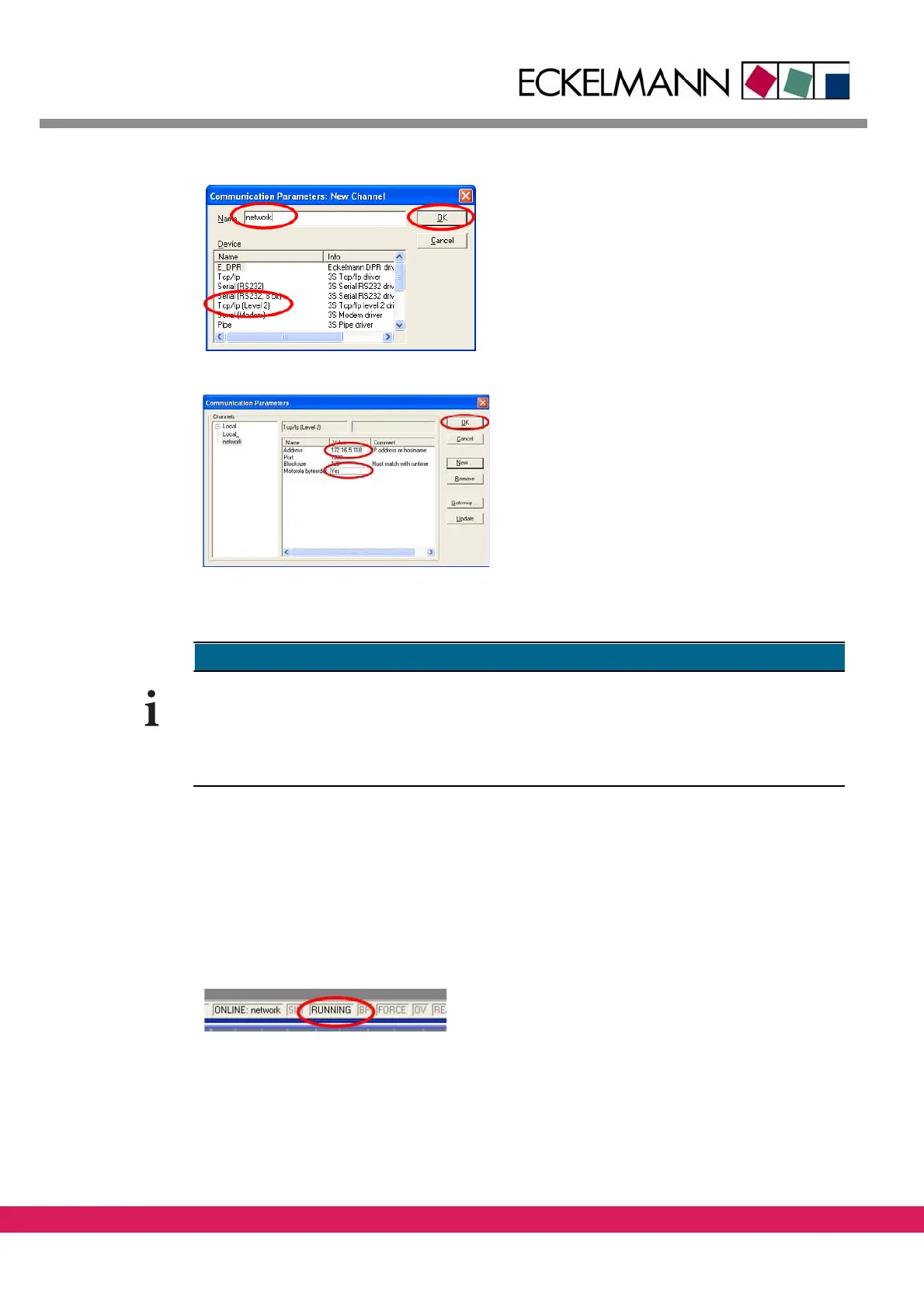
Abbildung 62:
A new connection is defined
• Change the entry localhost to the correct IP
addr
ess of the controller by making a double
click on the value of the correct IP address of the
controller (e.g. 172.16.5.118)
• Change the Motorola byteorder from No to Yes
by ma
king several double clicks
• Acknowledge by clicking on OK
Figure 62: Configuration of the network connection
The connection options are displayed in the left window pane, in this case two connections
(Local_ and Network) are displayed
The current setting is the setting that is displayed in the right window pane prior to the
clicking on OK. This setting is used for login.
10.11.3 Loading of the program
• The program is loaded into the controller via Online – Login
• The program can be started (see the following chapter)
The successful start of the program is indicated by the passing of the colour from gray to
bl
ack in box „RUNNING“ of the lower status bar.
Abbildung 63:
Figure 63: Status line
Moreover, the current connection (i.e. in this case: Local) is displayed in the lower status bar.
The program displays the current variable values
in the right part of the screen.



 To Next Page