Function of VS 300
56
Doku-Version 2.05 - Firmware 2.10 - 15. September 2017
4.5.11 Second setpoint - setpoint increase / decrease
A second characteristic can be programmed with high-pressure control and can be activated by the internal
week timer or via a digital input of the controller. Setpoint increase/decrease allows better matching to night and
weekend operation. Setpoint toggle is performed for the following values:
S Target temperature(s)
S Neutral zone
S Control constant
The polarity of digital input signals can be programmed (low or high active).
4.5.12 Heat recovery mode (HRC)
When a control loop is configured as a HP controller, operation at changed (higher) t
c
setpoints (heat recovery
mode) can be called up via a digital input (see section 4.2 Configuring/Monitoring Digital Inputs).
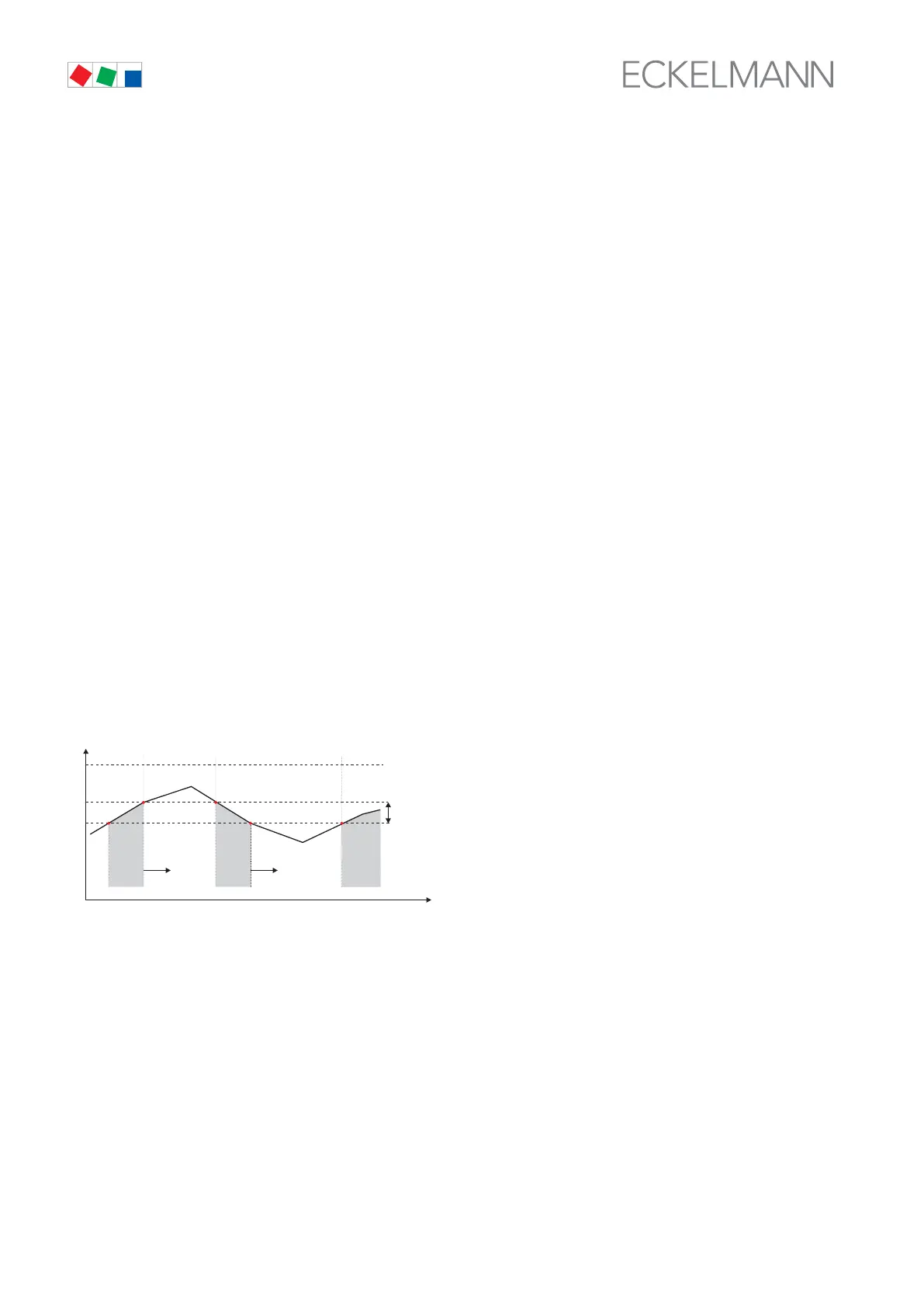
In heat recovery mode, HP control is controlled by the VS 300 with two parameters:
S The maximum condensing temperature allowed in HR mode is entered by the Max.HR parameter.
S A temperature differential is defined by the second parameter Dif.HR.
When pressure rises above Max. HR, the first fan stage is loaded immediately (without consideration to pro
grammed actuating times). Each additional fan stage is loaded after the basic load time has elapsed (without
consideration to variable actuating time).
When pressure drops below Max. HR - Dif. HR, fan stages are unloaded with consideration to the basic and
variable unload times.
t
Time
ZNR. 51203 65 530 E1
c
High pressure (
HP)
Max. pressure at HR
Fan step up Fan step down
Control algorithm heat recovery mode (HR mode)
LevelHP cutout
no
step
no
step
no
step
Dif.HR
Changes in controller action during HR mode:
S No alarming of high-pressure fault.
S No compressor shedding in high-pressure fault.
HR mode is displayed n the actual values screen of the external terminal (CI 3000 or AL 300):
S HR mode active:
t
c-Setp
HR 45°C
p
c-Setp
HR 20.85 b
HR mode is also shown on the status display of the integral user interface (see section 6 Operation).



 To Next Page