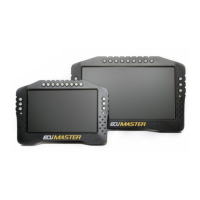
The next item we will add is an engine speed indicator. To do this, an RPM Bar item should be
added to the page. When a page object displays a changing value, you must define the channel
that drives the displayed value. This may be information from the CAN bus, a function, an
analogue or digital input value, or a fixed value. For engine speed this information will usually come
from the engine control unit via CAN bus or serial communication. A crankshaft position sensor
may also be connected directly to Digital Input 1. Most ECUs on the market transmit common data
via CAN (e.g. RPM, lambda, cooling liquid temperature, etc.) and this data is represented in the
ADU software by the ecu.* channels.
After loading the proper CANX file for the connected computer or configuring the serial
connection, the ecu.rpm channel will display the value sent by the ECU. For information specific to
your ecu, check the application notes files. Application notes also contain information about the
available log channels. If the ECU sends specific channels not included in the ecu.* channels, they
are assigned unique names. These can be previewed in the Project tree or found in the
application notes.
The pre-defined ECU channels are advantageous, as your page layouts can be used with
any ecu without needing revision (revolutions will always be ecu.rpm, the cooling liquid
temperature will be ecu.clt, etc.).
Page 42/137


 To Next Page