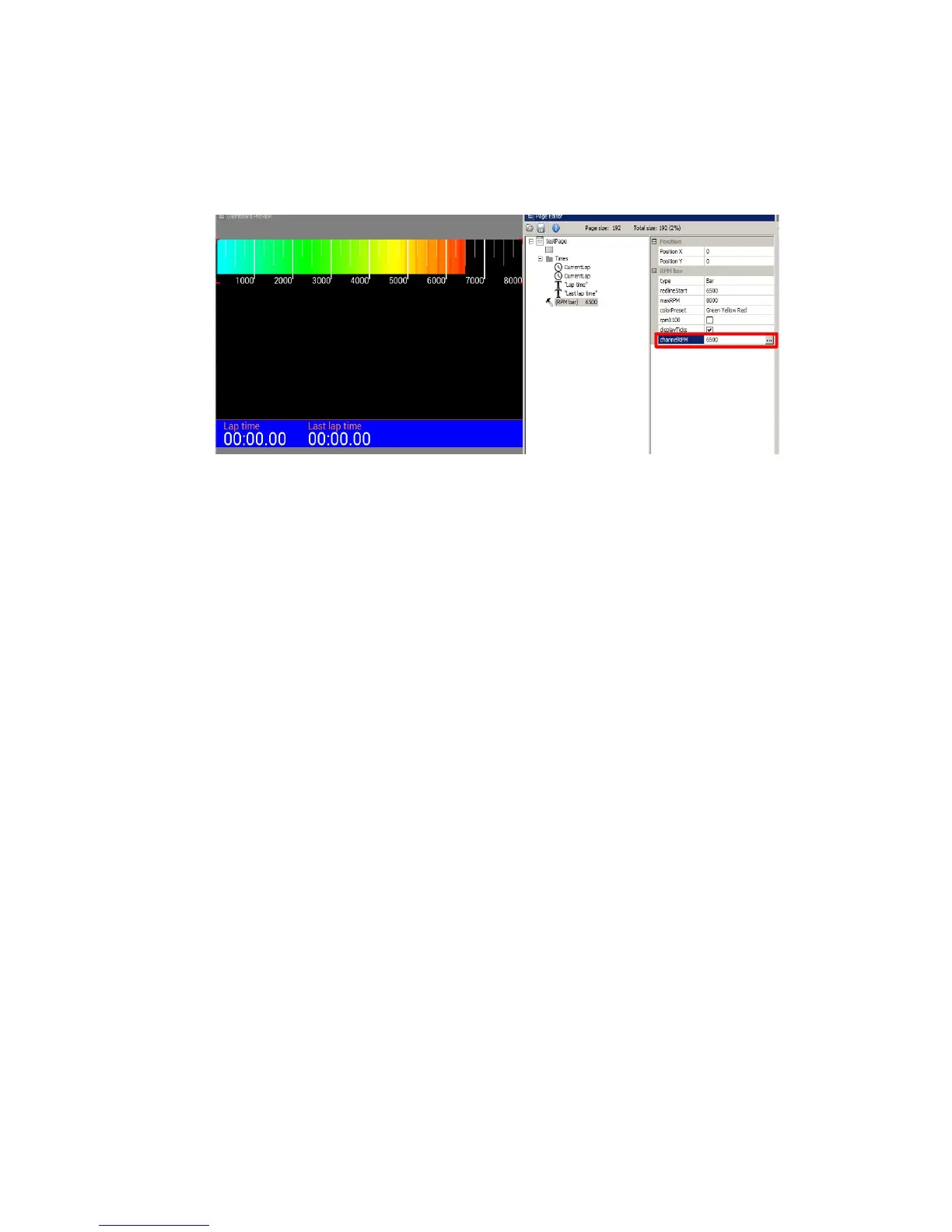
To test the operation of the indicator you can enter a numerical value (only integer values) in the
Channel field. In the example below, we typed 6500 in the channelRPM field and the engine
speed indicator appears.
Next we will add a horizontal coolant temperature indicator to our page using a Bar graph
indicator. Bar graph indicators have several configuration options. The first important parameter to
consider is the Update frequency (1). This parameter is the refresh rate of the displayed value.
The ADU screen refreshes at a rate of 50Hz, so this is the max frequency for any value. Values
with some degree of instability (e.g. oil or fuel pressure pulsation) are very difficult to read as they
change rapidly. Limiting the update frequency acts as a filter. Measurement units are configurable.
In our case, we want to the display temperature in degrees Celsius. If we change the unit to
Fahrenheit in the Units field, the displayed value will immediately be converted accordingly.
Another important function is the “redline” (3), which changes the indicator appearance if the
predetermined value is exceeded. In the redlineWhen field you may select the condition (i.e. warn
when exceeds or warn when below), and in the redlineStart field you may enter value at which the
indicator will change. The “redline” status will be indicated by the color selected in colorRedline.
Page 43/137


 To Next Page