Titanium Interfaces User Guide
Features for HVIO and HSIO Configured as
GPIO
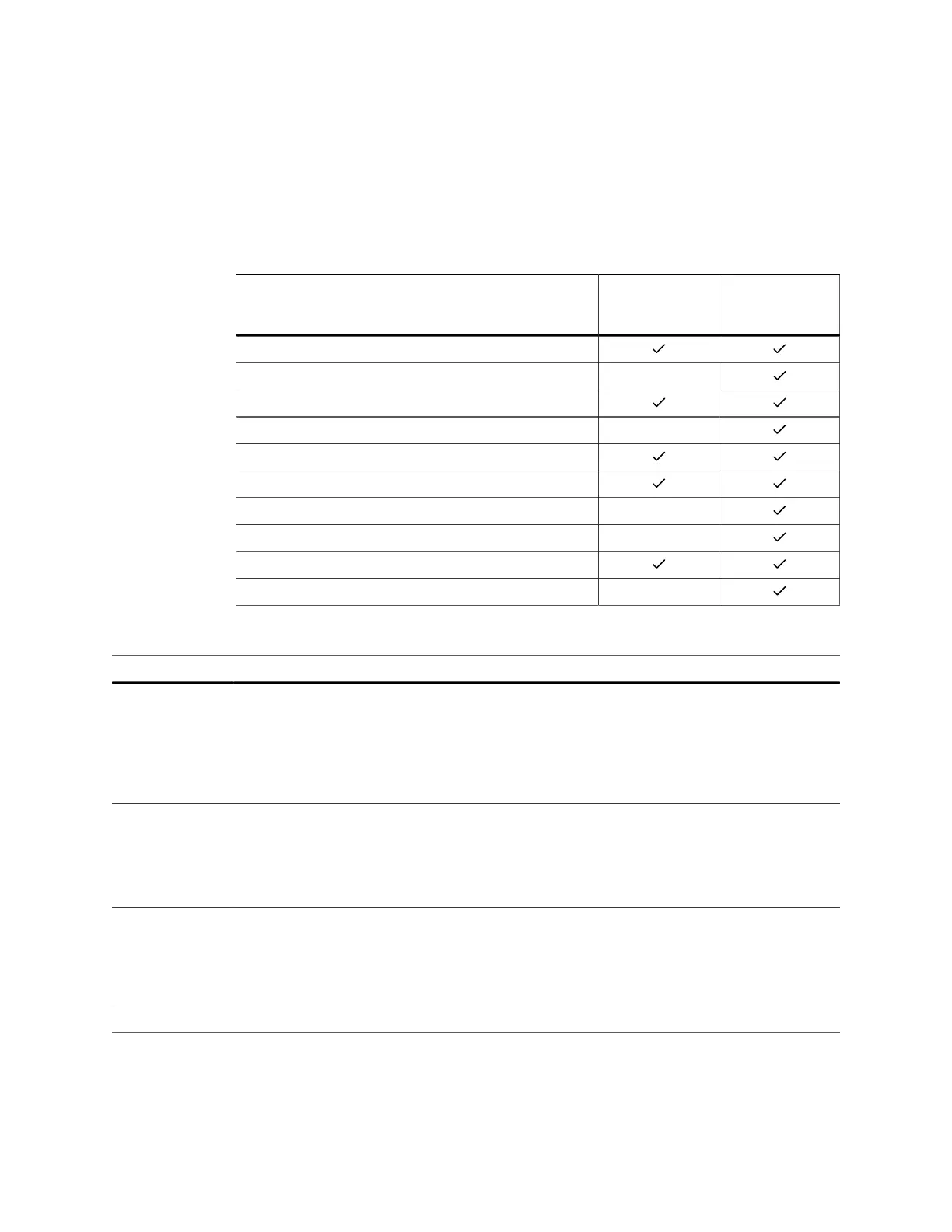
The following table describes the features supported by HVIO and HSIO configured as
GPIO.
Table 28: Features for HVIO and HSIO Configured as GPIO
Feature HVIO HSIO
Configured
as GPIO
Double-data I/O (DDIO)
Dynamic pull-up –
Pull-up/Pull-down
Slew-Rate Control –
Variable Drive Strength
Schmitt Trigger
1:4 Serializer/Deserializer (Full rate mode only) –
Programmable Bus Hold –
Static Programmable Delay Chains
Dynamic Programmable Delay Chains –
Table 29: GPIO Modes
GPIO Mode Description
Input Only the input path is enabled; optionally registered. If registered, the input path uses the
input clock to control the registers (positively or negatively triggered).
Select the alternate input path to drive the alternate function of the GPIO. The alternate path
cannot be registered.
In DDIO mode, two registers sample the data on the positive and negative edges of the input
clock, creating two data streams.
Output Only the output path is enabled; optionally registered. If registered, the output path uses the
output clock to control the registers (positively or negatively triggered).
The output register can be inverted.
In DDIO mode, two registers capture the data on the positive and negative edges of the
output clock, multiplexing them into one data stream.
Bidirectional The input, output, and OE paths are enabled; optionally registered. If registered, the input
clock controls the input register, the output clock controls the output and OE registers. All
registers can be positively or negatively triggered. Additionally, the input and output paths
can be registered independently.
The output register can be inverted.
Clock output Clock output path is enabled.
During configuration, all GPIO pins are configured in weak pull-up mode.
During user mode, unused GPIO pins are tristated and configured in weak pull-up mode.
You can change the default mode to weak pull-down in the Interface Designer.
www.efinixinc.com 41



 To Next Page