3025SW Master Control Switching & Channel Branding
Revision 1.0 Page 101
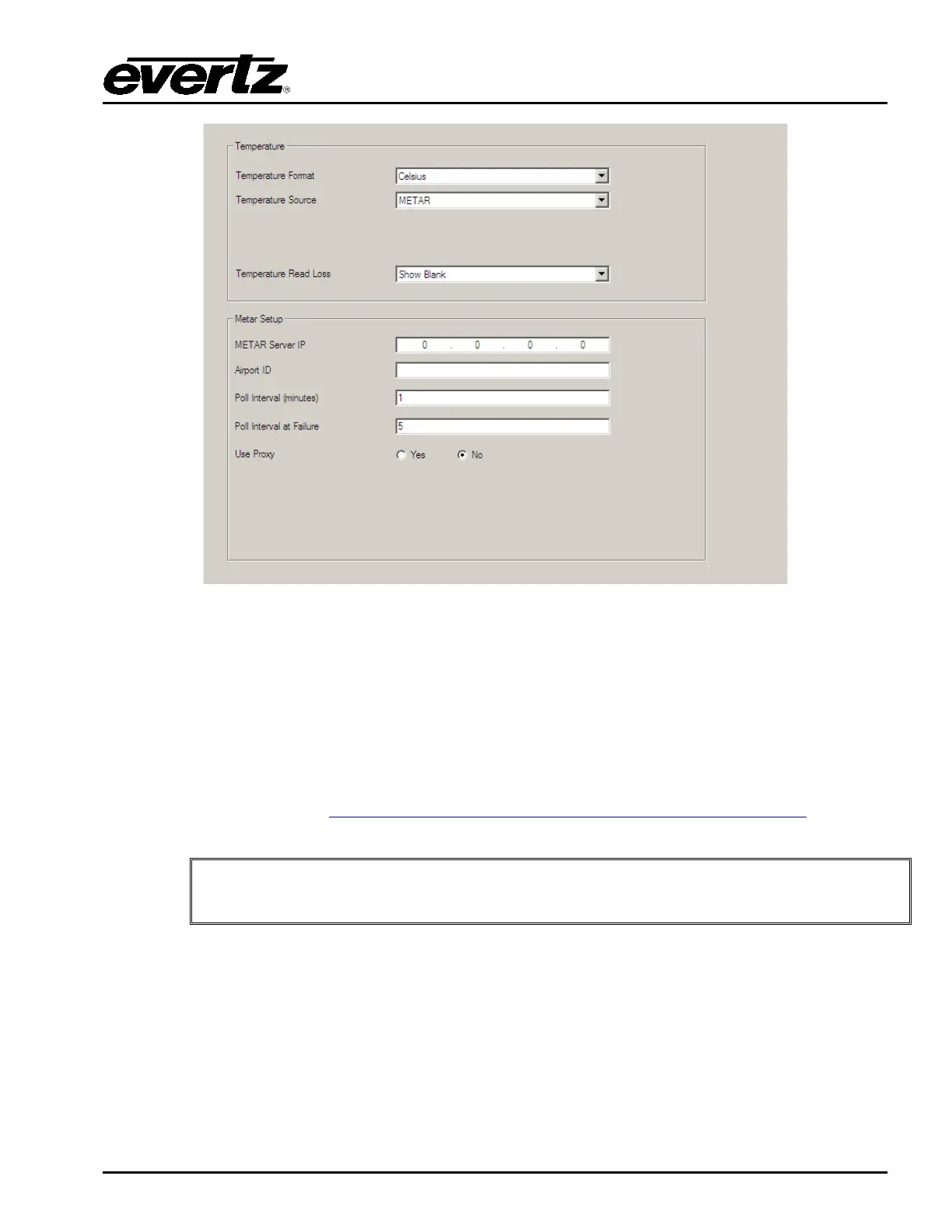
Figure 4-35: METAR Tab
METAR Server IP: Enter the IP address of the METAR server you would like to use. A known IP
address for one METAR server is 205.156.51.200.
Airport ID: Enter the airport code for the airport you would like to obtain the temperature from.
The Airport ID must be entered in all upper case letters. For example for KIAG
(Niagara Falls International Airport), the following file gets downloaded to the
device:
ftp://205.156.51.200/data/observations/metar/stations/KIAG.TXT
IMPORTANT: The airport call letters MUST be in CAPITALS. The METAR site is
case sensitive.
Poll Interval: Enter how often you would like the 3025SW to obtain the temperature.
Temperature logos will be immediately updated each time the temperature is
retrieved from the METAR server.
Poll Interval at Failure: Enter how long you would like the 3025SW to wait before trying to retrieve the
temperature from the METAR server after a failed attempt.
Use Proxy: This is selected if the 3025SW requires a proxy to access the METAR site
(Internet). See section 4.18 to set up the proxy.



 To Next Page