3025SW Master Control Switching & Channel Branding
Page 122 Revision 1.0
Buddy Panel Address: In some applications, two panels might be required to work with one
another. If this is the case then this address field should be set to the address of the panel that this
panel is required to work with. The other panel will also need this field set as the communication is bi-
directional.
Tally remains when protected: This checkbox allows the user to configure if the panel will show
tally (status) when the panel is in a “channel protect mode”.
Network: The “Ethernet instead of QLink” box MUST be checked in order for the panel to talk to
the 3025SW. The IP address that is filled in MUST match the IP address of the panel.
SNMP This allows the user to create SNMP events to recall from the QMC-DCP panel.
6.3.5.3. SNMP Setup
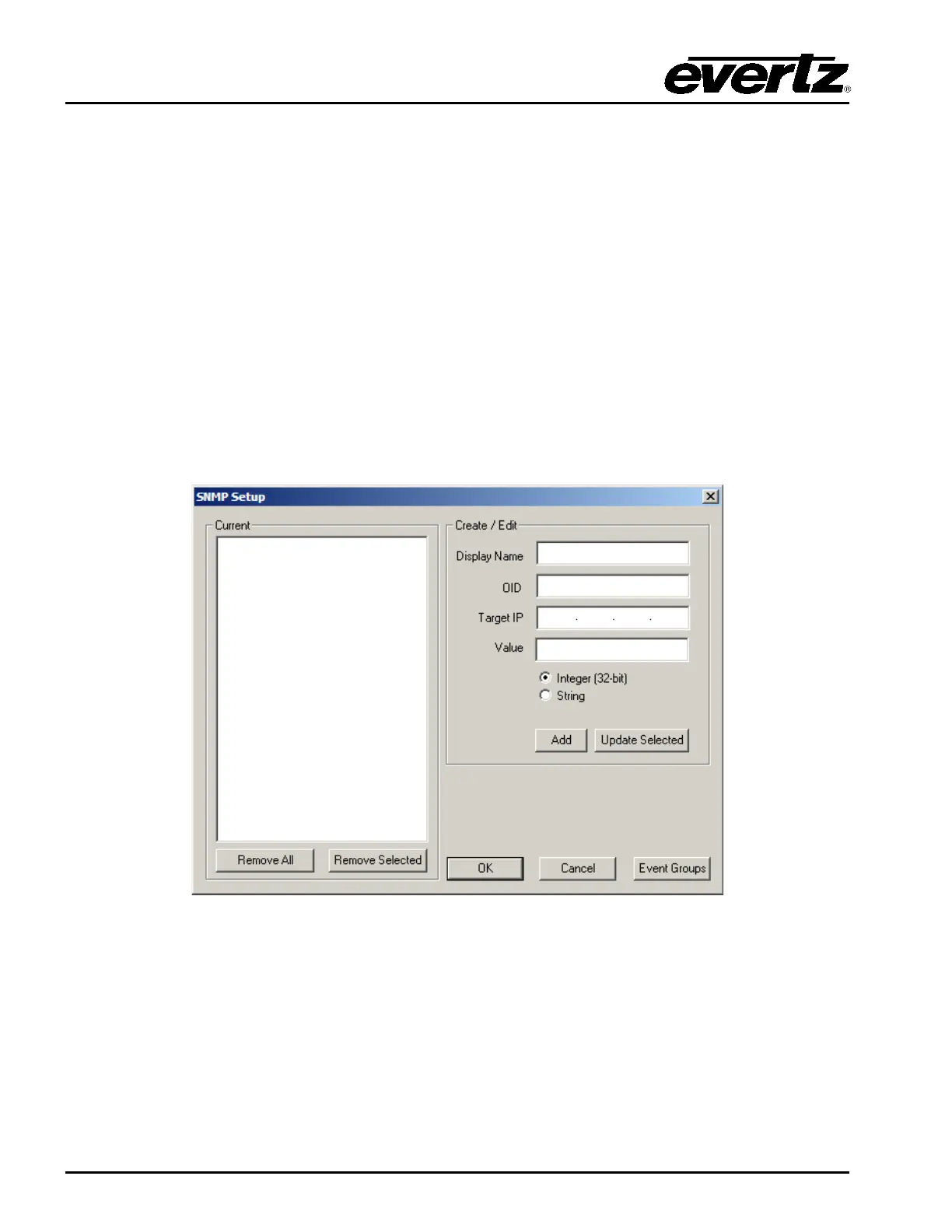
The SNMP Setup window will show the list of currently created SNMP Events. The user can create or
edit an event with following parameters:
Figure 6-10: SNMP Setup Window
Display Name: This is the name of the SNMP event. This will also show up on the LCD button.
OID: This is the Object Identifier uniquely identifies the managed object you want to set in a
product’s MIB. For example, on the 7812UDX, the aspect ratio control has a unique OID.
Target IP: This is the target IP address for accessing the product’s OID. Some products have a direct
IP connection to handle SNMP. Others may go through a frame controller (like the
7700FC) to handle the SNMP parameters.



 To Next Page