3025SW Master Control Switching & Channel Branding
Page 30 Revision 1.0
4. EMC CONFIGURATION SOFTWARE
This section describes the software used to configure the 3025SW switcher. Every 3025SW is supplied
with the EMC-Setup software, which is a Windows PC configuration tool. The following screens were
taken from version 5.00.111c of EMC-Setup software.
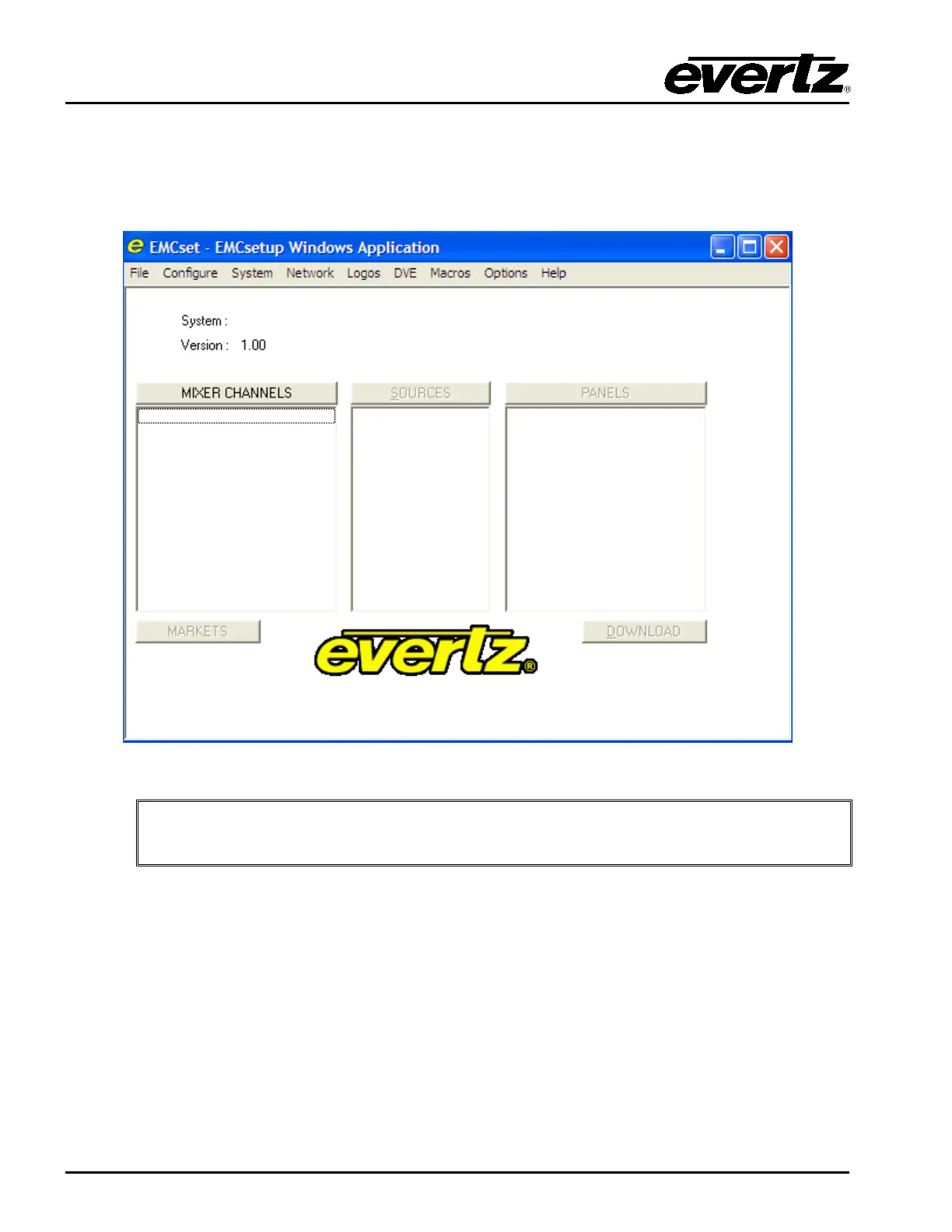
Figure 4-1: Main EMCSetup Screen
The version number of the setup application software can be found by selecting “Help”
then “About EMCSetup”.
The opening screen is broken down into the three major pieces that are required for a 3025SW system.
These sections are:
• Mixer Channels – The configuration of all the 3025SW channels in the overall system. Each
channel is added individually in this list.
• Sources – The source name table of the system for the 3025SW channels. This is a global name
table that ALL 3025SW channels in the system will use.
• Panels – The configuration of the various switcher control panels used in the system to control
the channels defined in the Mixer Channels section.
EMC-Setup will create a configuration file that describes the whole 3025SW system. This section will
describe how to configure a basic configuration similar to Figure 3-1.



 To Next Page