A. Working with the keyboard
A−4
Festo P.BE−SPC200−WIN−PISA−CD−EN en 0901d
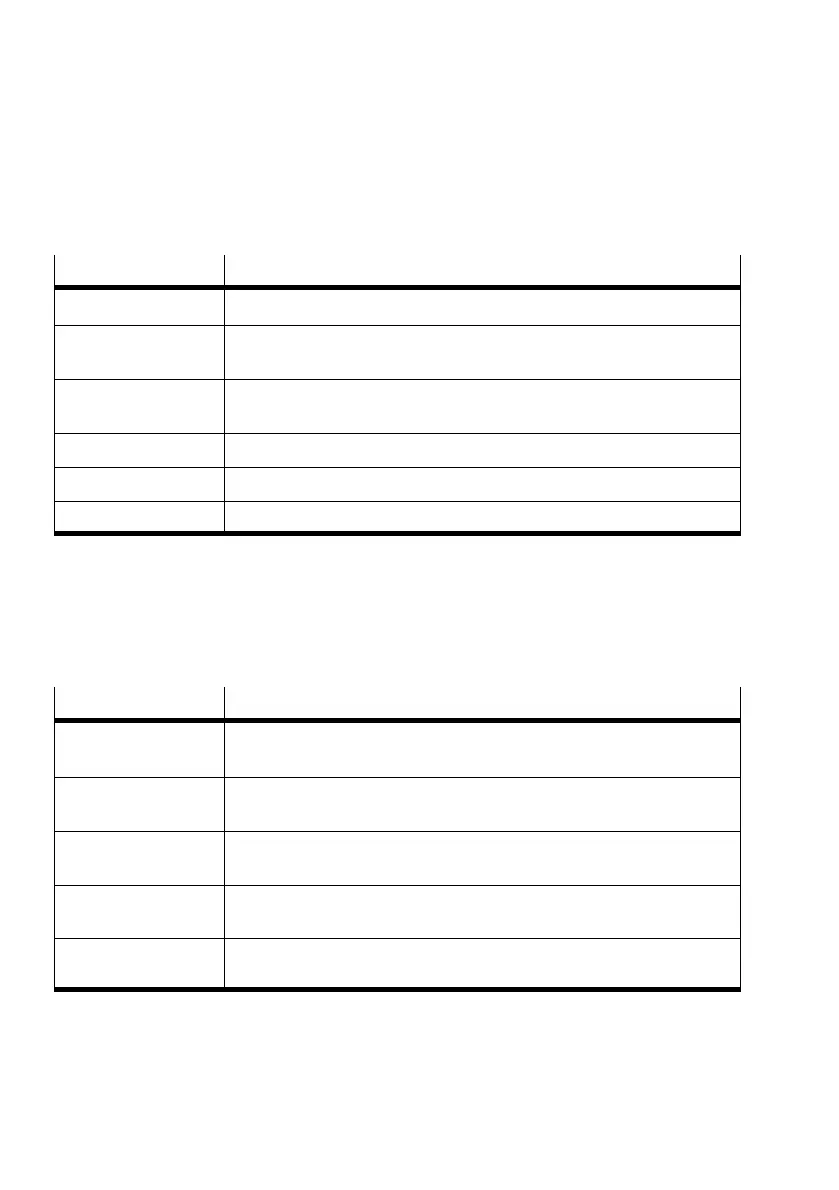
Menu keys
Press key(s) ...
... to do the following
ALT key or F10 Selects or unselects the first menu in the menu bar.
A character key Selects the menu or the command with the underlined letter or number
corresponding to the key pressed.
LEFT ARROW key or
RIGHT ARROW key
Moves between menus.
UP key or DOWN key Moves between commands.
ENTER key Selects the marked menu name or command.
ESC key Unselects the selected menu, or closes the open menu.
Edit keys
Use the following keys to edit text in a dialogue field or
window.
Press key(s) ...
... to do the following
BACKSPACE Deletes the character to the left of the insertion point, or deletes the
selected text.
DELETE key Deletes the character to the right of the insertion point, or deletes the
selected text.
SH IFT+DELETE
or CTRL + X
Deletes the selected text and places it on the clipboard.
SH IFT+INSERT
or CTRL + V
Inserts the text from the clipboard into the active window.
CTRL+INSERT
or CTRL + C
Copies the selected text and places it on the clipboard.


 To Next Page
 Loading...