3-14 Section 3: Model 9500B Controls: Modes of Operation Descriptions assume 9500B/1100
Head calibration stores head details and
calibration corrections, specific to that head,
regardless of the base unit to which it is fitted.
The above screen presents the stored details
derived from the fitted heads.
3.4.3.14 'MORE' Configuration
After exiting to the 'Present Settings' screen,
pressing the 'MORE' key will provide entry to
a second 'Configuration' menu screen, showing
the present settings of other parameters
(generally associated with Procedure mode)
which can be changed using screen keys whose
new labels appear on the display:
3.4.3.15 'Language'
Language Considerations
The 9500B default language is English. It is
possible to change the language used in
Procedure mode, but not in any of the other
modes.
For Procedure mode the language of the
introductory screens can be changed (these are
stored within the 9500B itself).
The language used in a procedure card is
determined and registered on the card, within
the procedure header, at the time that the
procedure is created (Portocal II can perform
this function). When the procedure card is
being used in the Model 9500B, the language
cannot be changed.
This facility allows users to alter the language
used in the introductory screens of Procedure
mode:
1. On the 'Present Settings' screen, to transfer
to the 'Current language' screen, press the
SELECT LANG screen key:
2. To change the Procedure mode language,
press the required language screen key on
the right.
3. Press EXIT to return to the second 'Present
Settings' menu screen.
The new language will be used the next time
that Procedure mode is entered.
When in Procedure mode, the direct-printing
certificate (Style 1), and the data on the 'Results'
card, will report 'Borderline' test results. Users
have access via Configuration mode to set the
percentage for borderline reporting.
1. For access to allow the borderline reporting
threshold to be altered, press the BORDER
LINE screen key on the 'Present Settings'
screen. This transfers to a configuration
screen designed for changing the threshold
(default value shown):
TODAY'S DATE TIME
Configuration
The current language is
indicated by the highlight.
Use the softkeys to select
another.
EXIT
ENGLISH
FRENCH
GERMAN
SPANISH
ITALIAN
3.4.3.16 'Border line'
Test Point Specifications — 'Borderline'
Reporting
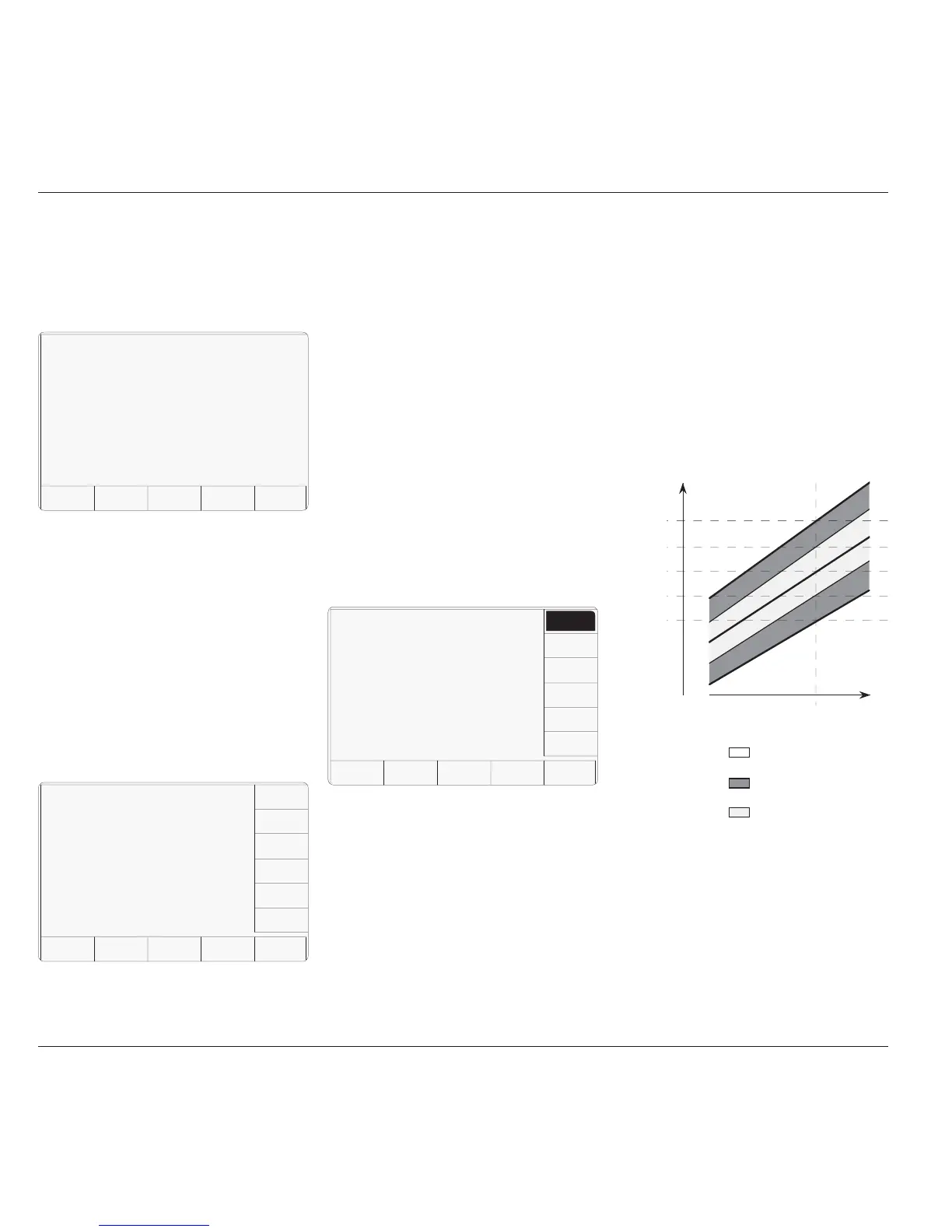
For users who wish to know when a UUT is
drifting towards the limits of (while still within)
the manufacturer's specification, it is useful to
provide some 'borderline' indication. This can
be expressed as a percentage of the
manufacturer's specification for each test point,
beyond which the indication will be given.
In the figure, the pass, borderline and fail
regions of the specification tolerance are
indicated at the test point.
Actual UUT
Input Value
Actual Test
Point Value
UUT
Indicated
Value
Nominal Test
Point Value
Upper 100%
Spec Limit
Lower 100%
Spec Limit
Borderline
Percentage
Borderline
Percentage
9500 Indicates 'Pass'
9500 Indicates 'Borderline'
9500 Indicates 'Fail'
3.4.3.13 'HEAD CONFIG'
Information only
Pressing the 'HEAD CONFIG' key provides a
screen which indicates the type, serial no., cal
date and cal due date for each head fitted:
TODAY'S DATE TIME
Configuration
Type S/N Cal Date Due Date
1 9510 XXXX XX/XX/XXXX XX/XX/XXXX
2 9510 XXXX XX/XX/XXXX XX/XX/XXXX
3 No Head ØØ/ØØ/ØØØØ ØØ/ØØ/ØØØØ
4 9510 UNDEFINED ØØ/ØØ/ØØØØ ØØ/ØØ/ØØØØ
5 No Head ØØ/ØØ/ØØØØ ØØ/ØØ/ØØØØ
EXIT
TODAY'S DATE TIME
Configuration
Present Settings:
Language English
Border line 7Ø.ØØ
Results card Disabled
Engineers Notes Disabled
Certificate Style 1
EXIT
SELECT
LANG
RESULTS
CARD
ENG
NOTES
CERT
DETAILS
CLEAR
USER
LIST
BORDER
LINE
Ser. No. XXXXXX Rev. XXX
Options : 1.1 GHz Normal xtal
The 'EXIT' screen key acts to escape, back to
the first Configuration menu screen.
If it desired to revert to the Mode Selection
display, press the front panel 'Mode' key.



 To Next Page