EasyManua.ls Logo

Fostex DMT-8VL - 3. Erase & Cut

Fostex DMT-8VL
158 pages
Print Icon
To Next Page IconTo Next Page
To Previous Page IconTo Previous Page
Loading...
DMT-8VL
Owner's
Manual
(Edit
function)
3.
Erase
&
Cut
The
Erase
function
and
Cut
function
are
two
different
function,
and
are
defined
as
follows
on
the
DMT-8
vl.
Make
sure
that
you
understand
the
difference
before
using
these
functions.
<Note>
The
Cut/E
rase
function
e
effective
only
lor
the
currency
selected
Program
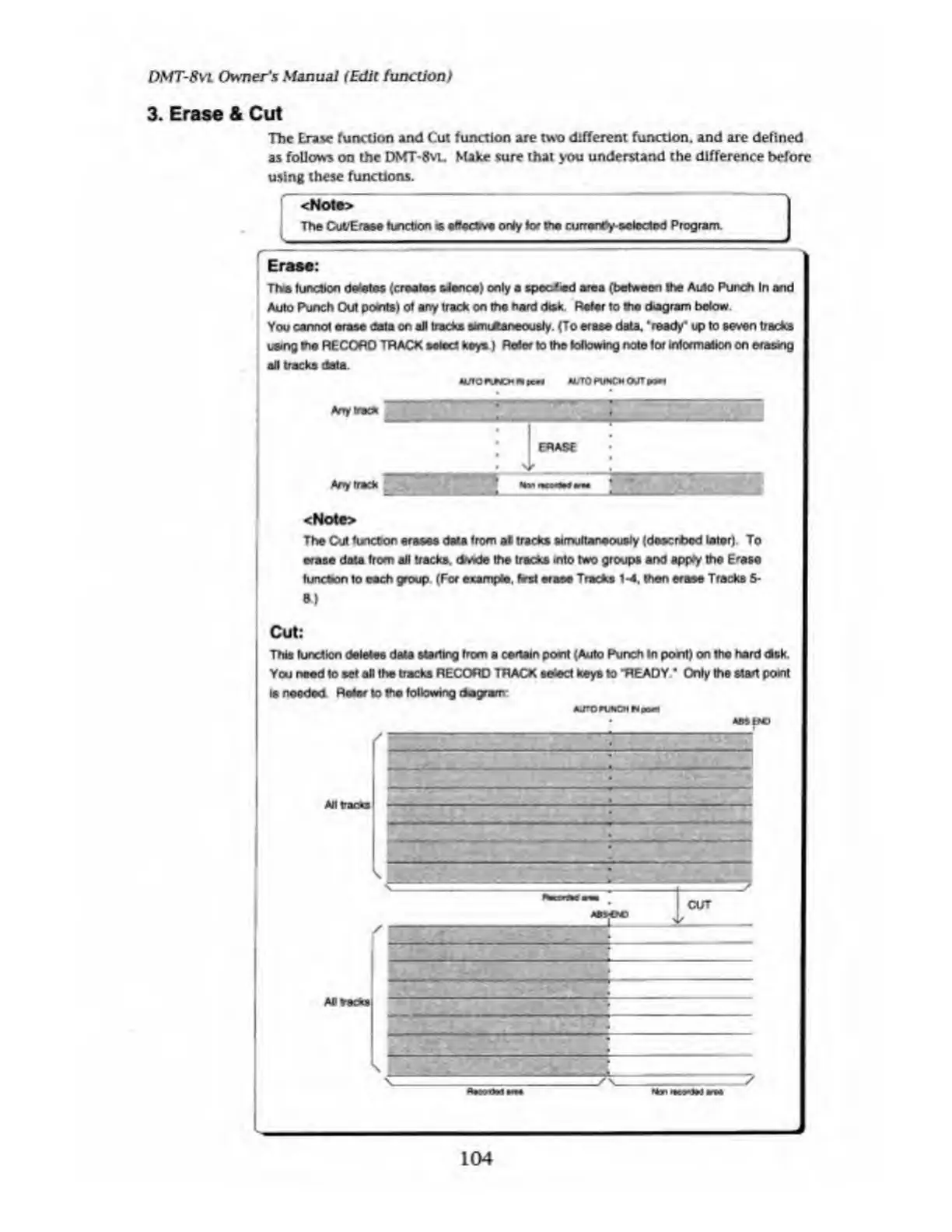
Erase:
The
function
deletes
(creates
silence)
only
a
speefied
area
(between
the
Auto
Punch
In
and
Auto
Punch
Out
points)
of
any
track
on
the
hard
disk.
Refer
to
the
diagram
below
You
cannot
erase
data
on
all
tracks
aim
dtaneoualy.
(To
erase
data,
'ready'
up
to
seven
tracks
using
the
RECORD
TRACK
select
keys
)
Refer
to
the
following
note
for
information
on
erasing
all
tracks
data.
«UIO
FINCH
Npc«*
N/T0
PUNCH
OUT
PPPI
Any
track
<Note>
The
Cut
function
erases
data
from
al
tracks
simultaneously
(deacrfced
laterj
To
erase
data
from
all
tracks,
drwde
the
tracks
into
two
groups
and
apply
the
Erase
function
to
each
group.
(For
example,
first
erase
Tracks
1-4,
then
erase
Tracks
5-
Cut:
This
function
deletes
data
starting
from
a
certain
poert
(Auto
Punch
In
pont)
on
the
hard
disk.
You
need
lo
set
all
the
tracks
RECORD
TRACK
select
keys
10
"READY'
Only
the
start
point
is
needed
Rater
to
the
following
dwgram
AUTO
PUNCH
N
paw
104

Table of Contents

Related product manuals