EasyManua.ls Logo

Fostex DMT-8VL - Recording using Program Change function

Fostex DMT-8VL
158 pages
Print Icon
To Next Page IconTo Next Page
To Previous Page IconTo Previous Page
Loading...
DMT-8VL
Owner's
Manual
(Recording/Playback)
3.
Recording
while
using
the
Program
Change
function
(Switching
Programs
1-5)
As
previously
explained,
the
DMT-8
vl
has
a
'Program
Change
function*
to
manage
up
to
five
songs.
You
can
record,
playback,
and
edit
each
Program
separately.
The
following
section
explains
basic
recording
and
playback
using
the
Program
Change
function.
y
*
First,
w»t
ffw
OMT-frA
ip
tfw
fl
ile
j
t
setlrigs
Chanaino
Proorams
VI
IUI
mij
r
i
wyi
mna
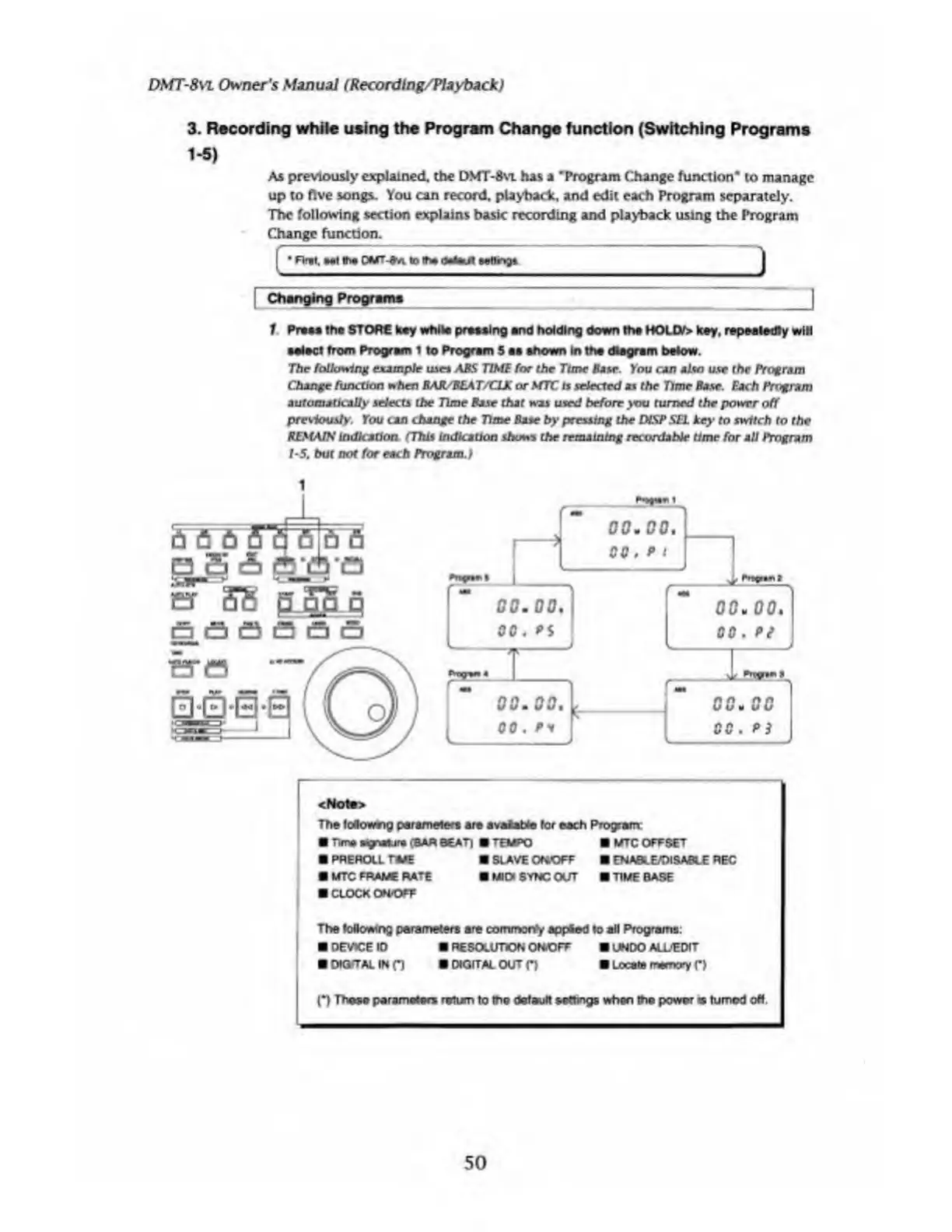
1
Praas
lha
STORE
key
while
prawing
and
holding
down
the
HOLD/>
key,
repeatedly
will
•elect
from
Program
1
to
Program
5
aa
shown
in
the
diagram
below.
The
following
example
uses
ABS
TIME
for
the
Time
Base.
You
can
also
use
the
Program
Change
function
when
BAR/BEAT/CLK
or
MTC
is
selected
as
the
Time
Base.
Each
Program
automatically
selects
the
Time
Base
that
was
used
before
you
turned
the
power
off
previously.
You
can
change
the
Time
Base
by
pressing
the
DISP
SEl
key
to
switch
to
the
REMAIN
indication.
(This
indication
shows
the
remaining
recordable
time
for
all
Program
1-5,
but
not
for
each
Program.)
00000000
gjjg
A
gjg’n
er
SB
sjSJLq
a
a
a
a
a
a
<Nota>
The
foiowng
parameters
are
avatabfe
for
each
Program:
Time
wgrtaura
(BAR
BEAT)
M
TEMPO
MTC
OFFSET
PREROLL
raaE
SLAVEOfiOFF
ENABLE/DISABLE
REC
fl
MTC
FRAME
RATE
MIDI
SYNC
OUT
TIME
BASE
CLOCK
OWOFF
The
following
parameters
are
commonfy
appied
to
all
Programs:
DEVICE
ID
RESOLUTION
ON.OFF
UNDO
ALUEDIT
OlOTTALINn
DIGITAL
OUT
(*)
Locate
memory
(*)
(*)
These
parameters
rattan
to
the
default
settings
when
the
power«tumod
oh.
50

Table of Contents

Related product manuals