EasyManua.ls Logo

Fostex DMT-8VL - Input Monitor and Repro Monitor

Fostex DMT-8VL
158 pages
Print Icon
To Next Page IconTo Next Page
To Previous Page IconTo Previous Page
Loading...
DSfT-Svi
Owner's
Manual
(
Before
operating
the
DMT-8vl)
5.
Input
monitor
and
Repro
monitor
There
are
two
ways
to
monitor
track
data
on
the
recorder:
Input
monitor
and
Repro
monitor.
These
are
defined
as
follows:
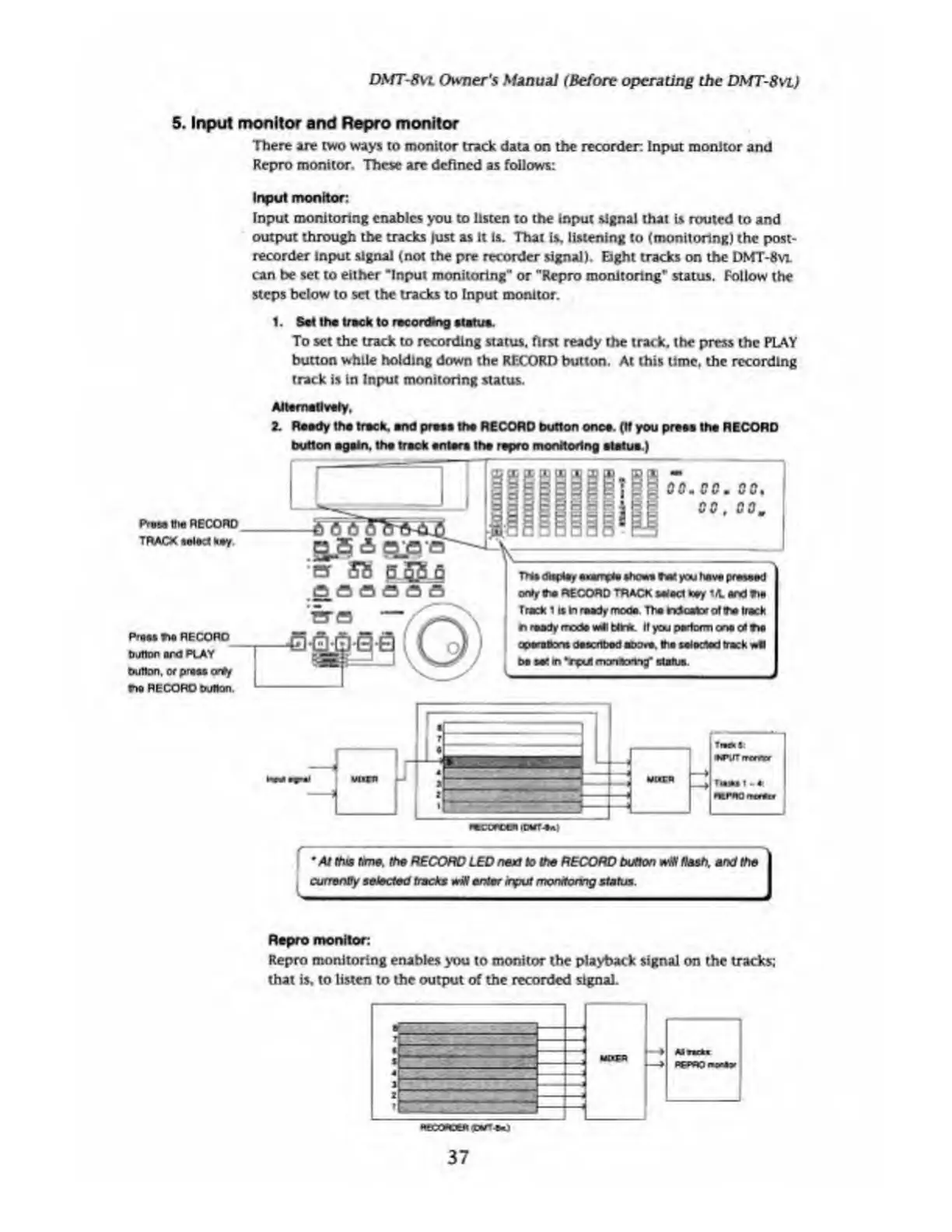
Input
monitor:
Input
monitoring
enables
you
to
listen
to
the
input
signal
that
is
routed
to
and
output
through
the
tracks
just
as
it
is.
That
is,
listening
to
(monitoring)
the
post-
recorder
input
signal
(not
the
pre
recorder
signal).
Eight
tracks
on
the
DMT-8
vl
can
be
set
to
either
"Input
monitoring”
or
”Repro
monitoring*
status.
Follow
the
steps
below
to
set
the
tracks
to
Input
monitor.
1.
Set
the
track
to
recording
status.
To
set
the
track
to
recording
status,
first
ready
the
track,
the
press
the
PLAY
button
while
holding
down
the
RECORD
button.
At
this
time,
the
recording
track
is
In
Input
monitoring
status.
i
ttre
RECORD
TRACK
select
key.
Pres*
T*
RECORD
button
ard
PLAY
button,
or
prssfiorSy
r*
RECORD
button.
Alternatively,
2.
Ready
the
track,
and
press
the
RECORD
button
once.
(If
you
press
the
RECORD
button
again,
the
track
enters
the
repro
monitoring
statue.)
•er
58
p.
SB
q
.a
a
a
a
a
a
(Q;
?
E2
:
I
30.
00.
00,
B
00,
GO.
m>
(UipU,
.OT0.
the.
r*f
toy*
pr*v>»d
only
the
RECORD
TRACK
nisei
key
i
A
and
tie
Track
11s
In
ready
moos.
The
rrtcator
of
ff*
track
n
ready
mode
veil
birfc
It
you
perform
one
ol
txi
aporeuons
described
above,
the
seiocted
track
wfl
be
set
m
Vpul
monaohny’
status.
f
"
-
"*v
At
this
time,
the
RECORD
LED
next
to
the
RECORD
button
wNt
flash,
and
the
currency
selected
tracks
wiH
enter
input
monitoring
status.
Repro
monitor:
Repro
monitoring
enables
you
to
monitor
the
playback
signal
on
the
tracks;
that
is,
to
listen
to
the
output
of
the
recorded
signal.
.pure*)
37

Table of Contents

Related product manuals