EasyManua.ls Logo

Fostex DMT-8VL - Difference between Track and Channel; Function of the PAN Knob and about the Stereo Bus

Fostex DMT-8VL
158 pages
Print Icon
To Next Page IconTo Next Page
To Previous Page IconTo Previous Page
Loading...
DMT
-
8vl
Owner's
Manual
(Before
operating
the
DMT-8VL)
2.
Difference
between
track
and
channel
The
terms
•track"
and
"channel"
can
sometimes
be
confusing.
In
this
manual,
they
arc
differentiated
as
follows:
Channel:
'Charmer
Is
used
co
define
the
Input
and
output
system
on
the
mixer
section
(e_g.,
the
bass
signal
routed
to
Channel
1
b
output
from
Channel
L)
Track:
'Track*
is
used
to
define
the
Input
and
output
system
In
the
recorder
section
(that
Is.
the
hard
disk
on
the
DMT-8\i)
e.
g..
Ping-pong
record
playback
signal
on
Track
1,
2,
and
3
to
Track
4.
3.
Function
of
the
PAN
knob
and
about
the
stereo
bus
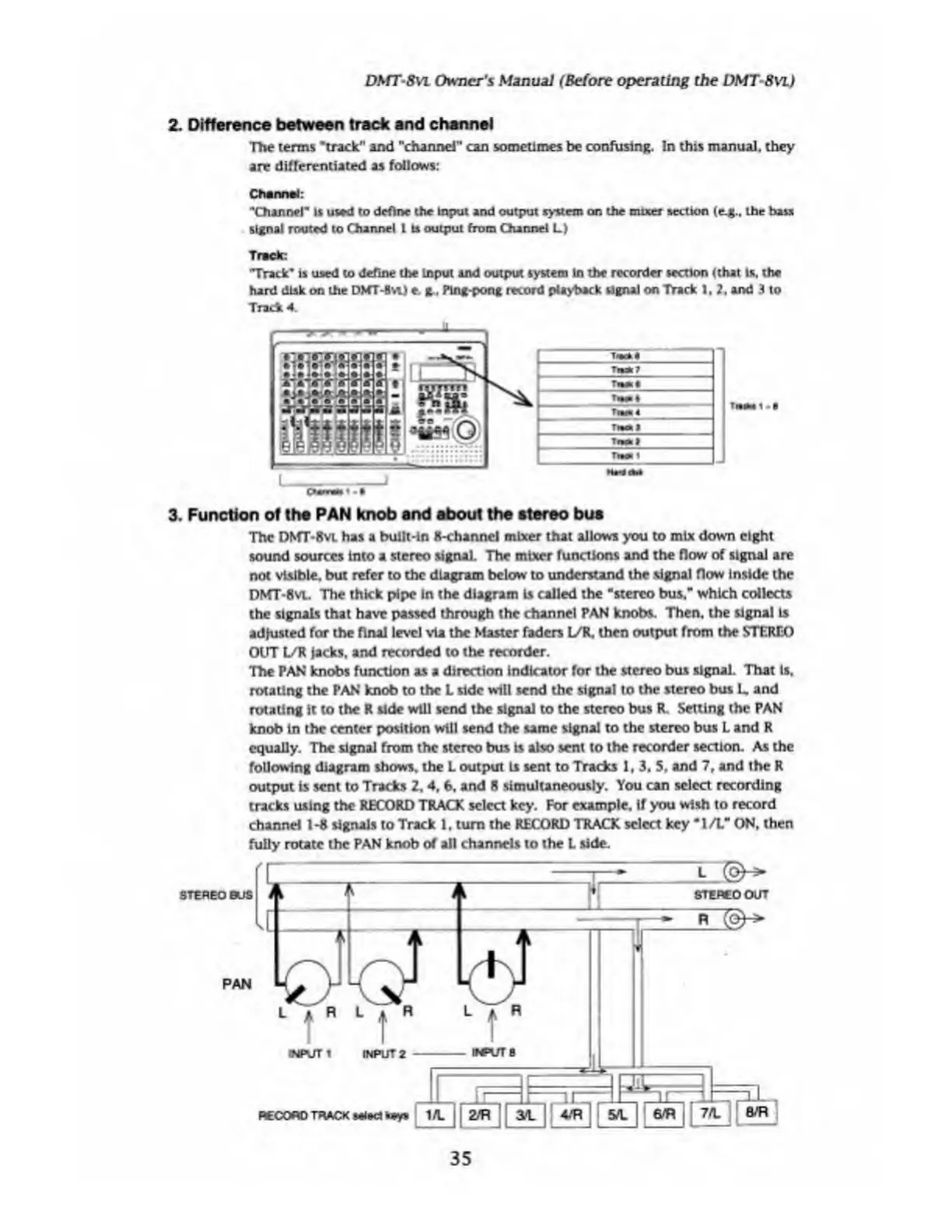
The
DMT-8vi
has
a
built-in
8-channel
mixer
that
allows
you
to
mix
down
eight
sound
sources
into
a
stereo
signal.
The
mixer
functions
and
the
flow
of
signal
are
not
visible,
but
refer
to
the
diagram
below
to
understand
the
signal
flow
inside
the
DMT*8vt.
The
thick
pipe
in
the
diagram
Ls
called
the
"stereo
bus."
which
collects
the
signals
that
have
passed
through
the
channel
PAN
knobs.
Then,
the
signal
Is
adjusted
for
the
final
level
via
the
Master
faders
WK,
then
output
from
the
STEREO
OUT
L/R
jacks,
and
recorded
to
the
recorder.
The
PAN
knobs
function
as
a
direction
indicator
for
the
stereo
bus
signal.
That
ls.
rotating
the
PAN
knob
to
the
L
side
will
send
the
signal
to
the
stereo
bus
L.
and
rotating
it
to
the
K
side
will
send
the
signal
to
the
stereo
bus
R.
Setting
the
PAN
knob
in
the
center
position
will
send
the
same
signal
to
the
stereo
bus
L
and
R
equally.
The
signal
from
the
stereo
bus
Is
also
sent
to
the
recorder
section.
As
the
following
diagram
shows,
the
L
output
Is
sent
to
Tracks
1,
3,
5.
and
7,
and
the
R
output
Is
sent
to
Tracks
2.4.
6.
and
8
simultaneously.
You
can
select
recording
tracks
using
the
RECORD
TRACX
select
key.
For
example.
If
you
wish
to
record
channel
1-8
signals
to
Track
1.
turn
the
RECORD
TRACK
select
key
"1/L"
ON.
then
fully
route
the
PAN
knob
of
all
channels
to
the
L
side.
35

Table of Contents

Related product manuals