EasyManua.ls Logo

Fostex DMT-8VL - Basic analog data recording

Fostex DMT-8VL
158 pages
Print Icon
To Next Page IconTo Next Page
To Previous Page IconTo Previous Page
Loading...
DMT-8vl
Owner's
Manual
(Recording/Playback)
2L
Basic
analog
data
recording
(before
starting
multitrack
recording)
Before
you
start
eight-track
recording,
first
try
to
record
one
sound
source
to
one
track.
This
is
very
basic
recording.
Any
sound
source
will
do.
Here,
as
an
example,
we
are
going
to
connect
an
electric
guitar
to
INPUT
Jack
1
to
record
the
guitar
sound
to
Track
1
in
Program
1
(“PI").
If
you
wish
to
record
in
another
Program,
refer
to
the
section
“Recording
while
using
the
Program
Change
function
(Switching
Programs
1-5)."
[
FWt
wt
Bi«
DMTan.
toradataut
MtBnga
I
Tun
pew
on
to
DMTBvv
vk]
ccrArm
run
tna
aUfUy
Tim*
Bom
<s
‘ASS'
XOM
OOS
OOF
I
and
that
Ptoqiwti
PI
m
setoctad.
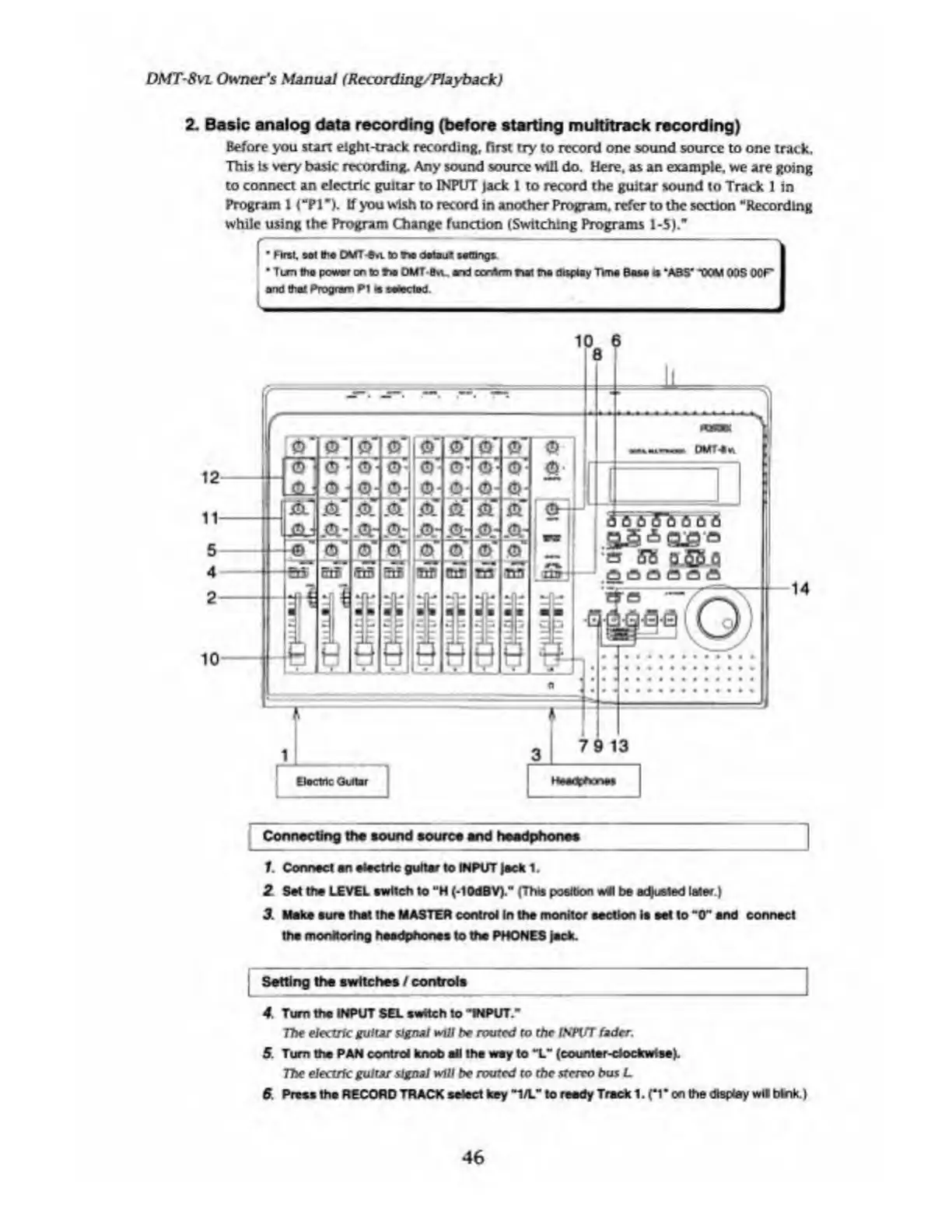
Connecting
the
sound
source
end
headphones
f.
Connect
an
electric
guitar
to
INPUT
Jack
1.
2
Set
the
LEVEL
switch
to
M
H
(-lOdBV)."
(This
position
wi\
be
adjusted
laser.}
3.
M
ake
sure
that
the
MASTER
control
In
the
monitor
section
is
eel
to
"0"
snd
connect
the
monitoring
headphones
to
the
PHONES
jack.
Setting
the
switches
/
controls
4.
Turn
the
INPUT
SEL
switch
to
’lNPUT.-
The
electric
guitar
signal
will
be
routed
ro
the
INPlfT
fader.
5.
Turn
the
PAN
control
knob
all
the
way
to
“L"
(counter-clockwise).
77k*
electric
guitar
signal
will
be
routed
to
the
stereo
bus
L
ft
Press
the
RECORD
TRACK
select
key
"1/L"
to
reedy
Track
1
.
(*1
*
on
the
display
wtl
trtnk.
)
46

Table of Contents

Related product manuals