EasyManua.ls Logo

Fostex DMT-8VL - 1. Auto Punch In;Out

Fostex DMT-8VL
158 pages
Print Icon
To Next Page IconTo Next Page
To Previous Page IconTo Previous Page
Loading...
DMT-8VL
Owner's
Manual
(Punch
In/Out)
1.
Auto
Punch
In/Out
To
perform
Auto
Punch
In/Out
recording,
first
you
need
to
specify
the
In
point
(recording
start
point)
and
the
Out
point
(recording
end
point).
Once
these
two
points
are
stored,
the
DMT-8vi
automatically
starts
recording
at
the
In
point
and
stops
recording
at
the
Out
point
while
the
recorder
Is
in
Take
mode."
When
you
use
the
Auto
Punch
In/Out
function,
you
can
select
"Rehearsal
mode’
to
practice
to
your
satisfaction
before
you
record.
Adjust
the
lev*
tor
oaslsr
AdiuM
ttt
pahlton
ter
tNftetftr
mcWlrxirg
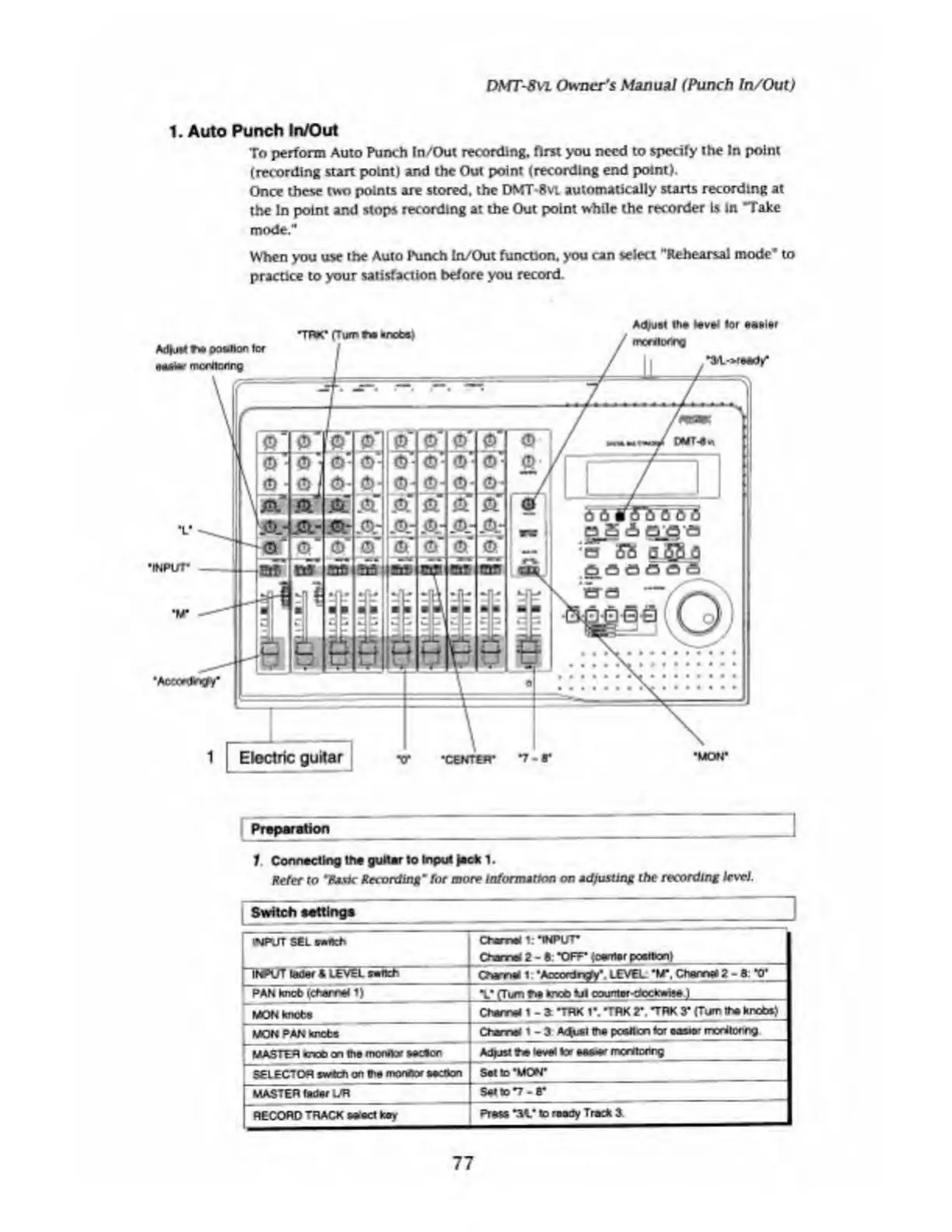
Preparation
1
.
Connecting
the
guitar
to
Input
jack
1.
Refer
to
'Kj.Pt
Recording
9
'tor
more
Information
on
ad/wsling
the
recording
level
Switch
settings
INPUT
SEL
rmnch
Ctame
1:
•INPUT
Own*
2
-
S:
“OFF’
{o*n\*r
pcartonl
INPUT
tetWf
«
LEVEL
»ttt-
|
PAN
knobldMfWal
1)
CNmtl
1
’ADCordngfy*.
LEVEL
*M",
Cham*
2
-
fi:
*0*
t
*
rTt*r\
Sm
>rc£>
til
countnr-dcckwtt*
i
MON
knots
Clwr-4
1
-
a
TRK
I*.
#
TRK
2*.
TRK
3*
(Turn
1Te
Nnobt)^
MON
PAN
knots
Own*
1
-3
A^l
lh#
poslton
tor
casio*
rrxnlomg
MASTER
knot)
on
trie
monitor
socSon
Mfjn
te
lev*
tor
w*-**
mentonr^
[SELECTOR
*w*e
h
on
the
monitor
a^tton
Sat
to‘MON*
MASTER
tidsr
L/R
SattoT-B*
RECORD
TRACK
seoct
key
Prow
-M.-
to
romJy
Track
3.
77

Table of Contents

Related product manuals