EasyManua.ls Logo

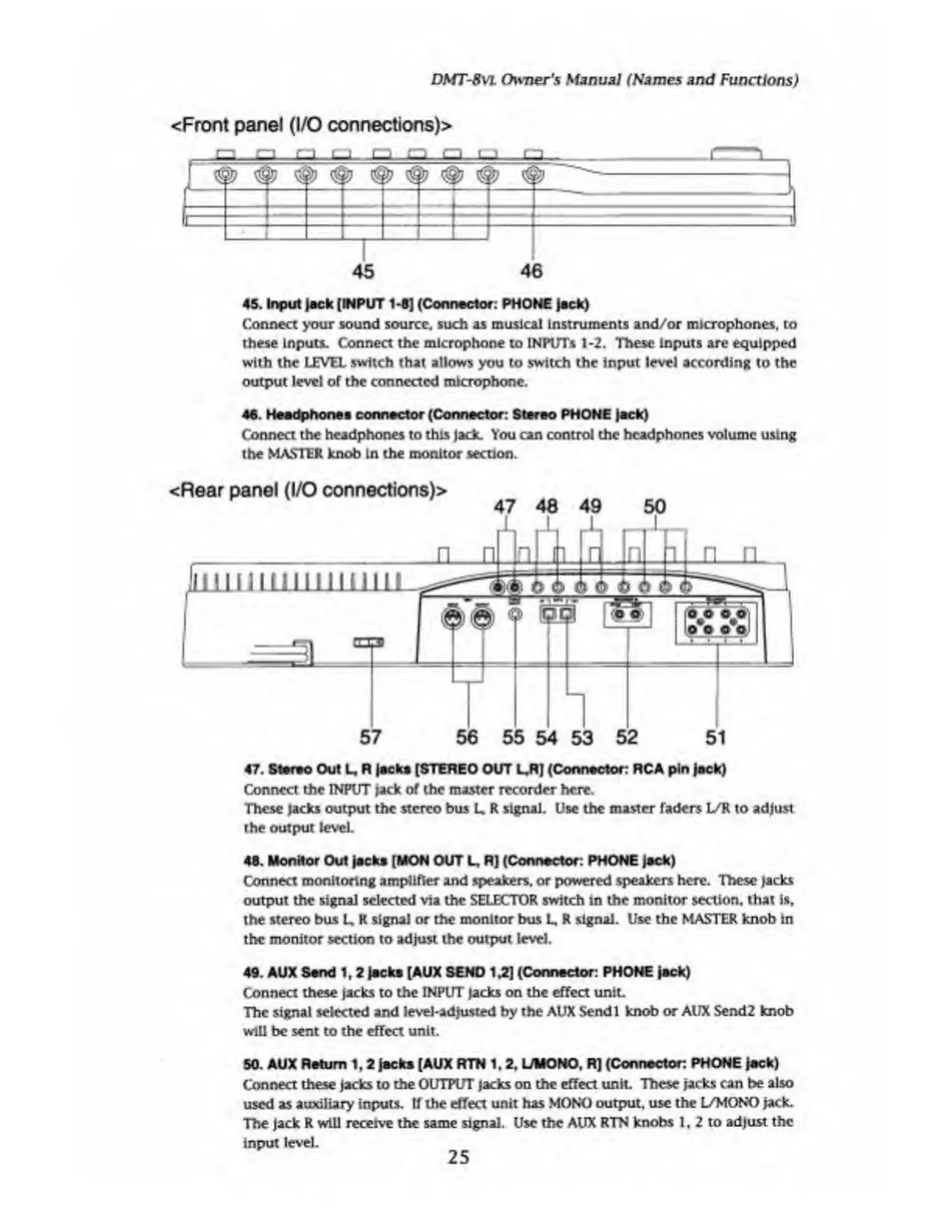
Fostex DMT-8VL - Top Panel (Recorder Section); Rear Panel (I;O Connections)

Fostex DMT-8VL
158 pages
Print Icon
To Next Page IconTo Next Page
To Previous Page IconTo Previous Page
Loading...
DMT-8VL
Owner's
Manual
(Names
and
Functions)
<Front
panel
(I/O
connections)>
1
_cm_cm_cm
i_
1
cm_
_i
45
46
45.
Input
lack
[INPUT
1*5]
(Connector:
PHONE
Jack)
Connect
your
sound
source,
such
as
musical
Instruments
and/or
microphones,
to
these
Inputs.
Connect
the
microphone
to
INPlTTs
1-2.
These
Inputs
are
equipped
with
the
LEVEL
switch
that
allows
you
to
switch
the
input
level
according
to
the
output
level
of
the
connected
microphone.
46.
Headphones
connector
(Connector:
Stereo
PHONE
Jack)
Connect
the
headphones
to
this
Jack.
You
can
control
the
headphones
volume
using
the
MASTER
knob
in
the
monitor
section.
<Rear
panel
(I/O
connections)>
47
48
49
50
1
_L
_L
_L
57
56
55
54
53
52
51
47.
Storvo
Out
L.
R
lacks
[STEREO
OUT
L.R)
(Conrwctor:
RCA
pin
|ack)
Connect
the
INPUT
jack
of
the
master
recorder
here.
These
Jacks
output
the
stereo
bus
L
R
signal.
Use
the
master
faders
L/R
to
adjust
the
output
level.
48.
Monitor
Out
Jacks
[MON
OUT
L,
R]
(Connector:
PHONE
Jack)
Connect
monitoring
amplifier
and
speakers,
or
powered
speakers
here.
These
jacks
output
the
signal
selected
via
the
SELECTOR
switch
in
the
monitor
section,
that
is,
the
stereo
bus
L
R
signal
or
the
monitor
bus
L,
R
signal.
Use
the
MASTER
knob
in
the
monitor
section
to
adjust
the
output
level.
49.
AUX
Sand
1, 2
Jacks
[AUX
SEND
1.2]
(Connector:
PHONE
Jack)
Connect
these
jacks
to
the
INPUT
Jacks
on
the
effect
unit.
The
signal
selected
and
level-adjusted
by
the
AUX
Sendl
knob
or
AUX
Send2
knob
will
be
sent
to
the
effect
unit.
50.
AUX
Return
1,2
Jacks
[AUX
RTN
1,2.
L/MONO,
R)
(Connector:
PHONE
Jack)
Connect
these
Jacks
to
the
OUTPUT
jacks
on
the
effect
unit.
These
Jacks
can
be
also
used
as
auxiliary
inputs.
If
the
effect
unit
has
MONO
output,
use
the
L/MONO
Jack.
The
Jack
R
will
receive
the
same
signal.
Use
the
AUX
RTN
knobs
1,
2
to
adjust
the
input
level.
25

Table of Contents

Related product manuals