EasyManua.ls Logo

Fostex DMT-8VL - Locate Function; 1. Locate

Fostex DMT-8VL
158 pages
Print Icon
To Next Page IconTo Next Page
To Previous Page IconTo Previous Page
Loading...
DMT-8vl
Owner's
Manual
(Locate
function)
Locate
Function
Since
the
DMT-Bvl
uses
a
hard
disk
as
storage
media,
it
can
locate
any
point
immediately.
Using
the
Locate
function
allows
you
to
quickly
locate
points
stored
at
the
OJP
BOARD
IN/OUT
key,
AUTO
PUNCH
rN/OUT
key,
AUTO
RTN
START/END
key.
LOCATE
key,
or
at
the
beginning
of
the
hard
disk
(ARS
TIME
0),
or
at
the
end
of
recording
area
(ABS
TIME
END).
This
function
is
also
very
useful
for
rehearsal
before
recording,
rehearsing
during
m
bed
own,
and
rehearsal
for
Auto
Punch
In/Out
recording.
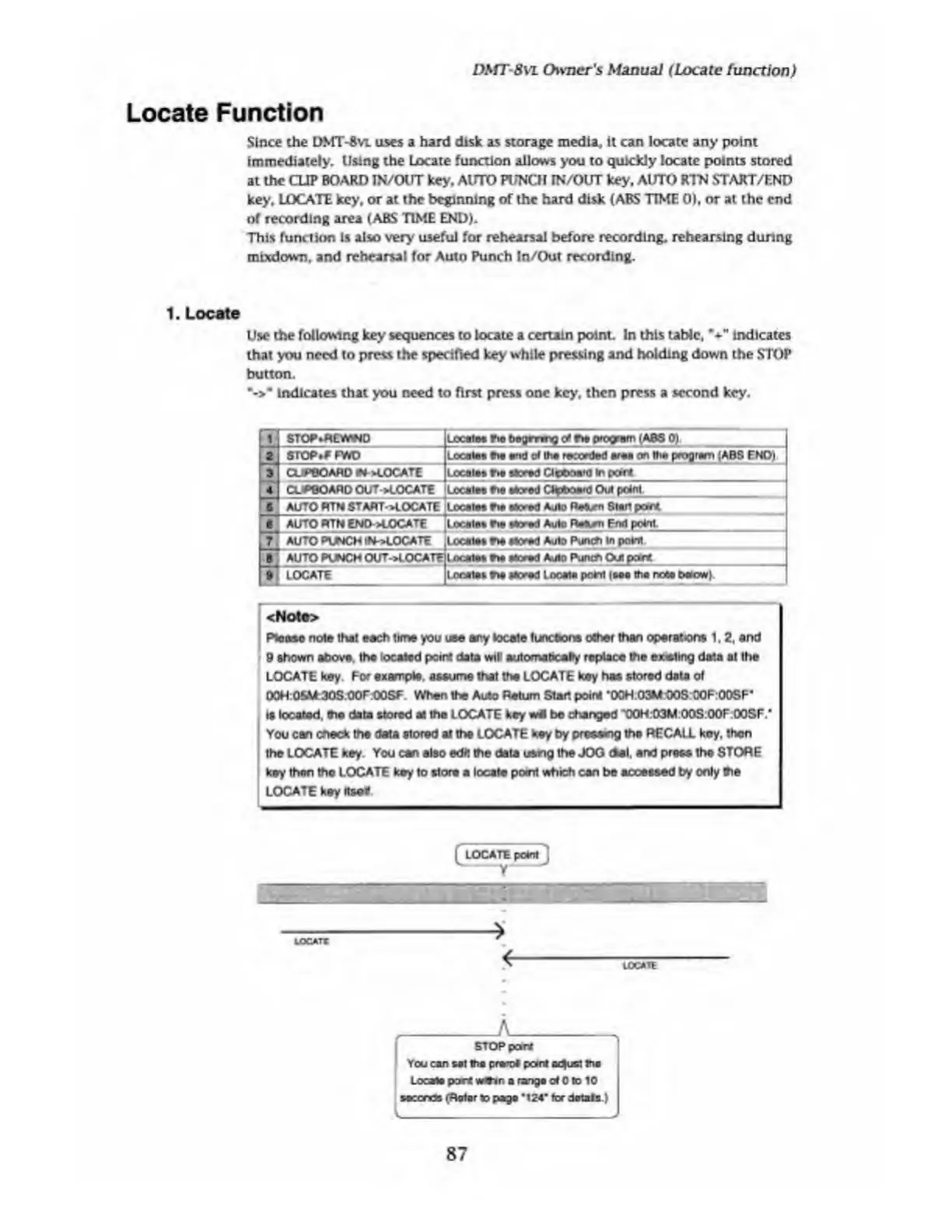
1.
Locate
Use
the
following
key
sequences
to
locate
a
certain
point.
In
this
table,
%
"
indicates
that
you
need
to
press
the
specified
key
while
pressing
and
holding
down
the
STOP
button.
•->*
indicates
that
you
need
to
first
press
one
key.
then
press
a
second
key.
STOP*REVWND
STOP.F
PHD
CUPBOARD
IN-LOCATE
Locate*
tie
begmng
c
4
fie
program
(ABS
0).
_
Locates
the
and
of
the
reur
ded
area
on
the
progrem
{ABS
END)
Locates
r»e
stored
Clipboard
In
con
CUPBO
ARD
OUToUOCATE
Locales
fie
stored
Clipboard
Out
print
1
AUTO
RTN
8TAWT->LOCATE
[
Locates
fie
stored
Aulo
Rstom
Start
print
I
AUTO
HTN
END->L
OCATE
[Locates
fie
ssoied
Au
te
Rsiew
End
print
AUTO
PUNCH
IN->LO
CATE
^Locates
fte
stored
Auto
Pum*
In
print
AUTO
PUNCH
OUT-^OCATElL
ocateS
fte
Noted
AulD
Punch
O
ut
print
_
|
9
[
LOCATE
Locates
fia
stored
Locate
print
(sea
the
nest
briow)
<Note>
Ptoase
note
that
each
time
you
use
any
locale
tunebons
other
than
operations
1,
2,
and
9
shown
above,
the
located
point
data
will
automabcafy
replace
the
exiting
data
at
the
LOCATE
key.
For
example,
assume
that
the
LOCATE
key
has
stored
data
of
t)0H:OSM
30S
OOr.COSF
When
the
Auto
Return
Start
point
'OOH
03MOOS
OOF:OOSF’
ts
located,
the
data
stored
al
the
LOCATE
key
wit
be
changed
'OOH:D3M
OOS
OOF
OOSF.’
You
can
check
the
data
stored
at
the
LOCATE
key
by
pressing
the
RECALL
key,
then
the
LOCATE
key.
You
can
also
edit
the
date
using
the
JOG
del.
and
press
the
STORE
key
then
tho
LOCATE
key
to
store
a
locate
point
which
can
be
accessed
by
only
the
LOCATE
key
itself
tOCATX
*
4
LOCATE
f
-
n
-
STOP
pant
You
can
sot
tha
prerot
point
o^ust
tno
Locate
port
vwtin
a
range
of
0
to
10
seconds
(Rotar
to
pago
*
124*
for
dotals
)
87

Table of Contents

Related product manuals