EasyManua.ls Logo

Fostex DMT-8VL - Mlxdown

Fostex DMT-8VL
158 pages
Print Icon
To Next Page IconTo Next Page
To Previous Page IconTo Previous Page
Loading...
DMT-8VL
Owner's
Manual
(Recording/Playback)
Connecting
the
effect
units
and
the
master
recorder
___
1.
Refer
lo
the
diagram
above
to
connect
two
effect
unit*
(reverb
unll/chorua)
and
a
matter
recorder
(DAT
or
analog
master
recorder)
Channel
switch
and
knob
aettinga_
_
2
Set
the
INPUT
SEL
twitches
for
all
Channels
14
to
~TR!t”
During
the
overdubbing
operation,
these
snitches
were
set
to
“IXPUT
*
Moke
sure
that
ill
these
switches
ore
set
to
“TKK
m
during
mixdown
With
these
settings,
all
Track
1-8
outputs
will
be
routed
to
INPUT
faders
1-8.
and
you
can
apply
equalization
and/or
effects
to
the
output
signals.
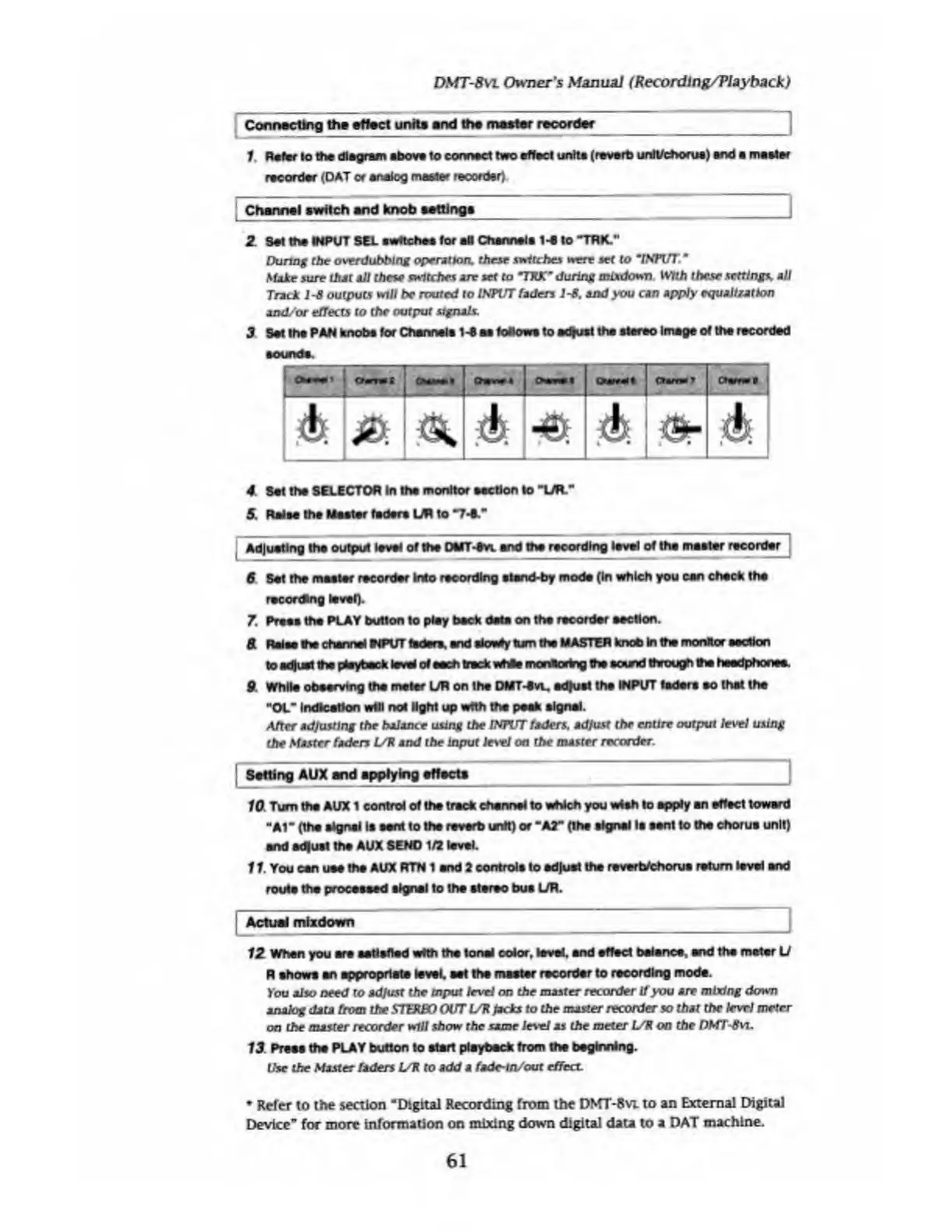
3
Set
tha
PAN
knobs
for
Channels
14
as
fodowt
lo
adjust
the
stereo
image
of
the
recorded
sounds.
Oir-*i
|
-1
CtmrmS
O
CUfNlI
j
|
C
tamtT
Ch***S
[A
0
N
T
4
A;
A]
4
S
et
the
SELECTOR
In
the
monitor
section
lo
“UR."
5.
Raise
the
Waster
faders
LAt
to
"74."
Adjusting
the
output
level
of
the
0MT4
vl
and
the
recording
level
of
the
master
recorder
6
Set
the
master
recorder
kilo
recording
stand-by
mode
(In
which
you
can
check
the
recording
level).
7.
Press
the
PLAY
button
to
pley
beck
data
on
tha
recorder
section.
41
Raise
the
channel
tIPVT
faders,
and
slowly
turn
tha
MASTER
knob
In
the
monitor
section
to
adjust
tha
playback
level
of
each
track
whit
monitoring
tha
ecsmd
through
the
headphones.
9
While
observing
the
meter
UR
on
the
DMT4vu
adjust
the
INPUT
faders
so
that
the
"Of
Indication
will
not
light
up
with
the
peek
signal.
After
adjusting
the
balance
using
the
INPUT
faders.
adjust
the
enure
output
level
using
the
Master
faders
UP
and
the
input
le\el
on
the
master
recorder.
|
Salting
AUX
and
applying
affects
_
10
Turn
tha
AUX
1
control
of
the
track
channel
to
which
you
wish
lo
apply
an
effect
toward
"At"
(the
signal
la
sent
to
tha
reverb
unit)
or
"AT
(the
signal
la
sent
to
tha
chorus
unit)
and
ad|ust
tha
AUX
SEND
1/2
level.
11
.
You
can
use
the
AUX
RTN
1
end
2
controls
to
adjust
the
reverbfcborua
return
level
and
route
the
processed
signal
to
tha
stereo
bus
UR.
|
Actual
mlxdown
__
12
When
you
are
satisfied
with
the
tonal
color,
level,
and
effect
balance,
and
the
meter
U
R
ahowa
an
appropriate
level,
eat
the
master
recorder
to
recording
mode.
You
also
need
to
adjust
the
tnput
level
on
the
master
recorder
If
you
are
mixing
down
analog
data
from
the
STEREO
OUT
UP
Jacks
to
the
master
recorder
so
that
the
level
meter
on
the
master
recorder
will
show
the
same
level
as
the
meter
UR
on
the
DMT-8vi,
13
Press
tha
PLAY
button
to
start
playback
from
tha
beginning.
the
the
Master
faders
UR
to
add
a
fade-m/out
effect.
Refer
to
the
section
"Digital
Recording
from
the
DNfT-8vL
to
an
External
Digital
Device"
for
more
information
on
mixing
down
digital
data
to
a
DAT
machine.
61

Table of Contents

Related product manuals