EasyManua.ls Logo

Fostex DMT-8VL - Setup mode

Fostex DMT-8VL
158 pages
Print Icon
To Next Page IconTo Next Page
To Previous Page IconTo Previous Page
Loading...
DMT’8vl
Owner's
Manual
(SETUP
mode)
Setup
mode
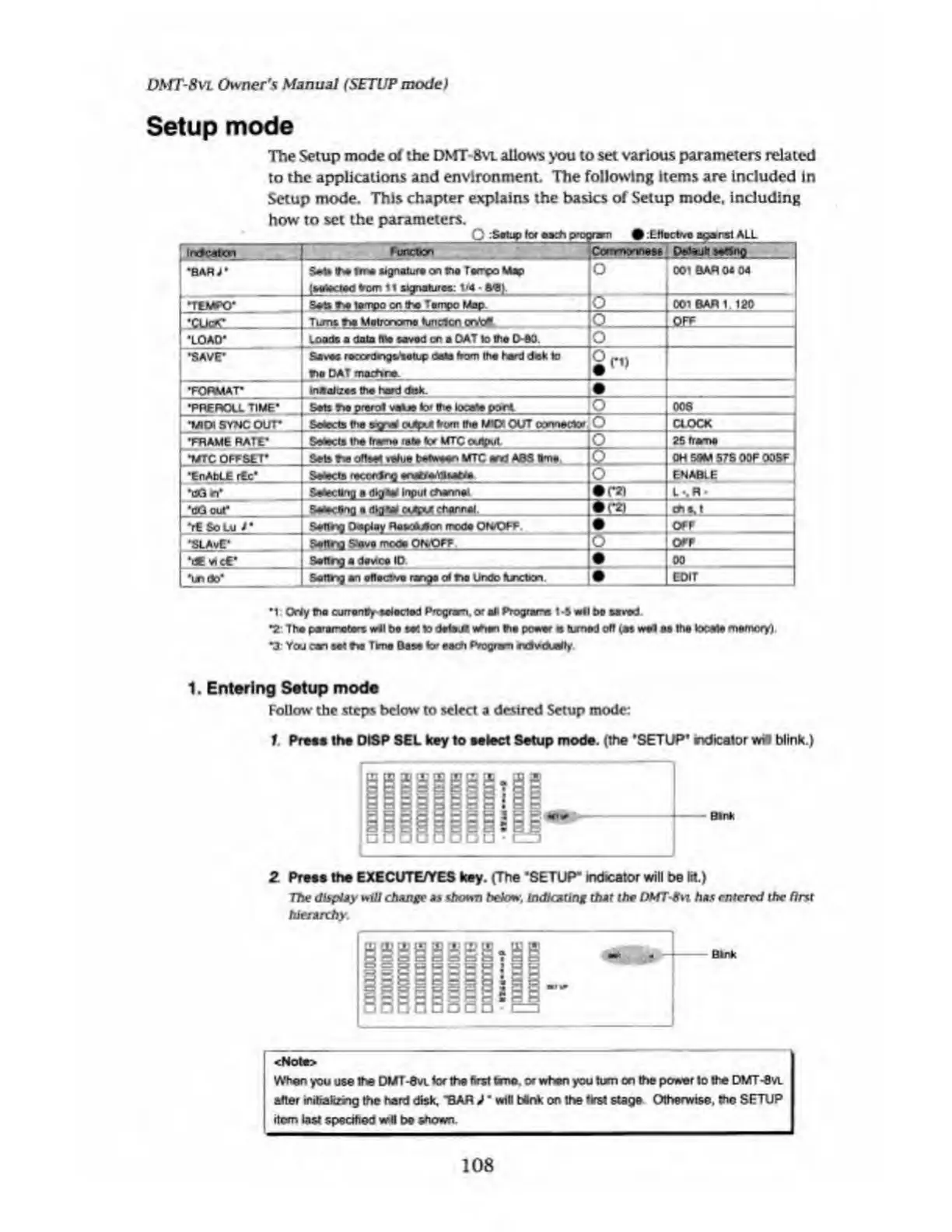
The
Setup
mode
o/
the
DMT-8
vl
allows
you
to
set
various
parameters
related
to
the
applications
and
environment.
The
following
items
are
included
In
Setup
mode.
This
chapter
explains
the
basics
of
Setup
mode,
including
how
to
set
the
parameters.
C
:Setup
tor
each
program
#
ttloctv©
agarst
ALL
usanBisfflsi
’BAR
Seta
«h©
Wte
signature
on
tha
Tempo
Map
O
;
selected
from
11
signature?:
1/4
ft-B).
001
BAR
04
04
•TEMPO’
Sets
f*
lampo
on
tha
Tampc
Map
001
BARI
120
‘CLicK*
Turns
r>a
Metrorwme
tunclcn
ontat
jO
,
QFF
•LOAD"
Loads
a
data
file
saved
on
a
DAT
to
tha
D-60.
jO
•SAVE-
Saves
roccrdngs.'setup
date
from
the
herd
dek
to
O
tho
DAT
ma^ire
TORMAT_
*P
RE
ROLL
TIME'
^midi
sync
our
FRAME
RATE*
•MTC
OFFSET*
•EnAbLE
rEc*
maaltzes
the
herd
disk.
Sat?
T>e
prarot
vaO©
tor
th©
locate
port
006
Selects
the
wjnaf
outeM
from
the
MIDI
OUT
connector
IO
CLOCK
Selects
lha
frame
rate
lor
MTC
output
Sets
he
ofteat
value
b*w«n
MTC
and
ABS
#me
o
_
0
~
o
2
f:
frame
OH
5SM
57S
OOF
OOBF
ENABLE
•cG
n*
Setecttng
a
digan
Input
channel
L-.R-
•cg
cut*
Setecttng
a
dig**
ojpjt
charnel
(*21
<*M
_
"rt
So
Lu
r
_
•SLAvE*
Sating
DtspleyReoaueor.
mode
ON/OFF
OFF
Seftrg
Save
mode
ON/OFF
X5
-
OFF
•dEvicC*
Bating
a
device
ID
00
•undo*
Sattng
an
eflectoe
range
al
r»o
Undo
fcjncban
e
EDIT
*1
Orly
tha
currently
selected
Pro
g
ram,
or
all
Programs
I
*5
vrtl
Do
saved
*2:
Th#
parameter?
wil
be
se!
to
data*
when
tha
power
e
turned
off
(a?
wet
an
Ihe
tocate
memory)
*3:
You
can
sal
fa
Tima
Das©
tor
each
Program
ravcualty
1.
Entering
Setup
mode
Follow
the
steps
below
to
select
a
desired
Setup
mode:
1.
Pre**
the
DISP
SEL
key
to
select
Setup
mode,
(the
'SETUP'
rxJicator
w*
blink.)
-
Bln*
2
Prete
the
EXECUTE/YES
key.
(The
'SETUP"
indicator
will
be
bt.)
The
display
will
change
as
shown
below,
indicating
that
the
DMTSvi
has
entered
the
first
hierarchy.
<Note>
When
you
U66
the
DMT*6
vl
lor
the
first
ten®,
or
when
you
turn
on
the
power
to
the
DMT-Bvt.
after
inifakhng
the
hard
disk.
"BAR
J
m
will
Mnk
on
the
first
stage
Otherwise,
the
SETUP
item
last
specified
wll
be
shown.
108

Table of Contents

Related product manuals