EasyManua.ls Logo

Fostex DMT-8VL - Auto Punch In;Out Rehearsal mode

Fostex DMT-8VL
158 pages
Print Icon
To Next Page IconTo Next Page
To Previous Page IconTo Previous Page
Loading...
DMT
8vl
Owner's
Manual
(Punch
In/Out)
Auto
Punch
In/Out
Rehearsal
mode
In
Rehearsal
mode,
che
‘READY*
track
enters
input
monitoring
status
between
the
Auto
Punch
in
and
Out
points.
Unlike
Take
mode,
which
is
explained
later,
the
recorder
will
not
record
any
data,
allowing
you
to
fine-tune
the
In/Out
points
or
the
recording
level
until
the
settings
are
satisfactory.
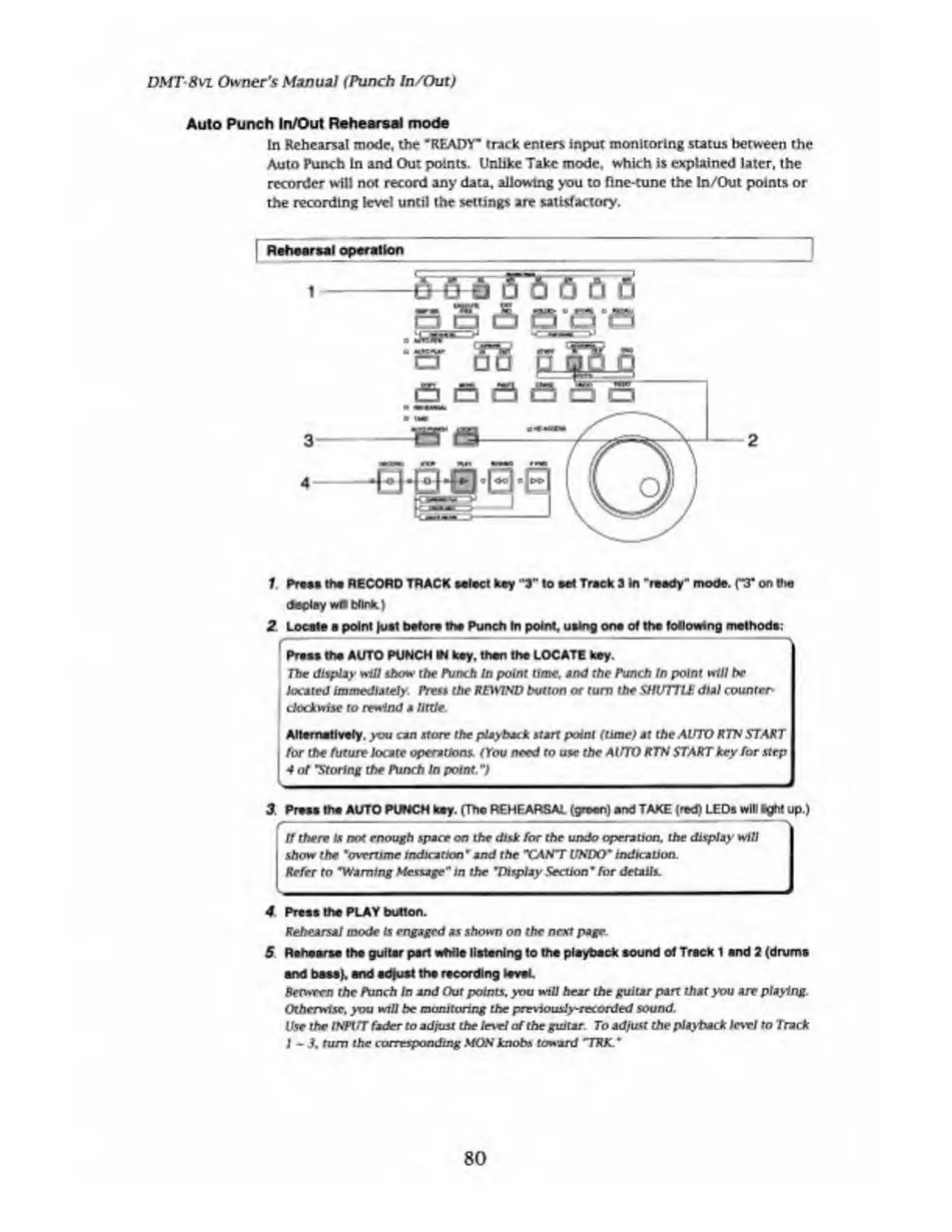
1
Rehearsal
operation
a
S
£>
e-a-e
1
Press
the
RECORD
TRACK
select
key
’3"
to
set
Track
3
in
"ready**
mode.
fT
on
the
display
wflMnfc.)
2
Locate
a
point
|uat
before
the
Punch
In
point,
using
one
of
the
following
methods:
Press
the
AUTO
PUNCH
M
key,
than
the
LOCATE
key.
The
display
will
show*
the
Punch
In
point
time.
and
the
Punch
In
point
w111
he
located
Immediately.
Press
the
REWIND
button
or
turn
the
SHUTTLE
dial
counter¬
clockwise
to
rewind
a
little.
Alternatively,
you
can
store
the
playback
start
point
(lime)
at
the
AUTO
RTN
START
for
the
future
locate
operations.
(You
need
to
use
the
AUTO
RTN
START
key
for
step
4
of
"Storing
the
Punch
In
point.
")
-
3
Press
the
AUTO
PUNCH
key.
(The
REHEARSAL
(green)
and
TAKE
(red)
LEDs
will
Bght
up.)
It
there
Is
not
enough
space
on
the
disk
for
the
undo
operation,
the
display
will
j
show
the
'overtime
Indication
*
and
the
"CANT
UNDO"
indication.
Refer
to
*Warning
Message"
In
the
"Display
Section
9
for
details.
4.
Prees
the
PLAY
button.
Rehearsal
mode
Is
engaged
as
shown
on
the
next
page
S
Rehearse
the
guitar
pari
while
listening
to
the
playback
sound
of
Track
1
and
2
(drums
and
bass),
and
adjust
the
recording
level.
Between
the
Punch
In
and
Out
points,
you
will
hear
the
guitar
pan
that
you
are
playing.
Otherwise,
you
will
be
monitoring
the
pre\iousJy~recorded
sound.
Use
the
INPtfT
fader
to
ad
fust
the
Inrl
of
the
guitar.
To
adjust
the
playback
lc\vl
to
Track
I
~
3.
turn
the
corresponding
MON
knobs
toward
"TRK.
*
80

Table of Contents

Related product manuals