EasyManua.ls Logo

Fostex DMT-8VL - MTC Synchronization;Machine Control system

Fostex DMT-8VL
158 pages
Print Icon
To Next Page IconTo Next Page
To Previous Page IconTo Previous Page
Loading...
DMT-8VL
Owner's
Manus!
<Recording/Playback)
3.
MTC
Synchronrzation/Machine
Control
system
This
paragraph
explains
the
control
system
vU
computer
using
MMC
(MIDI
Machine
Control),
and
the
synchronization
system
using
MTC
(MIDI
Time
Code)
output
from
the
DMT-8
vl
The
DMT-8vx
can
output
MTC
at
any
frame
rate
by
adding
a
time
offset
(with
a
time
difference
of
less
than
six
hours)
to
the
ABS
(absolute)
time
of
the
hard
disk.
You
can
also
control
the
DMT-8vt
from
an
external
device
by
sending
MMC
(MIDI
Machine
Control)
or
Fostcx
System
Exclusive
Messages.
In
this
case,
you
will
set
a
DEVICE
ID
number
In
the
-DEVICE"
parameter
of
Setup
mode
on
the
DMT-8VL
Therefore,
multiple
DMT-8VU
can
be
controlled
individually
by
changing
the
DEVICE
ID
number
within
the
messages
sent
from
the
computer.
Refer
to
-MMC
List"
on
page
*137-
for
more
Information
on
MMC.
and
to
-Fostcx
System
Exclusive
list"
on
page
"138"
for
more
information
on
Fostex
System
Exclusive
Messages.
When
the
DMT-8vi
receives
the
MMC
Rehearsal
messages
(WRITE:
40h.
RECORD
MODE:
4ch).
the
REHEARSAL
LED
will
blink.
Indicating
that
Manual
Punch
In/Out
recording
Rehearsal
mode
is
entered.
wo
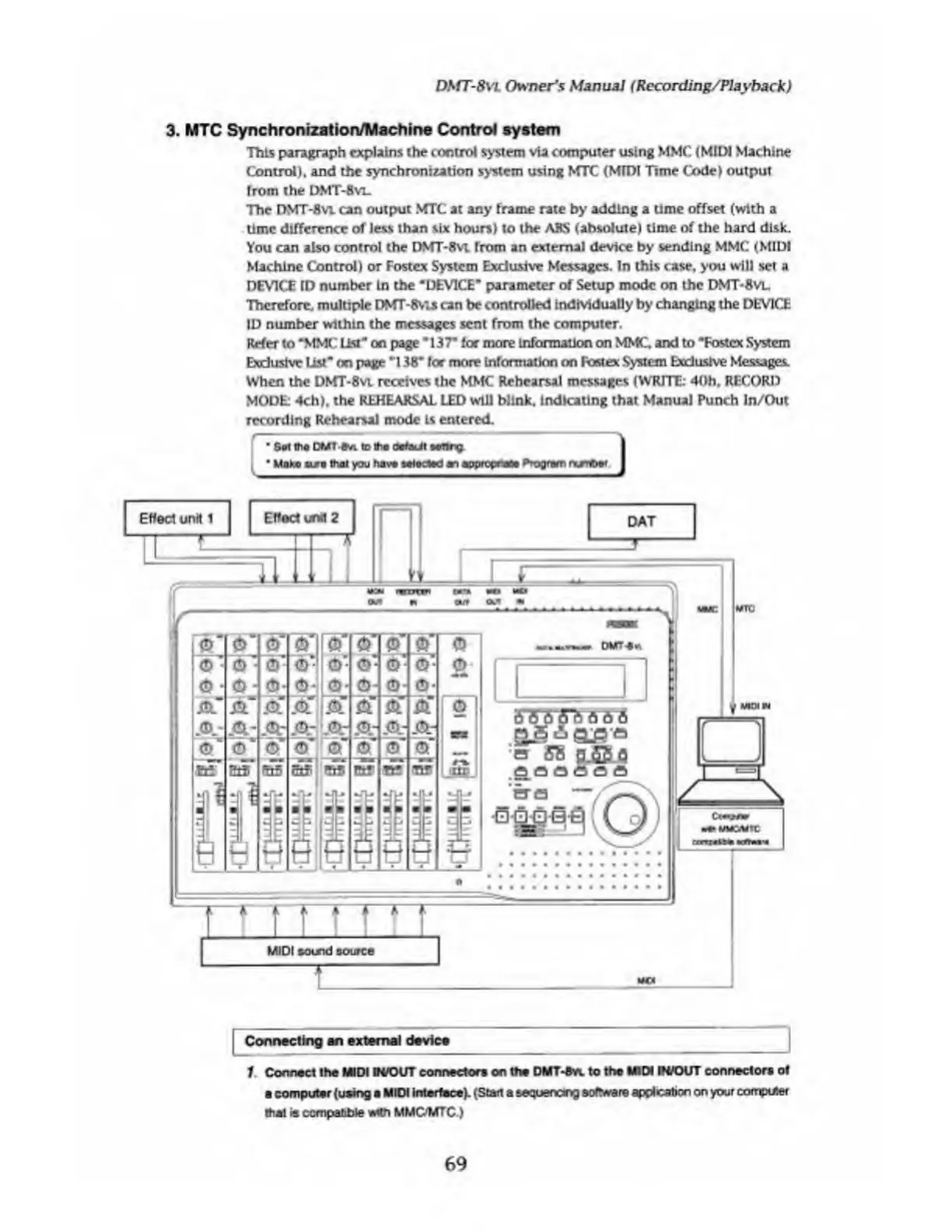
Connecting
an
external
device
1
Connect
the
MIDI
IWOUT
connector®
on
the
OMT-Ovt
to
the
MIDI
W/OVT
connector*
of
computer
(using
MIDI
Interface).
(Start
a
sequencing
software
applcation
on
your
computer
ttiat
is
compatible
with
MMCWTC.)
69

Table of Contents

Related product manuals