EasyManua.ls Logo

Fostex DMT-8VL - Cutting

Fostex DMT-8VL
158 pages
Print Icon
To Next Page IconTo Next Page
To Previous Page IconTo Previous Page
Loading...
DMT-Svl
Owner's
Manual
(Edit
function)
Cutting
8
Press
the
ERASE
key.
The
upper
row
of
the
7-segment
display
will
show
'ErAS.
m
and
the
message
"SURE?'
will
blink.
9
Press
the
EXECUTE/YES
key.
When
the
operation
ts
completed,
the
T9
rAS*
message
is
lit
on
the
bottom
row
of
the
display,
and
message
"COMPLETED*'
appears
Press
the
EXTT/NO
key
to
return
to
the
previous
display.
In
this
way,
the
sound
data
of
the
specified
area
is
erased.
Undo/Redo
the
Erase
operation
I
you
wish
to
restore
data
that
existed
before
you
executed
the
Erase
function,
press
the
UNDO
key
to
restore
the
status
of
the
DMT
flvi
before
you
erased
the
data
Pressing
the
REDO
key
after
pressing
the
UNDO
key
wil
restore
the
status
of
the
DMT
fta.
pnor
to
the
Undo
operator
The
Undo
and
Redo
functions
are
effective
only
while
the
DMT-
0vl
is
slopped
After
the
UNDO
key
or
REDO
key
is
pressed
the
(ftapiay
will
show
’COMPLETED*’
and
return
to
the
previous
screen
<Note>
You
can
use
the
undofredo
function*
while
the
DMT-4vi
is
in
stop
mode.
Under
the
following
oscurmtancss.
you
will
be
unable
lo
use
the
i#ido/redo
funcaons:
1.
if
you
make
a
new
recording.
2.
if
you
make
a
new
edit
(Copy
&
Paste,
Move
A
Paste.
Erase,
or
Cut).
3.
if
the
Auto
Punch
In
po*nt
was
passed
n
play
or
record
modo
whils
Auto
Punch
mode
was
on.
or
4
.
i
you
turned
oft
the
power
to
the
DMT-Svi..
then
turned
it
back
on.
4
6
-
1.3-
5-
u
-i
6
u
uHj
°
r
T'
"
cs-
-1.4
•g
g
g
a
.a
a
a
ip
a
a
•era
hmw
——
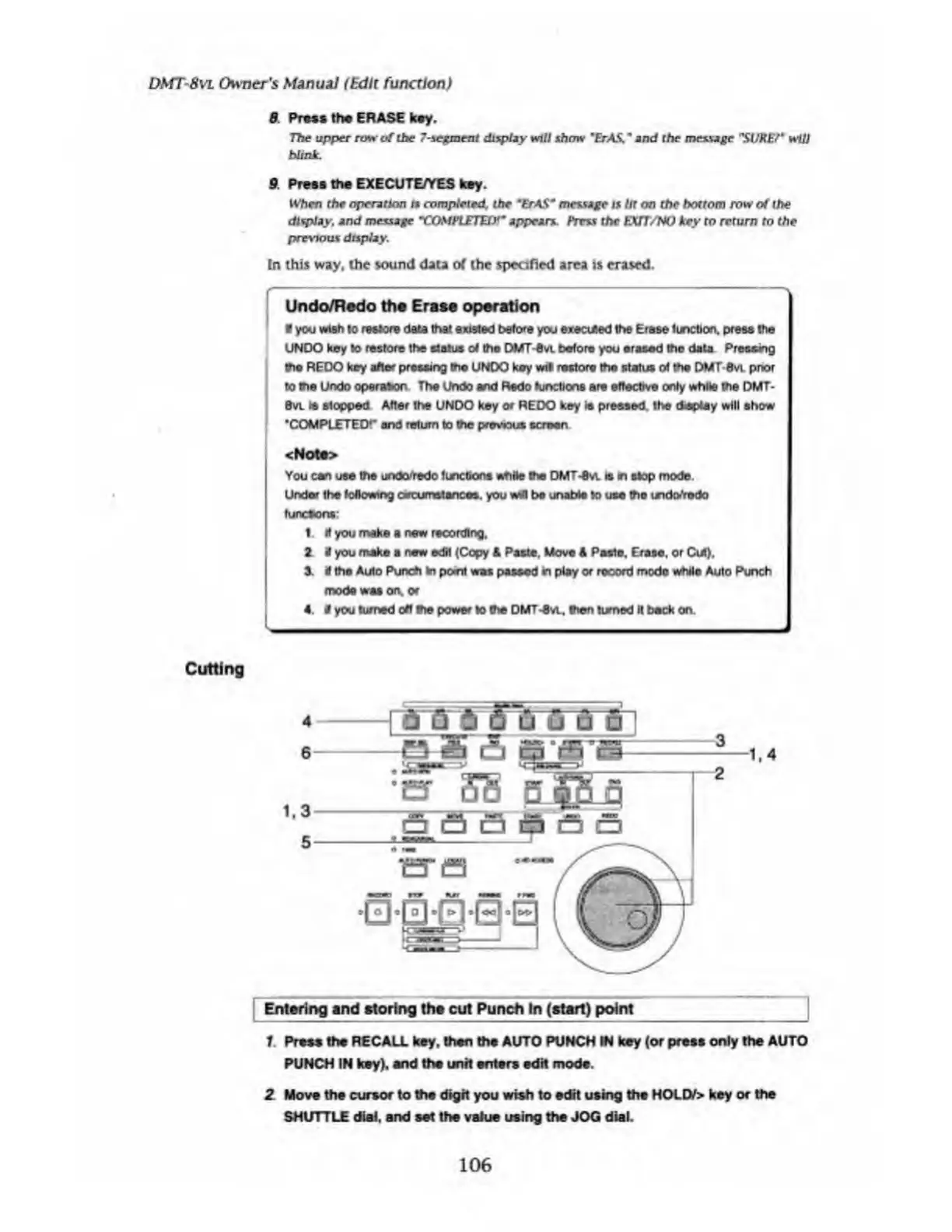
Entering
and
storing
tha
cut
Punch
In
(start)
point__|
1
Preee
tha
RECALL
key.
then
the
AUTO
PUNCH
IN
key
(or
press
only
the
AUTO
PUNCH
IN
key),
end
the
unit
enters
edit
mode.
2
Move
the
cursor
to
the
digit
you
wish
to
edit
using
the
HOLD/>
key
or
the
SHUTTLE
dial,
and
set
the
value
using
the
JOG
dial.
106

Table of Contents

Related product manuals