EasyManua.ls Logo

Fostex DMT-8VL - Setting the Auto Return Start;End point

Fostex DMT-8VL
158 pages
Print Icon
To Next Page IconTo Next Page
To Previous Page IconTo Previous Page
Loading...
DMT-Svl
Owner's
Manual
(Locate
function)
Setting
the
Auto
Return
Start/End
point
There
are
two
ways
to
set
the
Auto
Return
Start
point
and
End
point:
one
is
to
hold
and
store
a
desired
time
value
in
real-time
during
playback
or
while
the
DMT-8VL
is
stopped:
the
other
is
to
edit
and
store
a
desired
time.
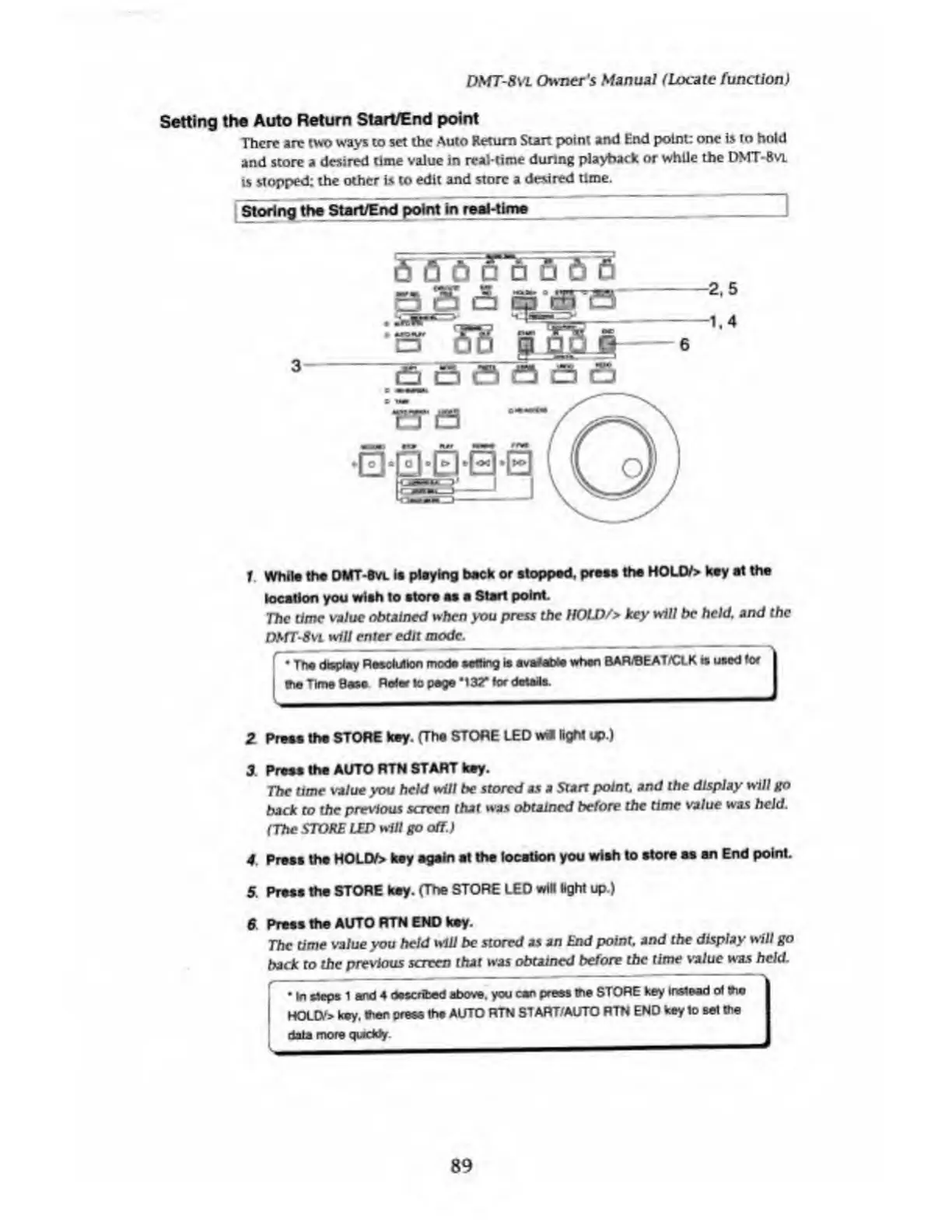
Storing
the
Start/End
poi
nt
In
reeMIme
I
1
While
the
DMT-Bvl
ia
playing
beck
or
stopped,
press
the
HOLD/>
key
at
the
location
you
wish
to
store
as
a
Start
point.
The
time
value
obtained
when
you
press
the
HOLD/>
key
will
be
held,
and
the
DStTSvL
will
enter
edit
mode.
_
_
_
r•
The
display
RsaoMkxi
mode
setting
is
avatat*
when
BARBEAT/CLK
is
used
for
I
I
the
Time
Base
Refer
to
pege
*132"
for
details.
2
Press
the
STORE
key.
fThe
STORE
LED
w*
light
up.)
3
Press
the
AUTO
RTN
START
key.
The
time
value
you
held
will
be
stored
as
a
Starr
point,
and
the
display
will
go
back
to
the
previous
screen
that
was
obtained
before
the
time
value
was
hold.
(The
STORE
LED
will
go
off.)
4
.
Press
the
HOLD/>
key
again
at
the
location
you
wish
to
store
as
an
End
point.
5.
Press
the
STORE
key.
(The
STORE
LED
will
light
up.)
6
Prees
the
AUTO
RTN
END
key.
The
time
value
you
held
will
be
stored
as
an
End
point,
and
the
display
will
go
back
to
the
previous
screen
that
was
obtained
before
the
time
value
was
held.
In
Heps
1
and
4
described
above,
you
can
press
the
STORE
key
Instead
cH
(ho
HOLD-*
key.
*er
press
the
AUTO
RTN
START/AUTO
RTN
END
key
to
set
the
data
more
qwddy
1
89

Table of Contents

Related product manuals