EasyManua.ls Logo

Fostex DMT-8VL - Page 90

Fostex DMT-8VL
158 pages
Print Icon
To Next Page IconTo Next Page
To Previous Page IconTo Previous Page
Loading...
DMT-8VL
Owner's
Manual
(Locale
/unction;
1
.
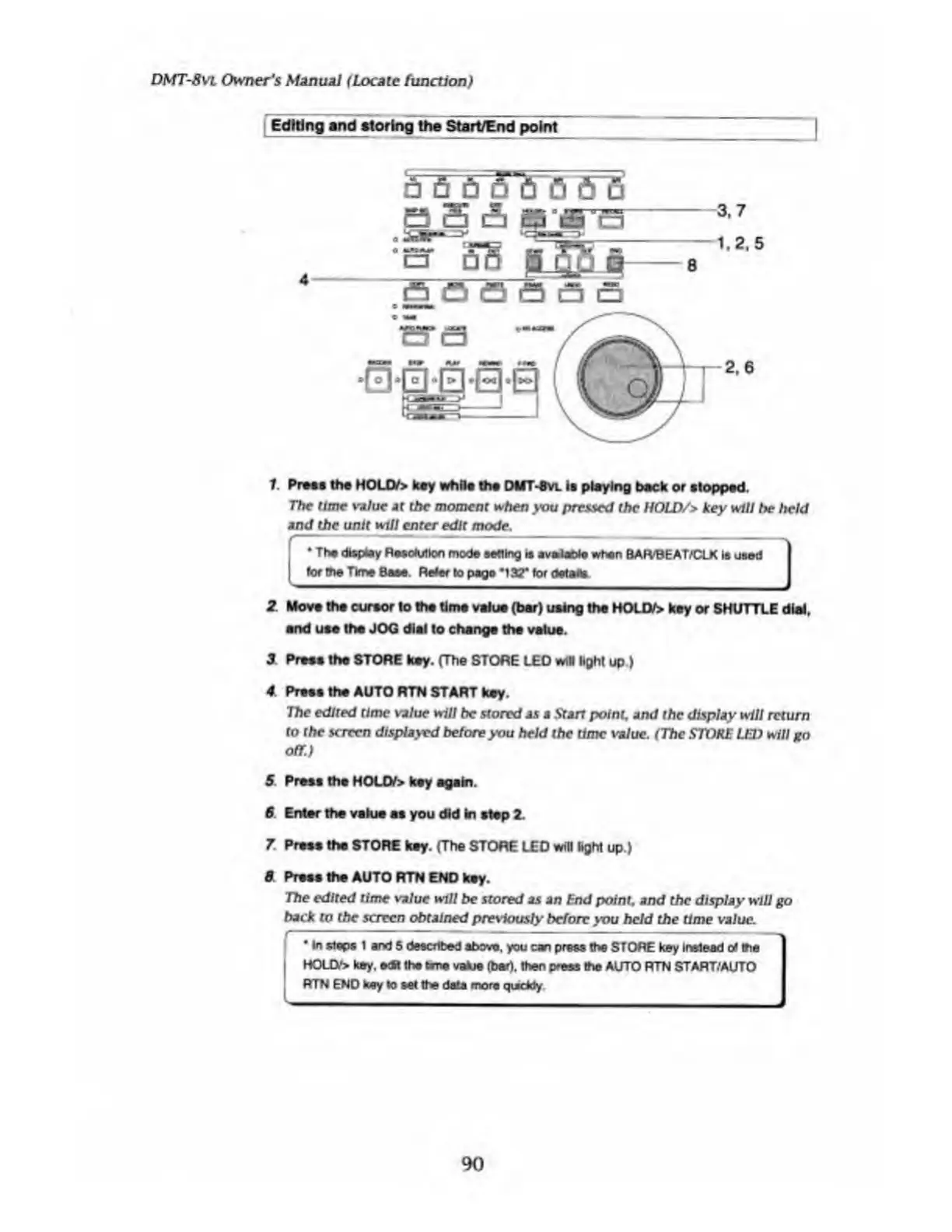
Press
the
HOLD/>
key
while
the
DUT-Sw
is
playing
hack
or
stopped.
The
time
value
at
the
moment
when
you
pressed
the
HOLD/>
key
will
he
held
and
the
unit
will
enter
edit
mode.
*
The
display
Resolution
mode
setting
is
avalaoie
when
BAFVBEAT/CLK
Is
used
tor
the
Time
Base.
Refer
to
page
m
l3T
tor
details
_
I
2
Move
the
cursor
to
the
time
value
(her)
using
the
HOUV>
key
or
SHUTTLE
dial,
and
use
the
JOG
dial
to
change
the
value.
3
Press
the
STORE
key.
(The
STORE
LEO
will
light
up.)
4
Press
the
AUTO
RTN
START
key.
The
edited
time
value
will
be
stored
as
a
Start
point,
and
the
display
will
return
to
the
screen
displayed
before
you
held
the
time
value.
(The
STOKE
LEI)
will
go
off.)
5
Press
the
HOUV>
key
again.
6
Enter
the
value
as
you
did
in
step
2
.
7
Press
the
STORE
key.
(The
STORE
LED
will
light
up.)
0
Press
the
AUTO
RTN
END
key.
The
edited
time
value
will
be
stored
as
an
End
point,
and
the
display
will
go
back
to
the
screen
obtained
previously
before
you
held
the
time
value.
In
stops
I
and
5
described
above,
you
can
press
the
STORE
key
Instead
ot
me
HOLD*
key.
edR
the
bme
value
(bar),
then
press
the
AUTO
RTN
START/AUTO
RTN
END
key
to
setthe
data
more
quickly
90

Table of Contents

Related product manuals