EasyManua.ls Logo

Fostex DMT-8VL - Synchronizing multiple DMT-8 vls in Slave mode

Fostex DMT-8VL
158 pages
Print Icon
To Next Page IconTo Next Page
To Previous Page IconTo Previous Page
Loading...
DS1T-8VL
Owner's
Manual
(Rccording/PIayback)
4.
Synchronizing
multiple
DMT-8
vl*
in
Slave
mode
This
section
explains
how
to
configure
a
16-channel/16-track
system
using
the
Slave
mode
function
of
the
DNCT-8VL
As
an
example,
wc
will
synchronize
one
slave
DMT-8vi
to
the
master
DMT-8
vl
digital
multitracker.
Set
TK>
DMT-8*
to
the
OetaiJt
seftrg
i
*
Uaka
sure
mat
you
have
sete:*d
an
acprcfnete
Program
rximber
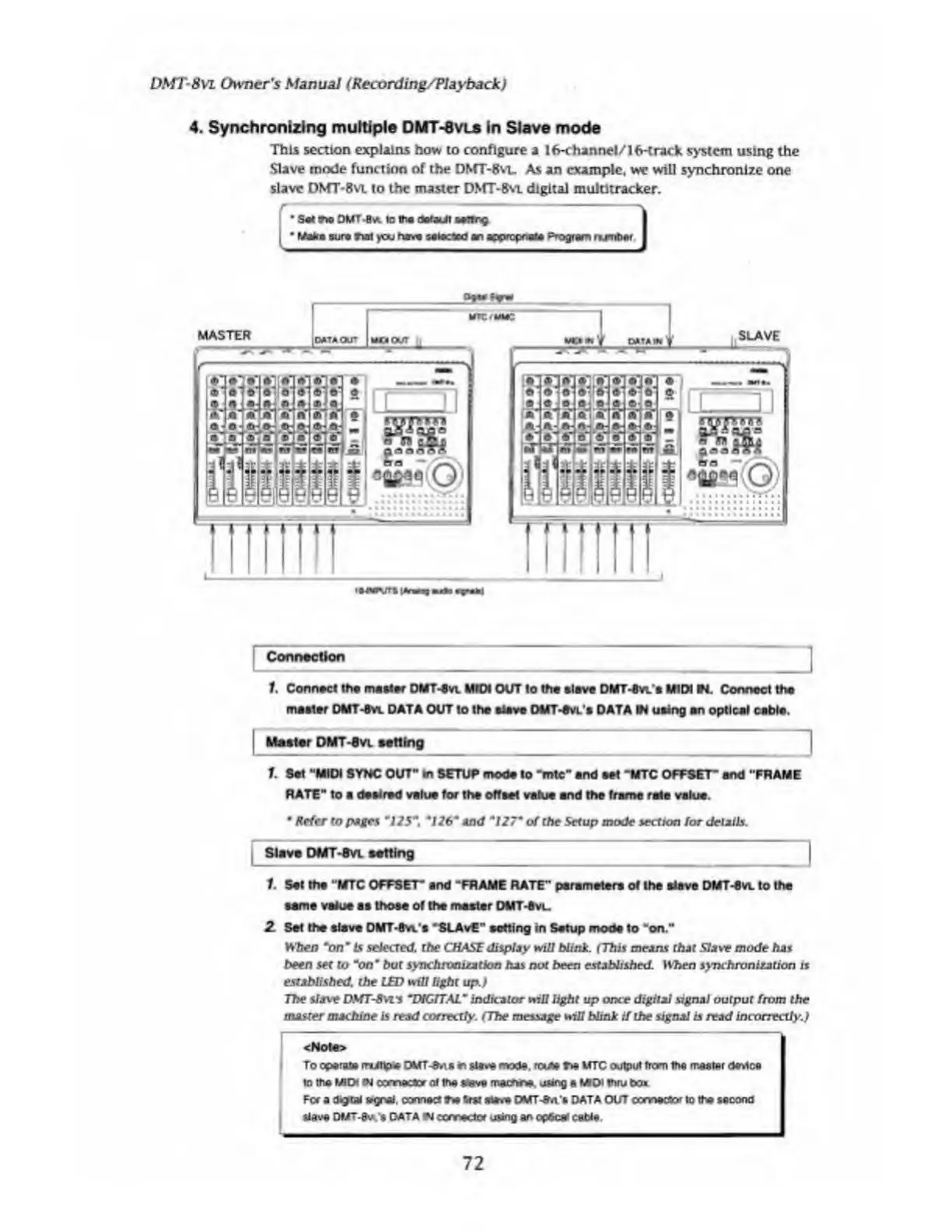
Connection
1.
Connect
the
metier
DMT-evi.
MIDI
OUT
to
the
slave
DMT-8
vl»
MIDI
WL
Connect
the
master
DMT-8
vl
DATA
OUT
to
the
slave
OMT-evL's
DATA
»i
using
an
optical
cable.
I
Master
DMT-Svl
setting
1.
Set
“MIDI
SYNC
OUT
H
In
SETUP
mode
to
Trite"
and
set
“MTC
OFFSET’
and
"FRAME
RATE"
to
a
desired
value
for
the
offset
value
and
the
frame
rale
value.
Refer
to
pages
*125*
t
*126*
And
*
127
*
of
the
Setup
mode
section
for
details.
Slave
DMT-Svl
setting
|
1
Set
the
"MTC
OFFSET"
and
"FRAME
RATE"
parameters
of
the
slave
DMT-Svl
to
the
same
value
as
those
of
the
master
DMT-Svl.
2.
Set
the
slave
DMT-Svi/s
“SLAvE"
setting
in
Setup
mode
to
“on."
Wien
“on*
Is
selected,
the
CHASE
display
will
Nink.
(This
means
that
Slave
mode
has
been
set
to
"on*
but
synchronization
has
not
been
established.
When
synchronisation
is
established,
the
LED
will
light
up.)
The
slave
DSfTS\vs
~DIGfT.AL~
indicator
will
light
up
once
digital
signal
output
from
the
master
machine
is
read
correctly.
(The
message
win
blink
if
the
signal
is
read
incorrectly.)
<Note>
To
operate
mJttp*
OMT-e.\$
in
slave
mode.
route
me
MTC
output
from
the
master
device
to
me
MIDI
*J
connecter
of
me
save
mechne.
using
a
MIDI
thru
bcu
For
a
digtaJ
egral.
connect
me
tost
serve
OMT-Obi/s
DATA
OUT
connector
to
the
second
Slave
DMT-8vk
$
DATA
connector
using
an
op*c*
cable
72

Table of Contents

Related product manuals