EasyManua.ls Logo

Fostex DMT-8VL - Page 73

Fostex DMT-8VL
158 pages
Print Icon
To Next Page IconTo Next Page
To Previous Page IconTo Previous Page
Loading...
DMT-8VL
Owner's
Manual
(Recording/Playback)
Checking
the
sync
operation
_
J
1.
Press
the
PLAY
button
on
the
mester
DMT-6
vl
to
start
playback.
When
the
slave
DMT-Svi
suns
reading
the
MTC
sign*]
from
the
master
device
correctly,
and
synchronization
fs
subsequently
esuMtshcd.
the
Minting
CHASE
display
on
the
stave
machine
wfJ7
tight
up
Recording
|
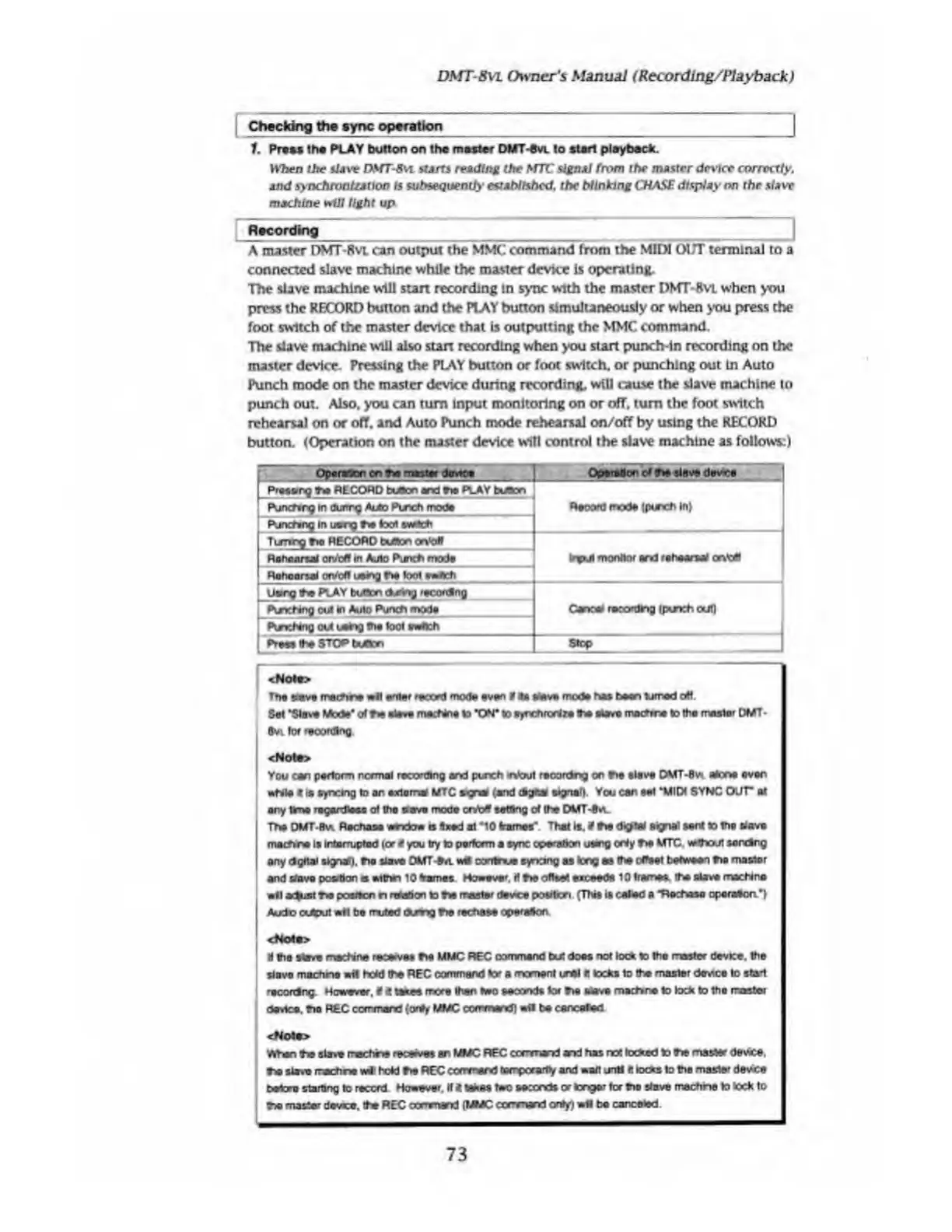
A
master
DMT-8
vl
can
output
the
MMC
command
from
the
MIDI
OUT
terminal
to
a
connected
slave
machine
while
the
master
device
is
operating.
The
slave
machine
will
start
recording
in
sync
with
the
master
DMT-8VL
when
you
press
the
RECORD
button
and
the
PLAY
button
simultaneously
or
when
you
press
the
foot
switch
of
the
master
device
that
is
outputting
the
MMC
command.
The
slave
machine
will
also
start
recording
when
you
start
punch-in
recording
on
the
master
device.
Pressing
the
PLAY
button
or
foot
switch,
or
punching
out
Ln
Auto
Punch
mode
on
the
master
device
during
recording,
will
cause
the
slave
machine
to
punch
out.
Also,
you
can
turn
Input
monitoring
on
or
off,
turn
the
foot
switch
rehearsal
on
or
off.
and
Auto
Punch
mode
rehearsal
on/off
by
using
the
RECORD
button.
(Operation
on
the
master
device
will
control
the
slave
machine
as
follows:)
skit
r:
.
be^shijli
"
r.
1
I
Proseng
toa
RECORD
button
and
toe
PLAY
tutten
Pjnchng
in
dunrg
Auto
Punch
mode
Punching
in
usrg
toe
toot
svrtch
Record
mode
{porch
In)
Turing
toe
RECORD
button
onto*
Rehearsal
on/oft
In
Auto
Punch
mode
Rehearsal
on/bff
using
toe
toot
ewAch
Input
monitor
and
rehearsal
orv'eif
Uangt*
PLAY
button
aetogrtcordtoQ
Pvkxhtog
out
In
Auto
Punch
modi
Canoe
recording
(punch
oul|
PcnchfriQ
out
using
the
tool
ewAch
|
PrsesBwSTOPIMIon
Stop
<Nota>
The
sieve
marine
«Hf
enter
recc'd
mode
even
tf
*
stove
mode
he*
been
tomed
art.
Set
'Steve
Mode'
toe
sieve
machine
to
W
to
eyrchrorJre
the
stove
mattont
to
the
muster
DMT-
8vi
for
reoordtog
<Noto>
You
can
perform
normal
recording
and
punch
•n'oul
recordng
on
toe
slave
DMT-0V*
alone
ever
wtvle
c
is
syncing
to
an
externa
MTC
sgna
(and
signal).
You
can
set
'MIDI
SYNC
OUT
at
ary
time
regardless
ol
the
save
mode
cob*
setting
of
the
DMT-toe
The
DMT*8v*
Rechase
endow
a
Aioed
at
*10
frames"
Thai
It.
*
toe
dip*I
signal
sent
to
toe
slave
mathre
Is
irtamjplad
lord
you
try
to
perfccm
a
sync
operation
using
oNy
toe
MTC
vMhout
serving
any
dgftal
signal),
toe
slave
DMT-tot
Ml
oontnue
synang
as
tong
asthe
cflfret
between
toe
master
and
slave
poohon
o
eithn
10
frames
However.
H
toe
offset
eiceede
10
frames,
the
Have
machine
ell
**ist
toe
posrton
n
rtoadon
to
toe
raster
device
position
(This
it
ealed
a
Ttehasa
operaAon')
Auto
(Xdput
ell
be
rruted
txm
g
toe
rechsee
operaAon
<No4e>
H
the
stave
machine
recedes
toe
MMC
REC
command
but
does
not
loc*
to
the
master
device,
the
siavo
machine
wit
hold
the
REC
command
tor
a
moment
ureI
It
locks
to
the
master
device
to
stad
recordng
However.
*
UM«
more
than
Two
tecondt
tor
toe
atove
machine
to
lock
to
the
raster
davtce.
toa
REC
corrmond
(only
MMC
co
mman
d
)
Ml
be
canceled
<No4*>
When
toe
slave
machine
recave*
an
MMC
REC
command
ar>d
has
no!
locked
to
toe
master
device,
toe
sla*e
rach
vM
held
toe
REC
ccrrmerd
terrpcrartV
and
wait
untl
It
locks
to
the
master
devee
betora
starting
to
record
However.
If
<
tohee
two
seconds
or
longer
tor
too
slave
mechne
to
tock
to
too
master
device,
the
REC
co
mmand
(MMC
ccrmand
onty)
wfl
be
canceled.
73

Table of Contents

Related product manuals