EasyManua.ls Logo

Fostex DMT-8VL - Step 4: Overdubbing the Vocal on Track 4_58

Fostex DMT-8VL
158 pages
Print Icon
To Next Page IconTo Next Page
To Previous Page IconTo Previous Page
Loading...
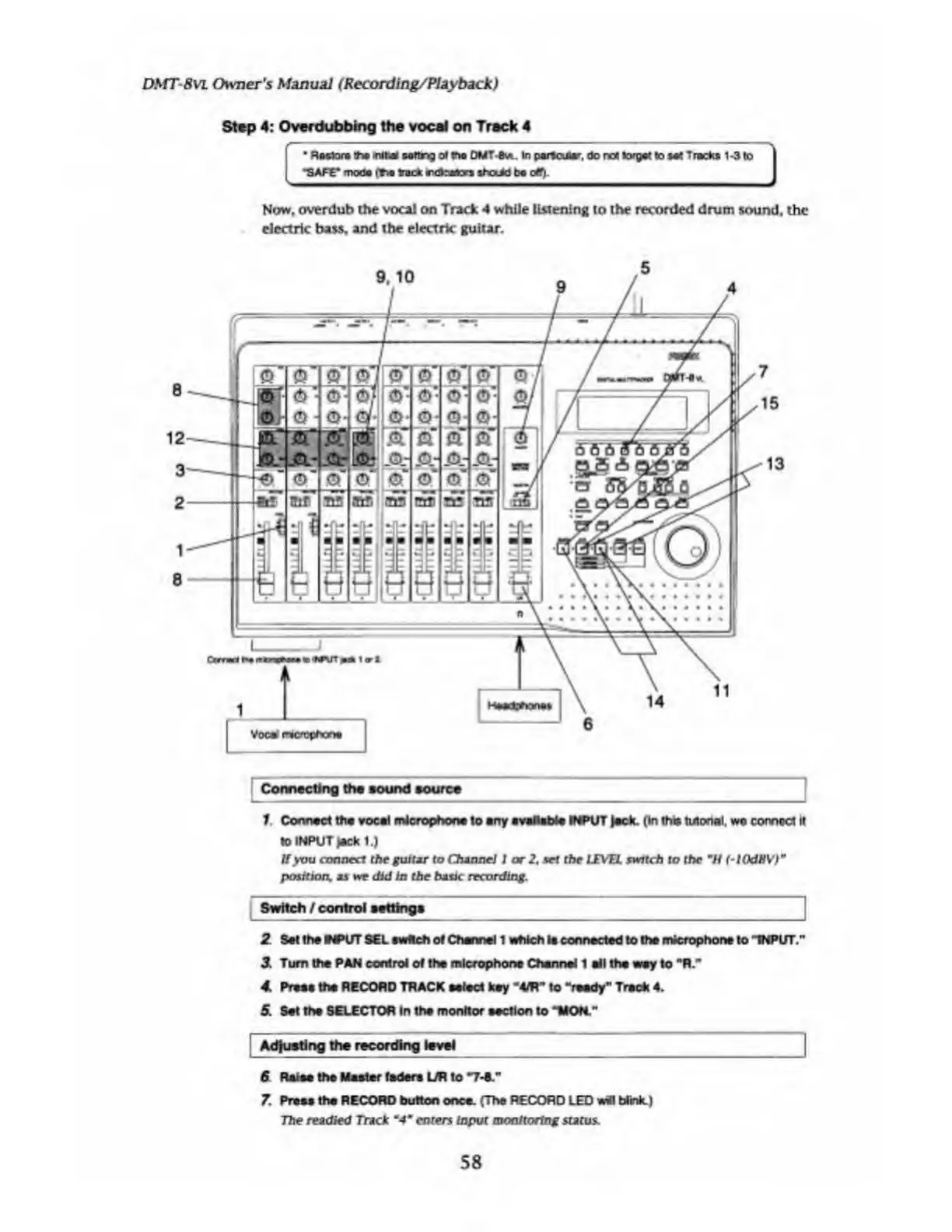
Now,
overdub
the
vocal
on
Track
4
while
listening
to
the
recorded
drum
sound,
the
electric
bass,
and
the
electrk
guitar.
Connecting
the
sound
source
1
Connect
the
vocal
microphone
to
erty
available
INPUT
lack.
(In
the
tutorial.
wa
connect
It
lo
INPUT
lack
1.)
If
you
connect
the
guitar
to
Channel
I
ar
2,
wf
the
LEVEL
switch
to
the
m
H
(-lOdBV)
9
position,
as
we
did
in
the
basic
recording.
Switch
/
control
settings
2
Set
the
WPUT
SEL
twitch
of
Channel
1
which
la
connected
to
the
microphone
to
-INPUT.’
3.
Turn
the
PAN
control
of
the
microphone
Channel
1
ell
the
way
to
"R."
4.
Press
the
RECORD
TRACK
select
key
‘4m"
to
"reedy”
Track
4.
5.
Set
the
SELECTOR
In
the
monitor
section
to
"HON."
Adjusting
the
recording
level
6
Raise
the
Master
fadera
UR
to
"7-C"
7
Press
the
RECORD
button
once.
(The
RECORD
LED
will
Wink.)
The
readied
Track
"4*
enters
Input
monitoring
status
DS1T-8VL
Owner's
Manual
(Rccording/Playback)
Step
4:
Overdubbing
the
vocal
on
Track
4
*
Roslor#
tea
initial
sottr
>3
at
tea
DMT-Bvi.
In
partcuftar,
do
not
tergal
to
set
Tracks
1-3
to
•SAFE*
mods
(tea
track
rctrators
sftxM
bo
off)-
58

Table of Contents

Related product manuals