EasyManua.ls Logo

Fostex DMT-8VL - Erasing

Fostex DMT-8VL
158 pages
Print Icon
To Next Page IconTo Next Page
To Previous Page IconTo Previous Page
Loading...
DMT-8VL
Owner's
Manual
(Bdil
function)
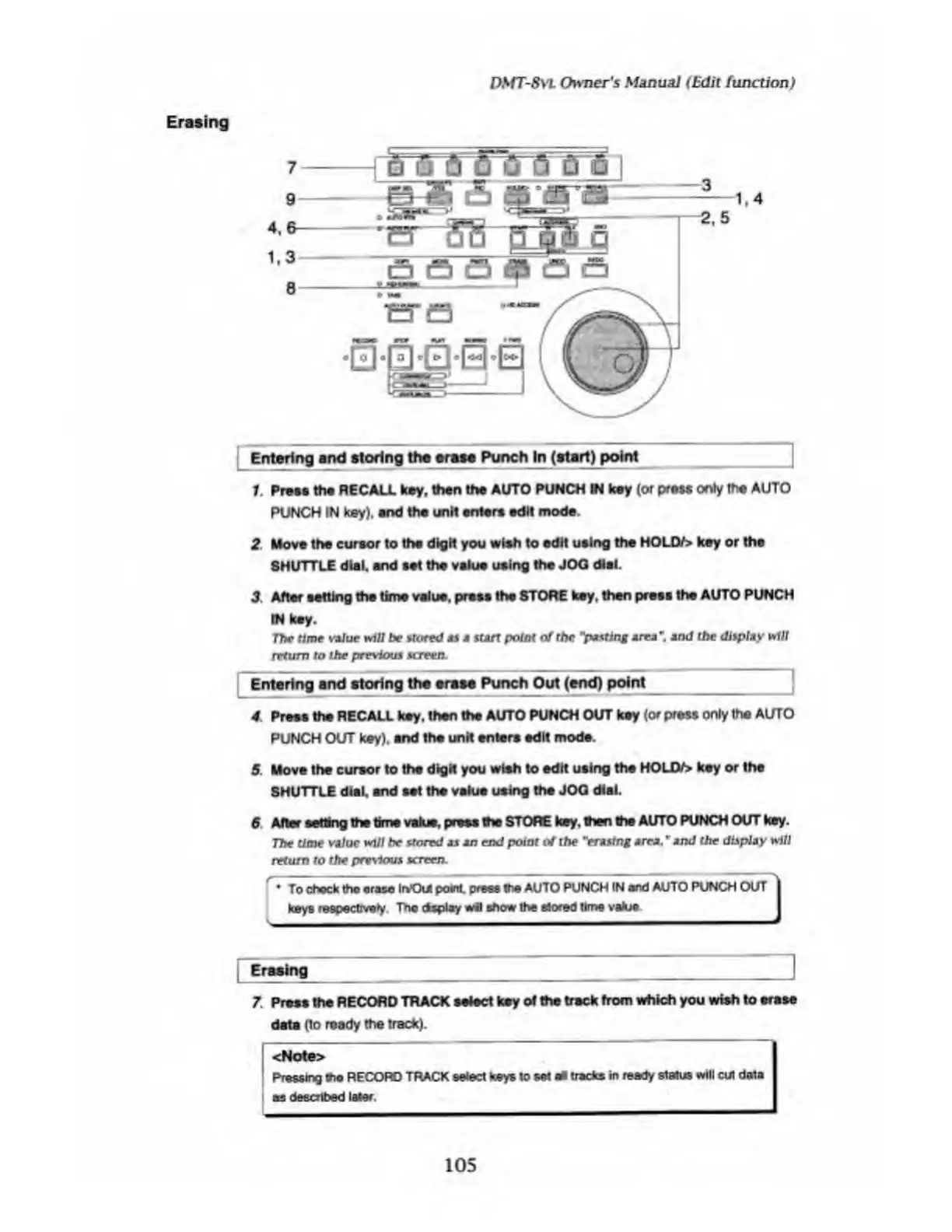
Erasing
7
9
4,
1.3
8
-
j
eh
5
Q
Q
0
fi
1
¥S
i
'IJS
q
—3
-1.4
-2.5
js
e
Ci
-
p
a
a
’isr
e
Entering
and
storing
the
erase
Punch
In
(start)
point
1
Press
the
RECALL
key,
then
the
AUTO
PUNCH
IN
key
(or
press
only
me
AUTO
PUNCH
IN
key),
and
the
unit
enters
edit
mode.
2
.
Move
the
cursor
to
the
digit
you
wish
to
edit
using
the
HOLQ/>
key
or
the
SHUTTLE
dial,
and
set
the
value
using
the
JOQ
dial.
3
After
setting
the
time
value,
press
the
STOWE
key.
then
press
the
AUTO
PUNCH
IN
key.
The
time
value
will
be
stored
as
a
sun
point
of
the
"parting
area
’.
and
the
display
t*f
U
return
to
the
previous
screen.
Entering
and
storing
the
erase
Punch
Out
(end)
point_
4
Press
the
RECALL
key.
then
the
AUTO
PUNCH
OUT
key
(or
press
only
the
AUTO
PUNCH
OUT
key),
and
the
unit
enters
edit
mode.
5
Move
the
cursor
to
the
digit
you
wish
to
edit
using
the
HOUV>
key
or
the
SHUTTLE
dial,
and
set
the
value
using
the
JOQ
dial.
6
After
setting
the
time
value,
press
the
STORE
key.
then
the
AUTO
PUNCH
OUT
key.
The
time
value
will
be
stored
as
an
end
point
of
the
"erasing
area.
~
and
the
display
will
return
to
the
previous
screen.
'
To
chock
thp
erase
kt*Oui
point
press
the
AUTO
PUNCH
IN
and
AUTO
PUNCH
OUT
\
keys
respectively
Tho
dsplay
wil
show
the
tf
<xed
time
vafcje
J
I
Erasing
7.
Press
the
RECORD
TRACK
select
key
of
the
track
from
which
you
wish
to
erase
data
(to
ready
the
track).
<Note>
Pressing
the
RECORD
TRACK
sated
keys
to
set
at
tracks
in
ready
status
will
cut
data
os
described
later,
105

Table of Contents

Related product manuals