EasyManua.ls Logo

Fostex DMT-8VL - Page 71

Fostex DMT-8VL
158 pages
Print Icon
To Next Page IconTo Next Page
To Previous Page IconTo Previous Page
Loading...
DMT-8vl
Owner's
Manual
(Recordlng/P/ayback)
Do
not
forget
to
read
the
following
section.*
About
the
MMC
REC
Out
function
Using
the
MMC
REC
out
function,
you
can
send
the
MMC
command
from
the
MIDI
OUT
connector
In
response
to
your
operation
on
the
DMT-Svl.
For
example,
pressing
the
PLAY
button
and
the
RECORD
button
simultaneously
will
output
the
MMC
REC
command
from
the
MIDI
OUT
connector.
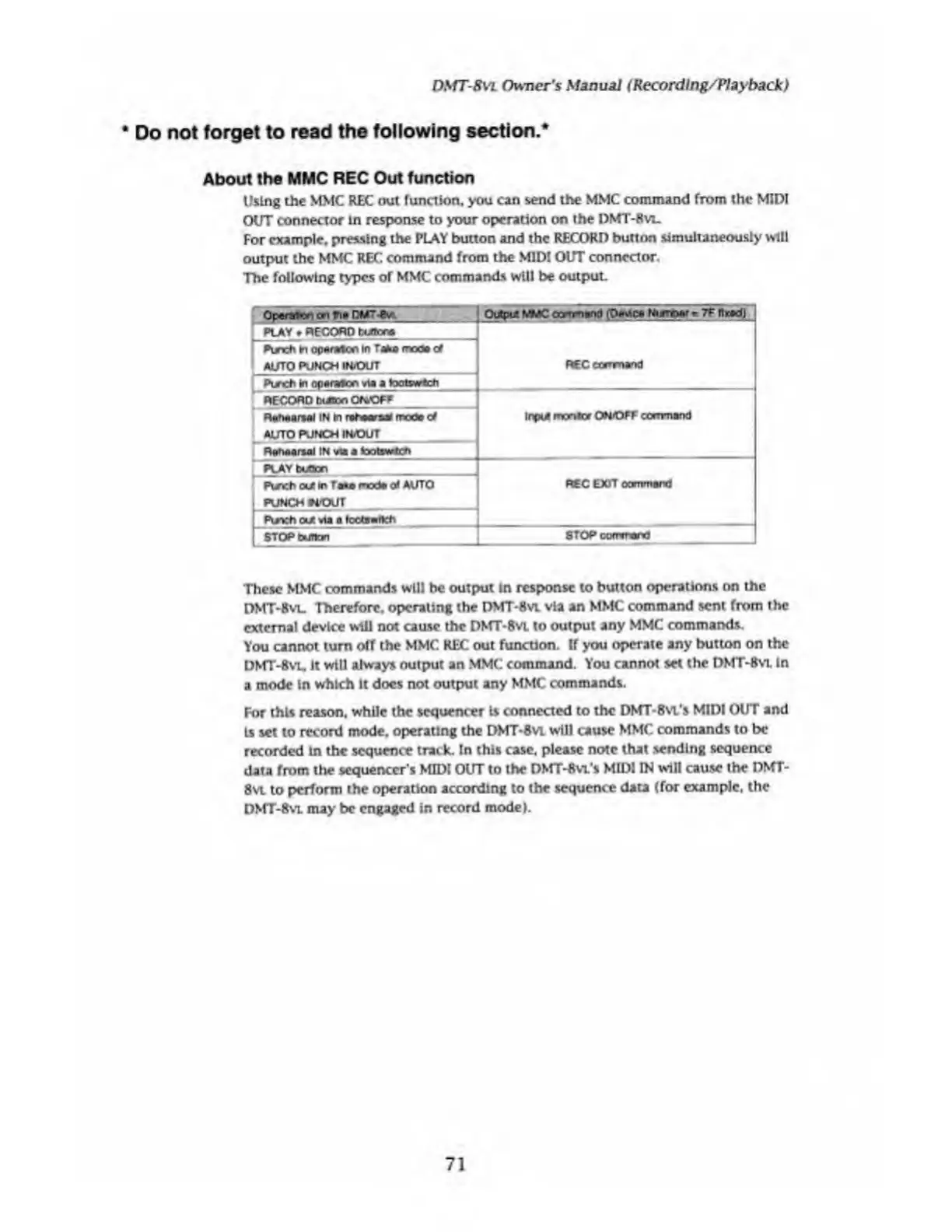
The
following
types
of
MMC
commands
will
be
output.
PLAY
RECORD
txJtora
Punch
in
op«N*lon
In
Taka
mod#
of
AUTO
PUNCH
INiOUT
_
Punch
in
of)#r«rtcn
via
a
tootswbch
REC
ccrrrnand
1
RECORD
baton
OftOPP_
R#h«anwJ
IN
in
rataral
rrcoe
of
AUTO
PUNCH
INfOUT_
Ronaarsai
IN
via
a
tootswten
Input
rnonior
ORfOFF
ccnrnand
L
PLAY
bcCon
Pisicti
out
m
fw
mod#
o*
AUTO
REC
EXIT
oommard
punch
nouT
I
Punch
out
vta
a
f
cc<s
itch
[
5TOP
button
_
STOP
command
These
MMC
commands
will
he
output
in
response
to
button
operations
on
the
DMT-Svl.
Therefore,
operating
the
DMT-Hvi
via
an
MMC
command
sent
from
the
external
device
will
not
cause
the
DMT-Bvi
to
output
any
MMC
commands.
You
cannot
turn
off
the
MMC
REC
out
funcuon.
If
you
operate
any
button
on
the
DMT-8
vl.
It
will
always
output
an
MMC
command.
You
cannot
set
the
DMT-8
vl
in
a
mode
in
which
It
does
not
output
any
MMC
commands.
For
this
reason,
while
the
sequencer
Is
connected
to
the
DMT-Bvi's
MIDI
OUT
and
is
set
to
record
mode,
operating
the
DMT-Svl
will
cause
MMC.
commands
to
be
recorded
in
the
sequence
track.
In
this
case,
please
note
that
sending
sequence
data
from
the
sequencer
s
MIDI
OUT
to
the
DMT-8
vl‘s
MIDI
IN
will
cause
the
DMT-
8vi
to
perform
the
operation
according
to
the
sequence
data
(for
example,
the
DMT-8
vl
may
be
engaged
in
record
model.
71

Table of Contents

Related product manuals