EasyManua.ls Logo

Fostex DMT-8VL - Page 70

Fostex DMT-8VL
158 pages
Print Icon
To Next Page IconTo Next Page
To Previous Page IconTo Previous Page
Loading...
DMT-8VL
Oniier's
Manual
(Recording/Playback)
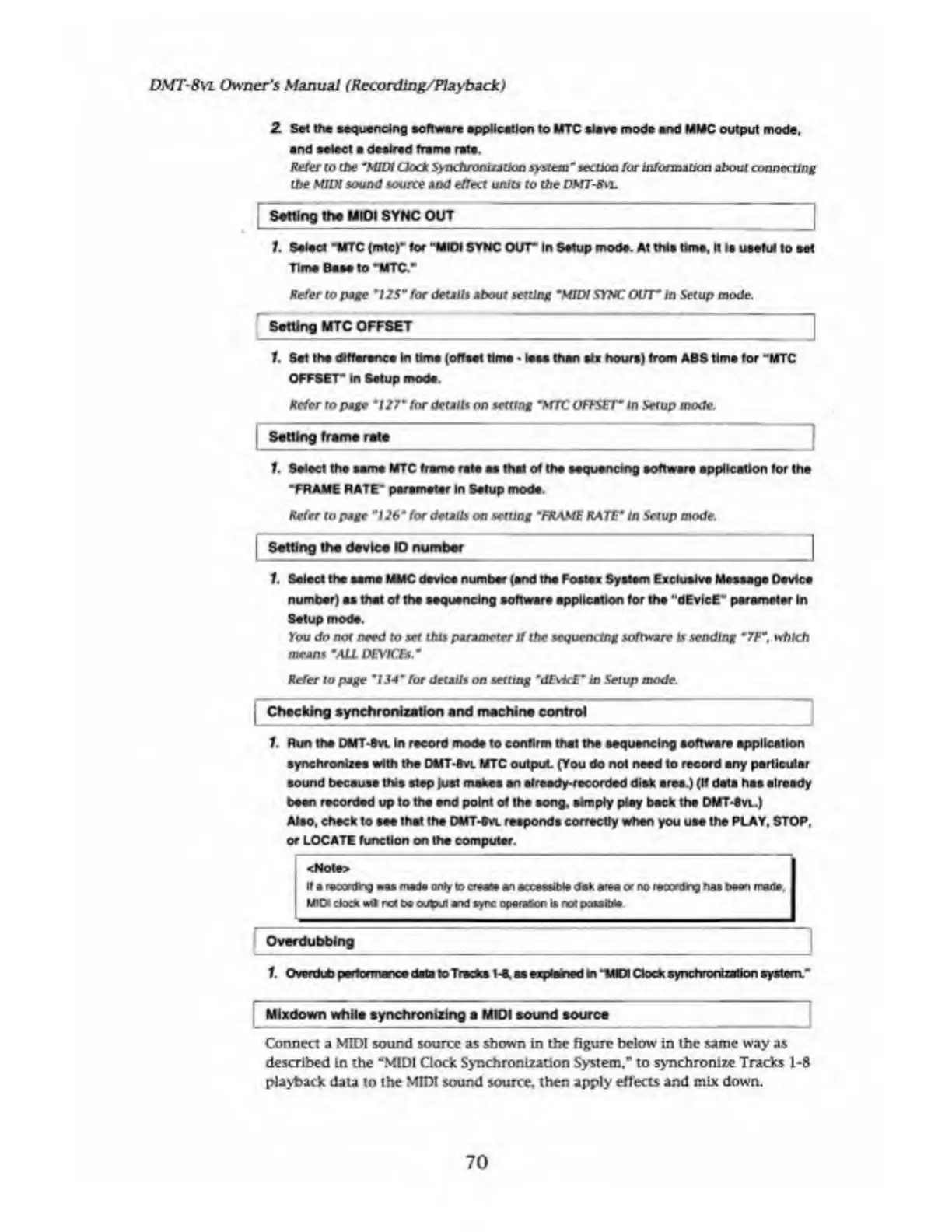
2
Sell
ha
sequencing
software
application
to
MTC
stave
mod*
and
MMC
output
mode,
and
select
a
desired
frame
rats.
Refer
to
the
"MIDI
Clock
Synchronisation
system"
section
for
information
about
connecting
the
MIDI
sound
source
and
effect
units
to
the
DMT-8
vl
Setting
the
MIOI
SYNC
OUT
1.
Salad
MTC
(mtc)“
for
"MIOI
SYNC
OUT*
In
Setup
mode.
At
this
time,
It
Is
usefd
to
set
Time
Base
to
“MTC.“
Refer
to
page
"US"
for
details
about
setting
"MIDI
STMT
OUT"
in
Setup
mode.
Salting
MTC
OFFSET
1.
Set
the
difference
In
time
(offset
time
less
than
six
hours)
from
ABS
tims
for
“MTC
OFFSET*
In
Setup
mode.
Refer
to
page
*127"
for
details
on
setting
"MTC
OFFSET"
In
Setup
mode
.
Setting
frame
rate
1.
Select
the
same
MTC
frame
rate
as
that
of
the
sequencing
software
application
for
the
“FRAME
RATE*
parameter
In
Setup
mode.
Refer
to
page
"126"
for
details
on
setting
*FRAME
RATE
0
In
Setup
mode.
|
Setting
the
device
ID
number
|
1.
Select
the
same
MMC
device
number
(end
the
Fostex
System
Exclusive
Message
Device
number)
es
that
of
the
sequencing
software
application
for
th#
“dEvIcE*'
parameter
In
Setup
mode.
You
do
not
need
to
set
this
parameter
if
the
sequencing
software
Is
sending
m
7F~,
which
means
"ALL
DEVICES
Refer
to
page
*134"
for
details
on
setting
"dEvicE"
in
Setup
mode.
|
Checking
synchronization
and
machine
control
1.
Run
the
OMT-Svl
In
record
mode
to
confirm
that
the
sequencing
software
application
synchronizes
with
the
DMT-8
vl
MTC
output
(You
do
not
need
to
record
any
particular
sound
because
this
step
Just
makes
an
already-recorded
disk
area.)
(If
deta
has
already
been
recorded
up
to
the
end
point
of
the
song,
simply
play
beck
the
DMT-ew.)
Aleo,
check
to
see
that
the
DMT-Svl
responds
correctly
when
you
use
the
PLAY,
STOP,
or
LOCATE
function
on
the
computer.
<Note>
If
a
recording
mads
only
to
ersess
an
ecceskbie
dek
arse
or
no
recording
has
been
rrade
MIOt
dock
*41
rcc
be
output
and
sync
operator
is
no!
possible
Over
dubbing
1.
Overdub
performance
data
to
Tracks
t-t.
as
explored
m
“MIDI
Clock
synchronization
system.*
Mixdown
while
synchronizing
a
MIOI
sound
source
Connect
a
MIDI
sound
source
as
shown
in
the
figure
below
in
the
same
way
as
described
in
the
“MIDI
Clock
Synchronization
System,"
to
synchronize
Tracks
1-8
playback
data
to
the
MIDI
sound
source,
then
apply
effects
and
mix
down.
70

Table of Contents

Related product manuals