EasyManua.ls Logo

Fostex DMT-8VL - Page 55

Fostex DMT-8VL
158 pages
Print Icon
To Next Page IconTo Next Page
To Previous Page IconTo Previous Page
Loading...
DMT-8VL
Owner's
Manual
(Recording/Playback)
Step
3:
Overdubbing
an
electric
guitar
on
Track
3
Rwtcf*
Via
rtUal
MMng
ol
lha
OMT-e»u
In
partcutof.
do
nol
lofgai
to
sal
Trades
1
and
2
to
"SAFE*
mod*
<lha
track
fdciKKi
thoJd
be
c*)
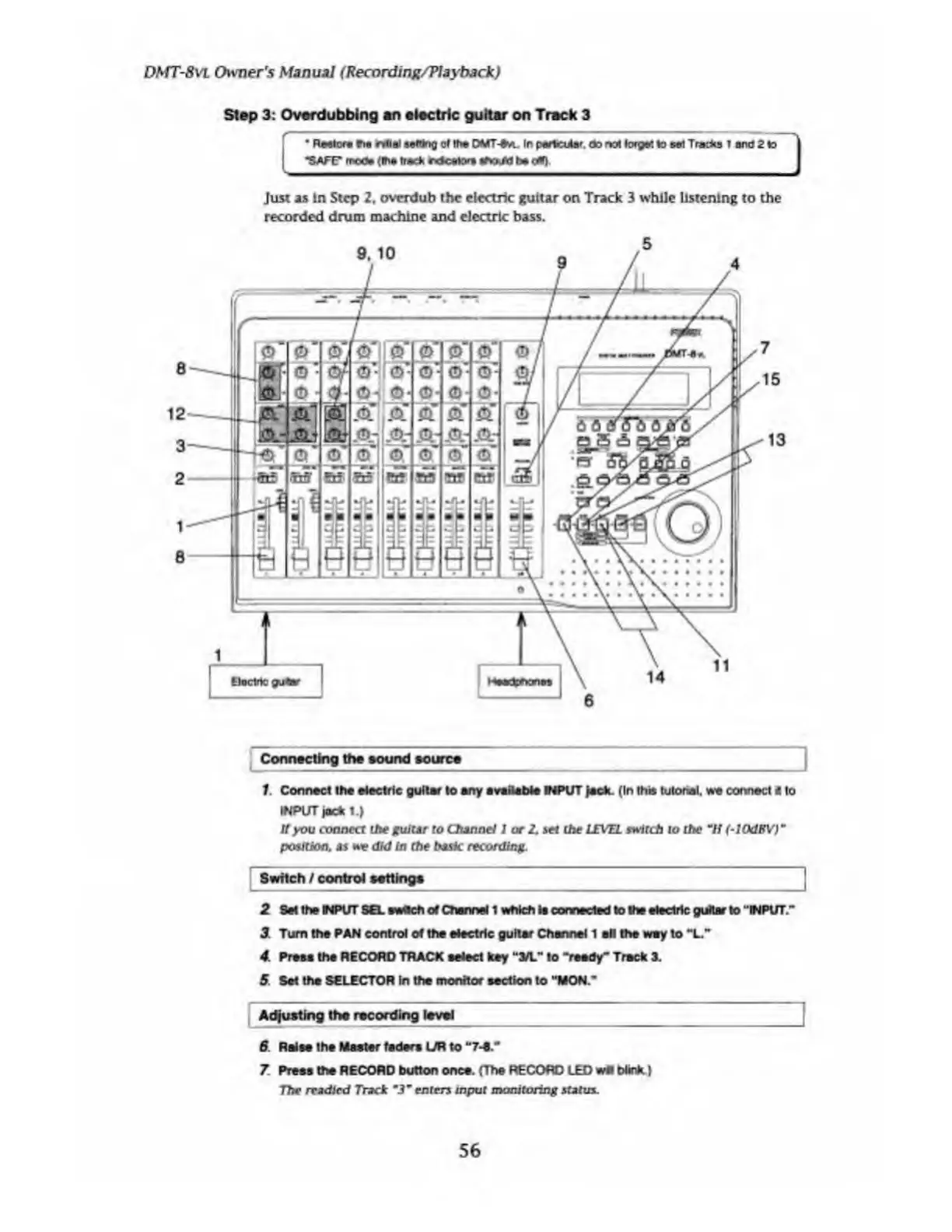
Just
as
in
Step
2,
overdub
the
electric
guitar
on
Track
3
while
listening
to
the
recorded
drum
machine
and
electric
bass.
Connecting
the
sound
source
1
.
Connect
the
electric
guitar
to
any
available
INPUT
jack.
(In
this
tutorial,
we
connect
4
to
INPUT
jack
1.)
If
you
connect
the
guitar
to
Channel
J
or
2.
set
the
LEVEL
switch
to
the
“If
(-lOdEV
)"
position,
as
we
did
in
the
basic
recording.
Switch
/
control
settings
2
Set
the
NPUT
SEL
swach
ol
Channel
1
which
la
connected
lo
the
electric
guitar
to
"INPUT.'*
1
Turn
the
PAN
control
of
the
electric
guitar
Channel
1
all
the
way
to
"L"
4
Presa
the
RECORD
TRACK
select
key
"3/L"
to
“reedy-
Track
3.
5
Set
the
SELECTOR
In
the
monitor
section
to
"MON.*
Adjusting
the
recording
level
6
Raise
the
Master
fader*
UR
to
7
Press
the
RECORD
button
once.
(The
RECORD
LED
wfl
blink)
77m*
readied
Track
m
3
m
enters
input
monitoring
statin.
56

Table of Contents

Related product manuals