(0...7) for low power operation and RUN_CFG allows to select a normal run mode from RUNPC
registers. Note that by default, all peripherals run on RUNPC[0] register.
Example for configuring SIUL peripheral (System Integration Unit Line: GPIO and external
interrupt manager) to run only in RUN0 mode, using RUNPC1:
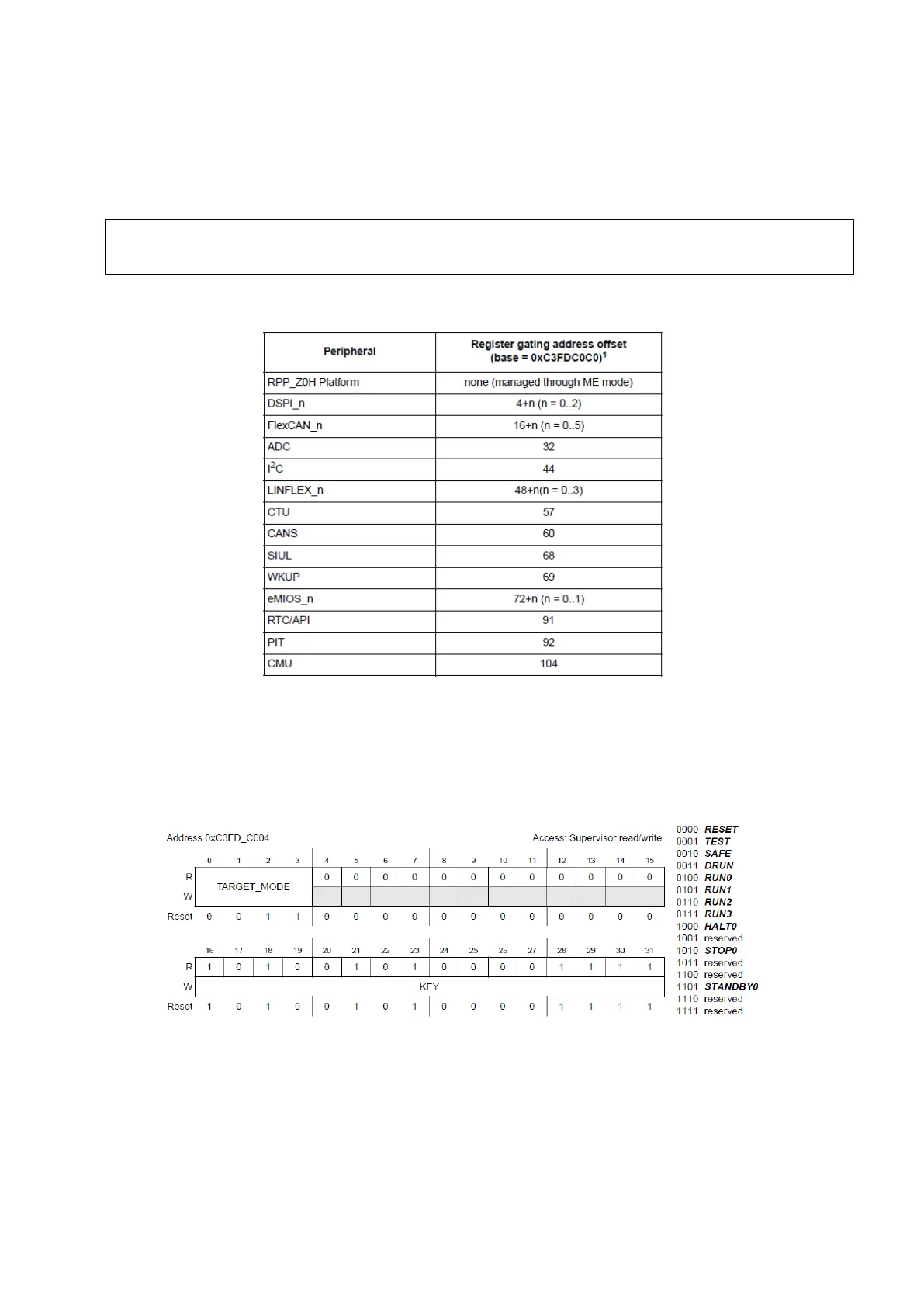
Here’s a table of peripherals with id numbers up to 143:
Figure 7 : Register gating address offset for peripherals (Reference Manual Rev8 – Fig. 6-1)
1.5.
After enabling modes we want to use, configuring them and the peripherals, we can change the
current mode of the device using the Mode Control Register.
Figure 8 : Mode Control Register (Reference Manual Rev8 – Fig. 8-3)
In order to perform a mode selection, you need to specify the mode in the field TARGET_MODE
and use the Key 0xA50F first, and then repeat the same thing with the inverted key 0x5AF0. This
will trigger a mode transition.
ME.RUNPC[1].R = 0x00000010; /* Peri.Cfg. 1 settings: only run in RUN0 mode */
ME.PCTL[68].R = 0x01; /* MPC56xxB/S: select ME.RUNPC[1] */



 To Next Page