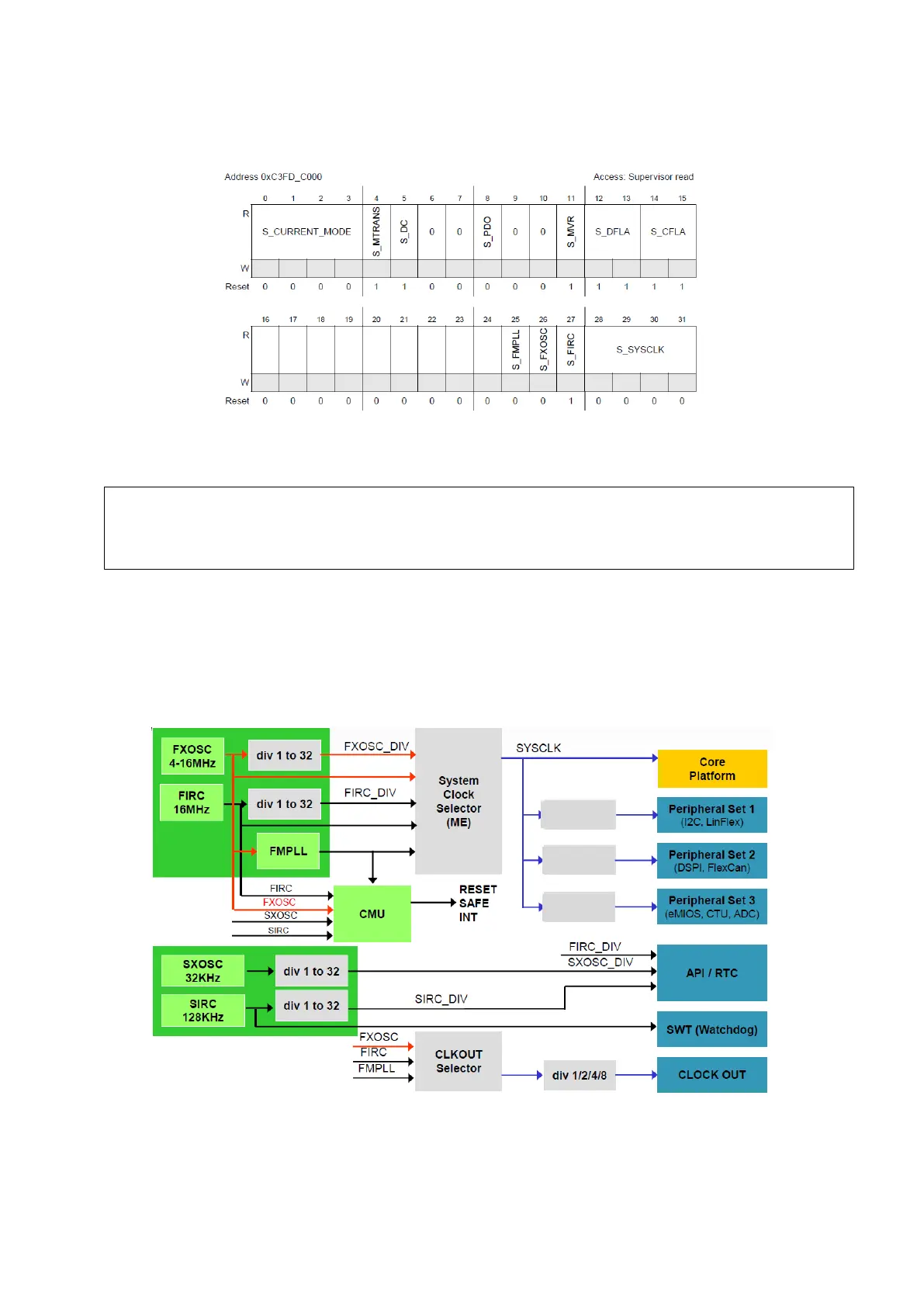
To ensure that the operation was successful, you need to use the read only Global Status Register
to check the current mode.
Figure 9 : Global Status Register (Reference Manual Rev8 – Fig. 8-2)
Here’s an example code for a transition towards RUN0 mode:
CGM: Clock Generation Module
2.1.
In this section we will discuss different ways to setup the system clock and peripheral clocks in
this microcontroller. The clocking structure is represented on the figure below.
Figure 10 : The Clock Architecture (MC_CGM) (Freescale Lecture)
There are three sets of peripherals in this architecture that can have independent clocks as
noted in the figure above, all peripherals not mentioned there are in the core platform.
ME.MCTL.R = 0x40005AF0; /* Enter RUN0 Mode & Key */
ME.MCTL.R = 0x4000A50F; /* Enter RUN0 Mode & Inverted Key */
while (ME.GS.B.S_MTRANS == 1) {} /* Wait for mode transition to complete */
while (ME.GS.B.S_CURRENTMODE != 4) {} /* Verify RUN0 is the current mode */



 To Next Page