Settings – Retooling the Product
90
1.10 GB (2019/02/28)
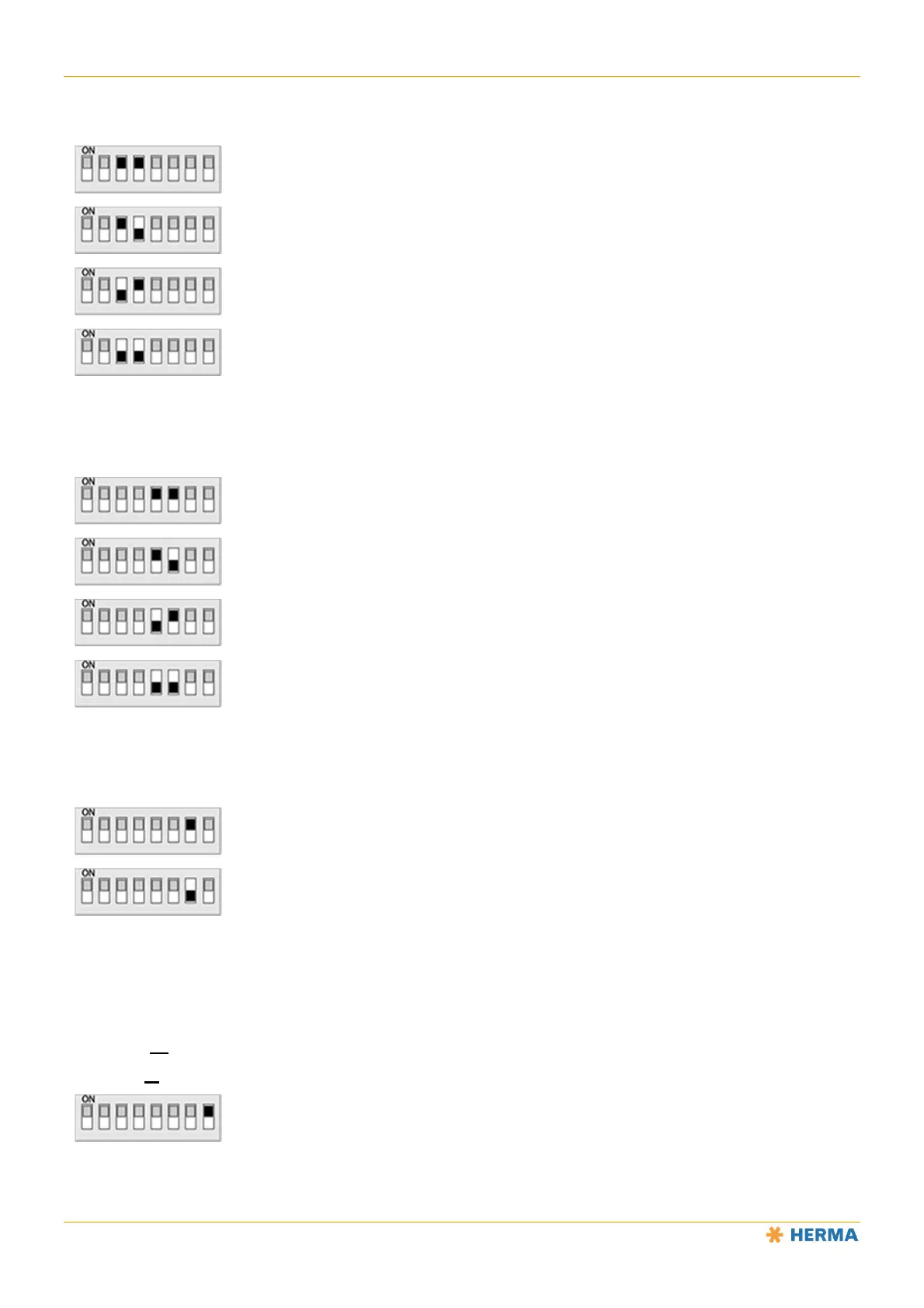
Switches 3 and 4
Determine the size of the unit (Ø of holding disc)
On – On: 600mm
On – Off: 400mm (select this setting on the magazine filler)
Off – On: 500mm
Off – Off: 300mm (select this setting on the loop module)
Switches 5 and 6
Determine the unit’s core diameter
On – On: not defined
On – Off: 6" • 152mm
Off – On: not defined
Off – Off: 3" • 76mm (select this setting on the loop module and the magazine filler)
Switch 7
Determines the unit’s pendulum type / the shaft size for the loop module
On: Double pendulum / long shaft
Off: Single pendulum / short shaft (select this setting on the magazine filler)
Switch 8
Determines the unit’s preset direction of rotation when viewed from the front of the unit and looking at the
disc/roller.
(Motorised unwinder: use the illuminated button to make a change.)
Motorised rewinder: observe the information below.
On: Clockwise (choose this setting on the unwinder/winder in version R, on the loop module
and the magazine filler in version L)



 To Next Page