Documentation HERMA 500
1.10 GB (2019/02/28)
89
Activating Smooth Mode (Motorised Unwinder)
For certain applications, the winder (in this example, the motorised winder) is too dynamic in its movements. It is
therefore possible to set the winder to run more “smoothly”, to start and stop less abruptly. Proceed as follows to
set to smooth mode:
Press and hold the blue illuminated button for more than 20 seconds. During these 20 seconds, the button
will flash slowly at first and then more rapidly.
Once the illuminated button starts flashing rapidly, move the pendulum to the tensioned position.
Release the illuminated button.
Move the pendulum to the rest position.
Press the illuminated button again. The winder is now in smooth mode.
To return the winder to normal mode, perform the same steps again.
Winder system DIP switch
The DIP switches on the motherboard can be used to adjust certain settings for parameterising the unit. Note:
This basic winder unit is used not only for the unwinder but also for the rewinder and the loop module. Moreover,
these units are also used in magazine fillers (e.g. for an EasySplicer).
DIP switches
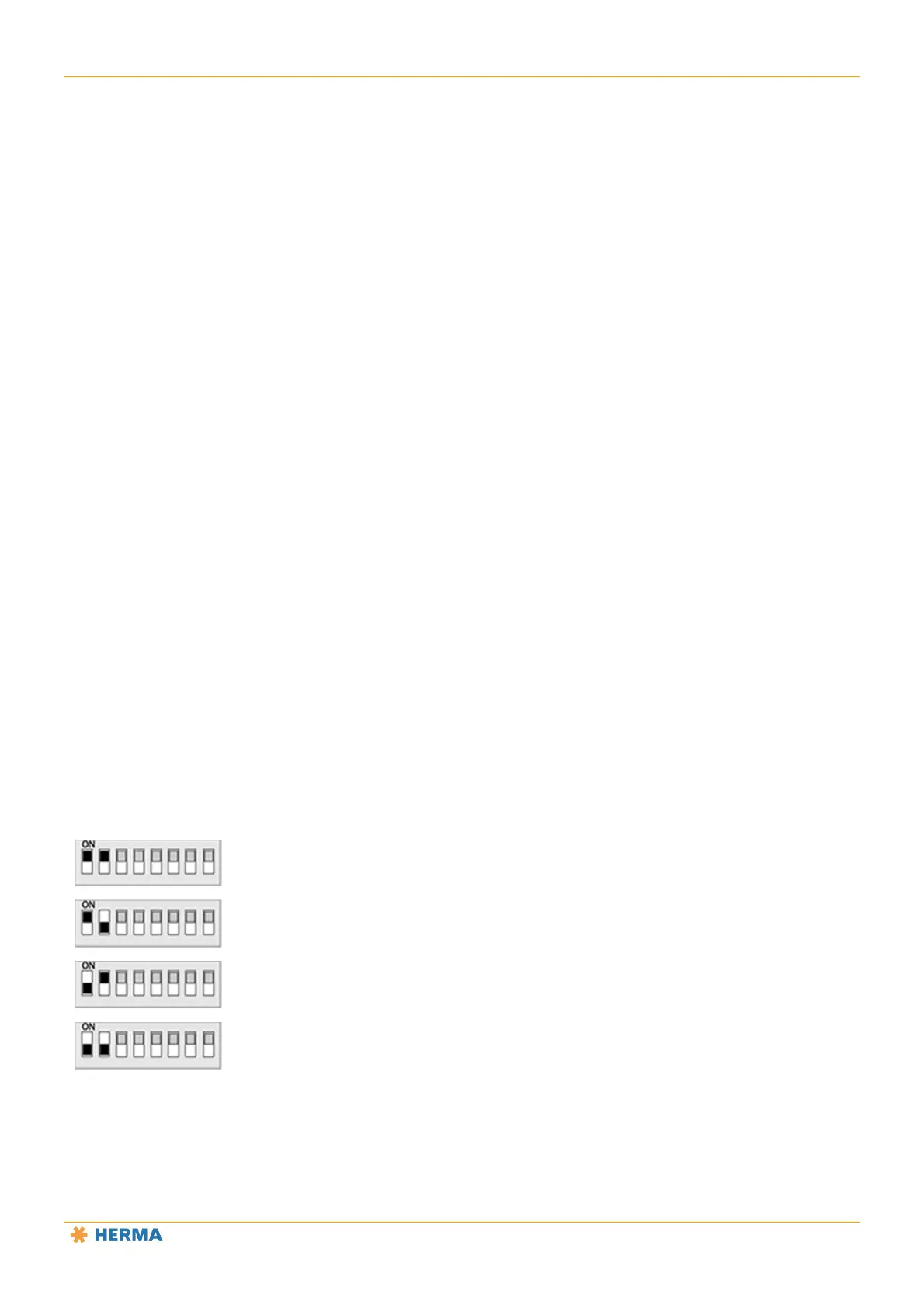
Switches 1 and 2
Determines the type of unit
On – On: Loop module/magazine filler
On – Off: Unwinder
Off – On: Rewinder
Off – Off: not defined



 To Next Page