OPERATING INSTRUCTIONS
ThinPrep 2000 Processor Operator’s Manual
5A.11
LOADING THE THINPREP MICROSCOPE SLIDE
1. Label the ThinPrep slide with patient’s identification information. Use the frosted area of the
slide. When using an adhesive label, ensure that the label is completely adhered to the slide and
that there are no overhanging edges.
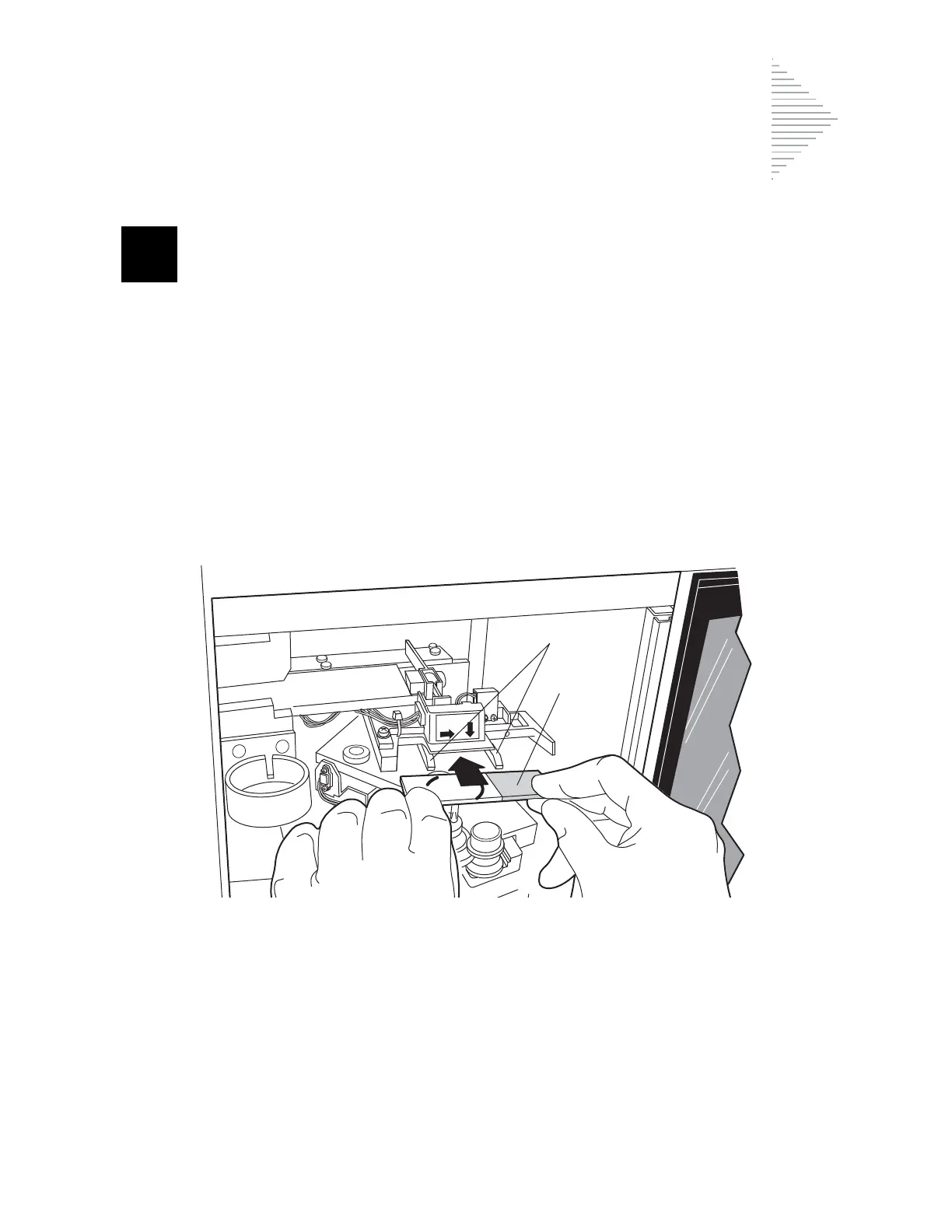
2. Using two hands, hold the slide by the two front corners with your index fingers and thumbs as
shown in Figure 5A-8. Be sure not to touch the slide within the defined screening area. Place the
label end to the right and facing down.
3. Insert the slide. Using the slide to push the spring-loaded clamps down, insert the slide halfway
under the upper guide block and over the spring-loaded clamps, then release the slide. Refer to
Figure 5A-8.
Figure 5A-8 Inserting the Slide onto the Clamps
LABE
L
E
N
D



 To Next Page