Performing a Backup Using the NORMAL ATTIME Suspend Function (for Cnt Ac-A)
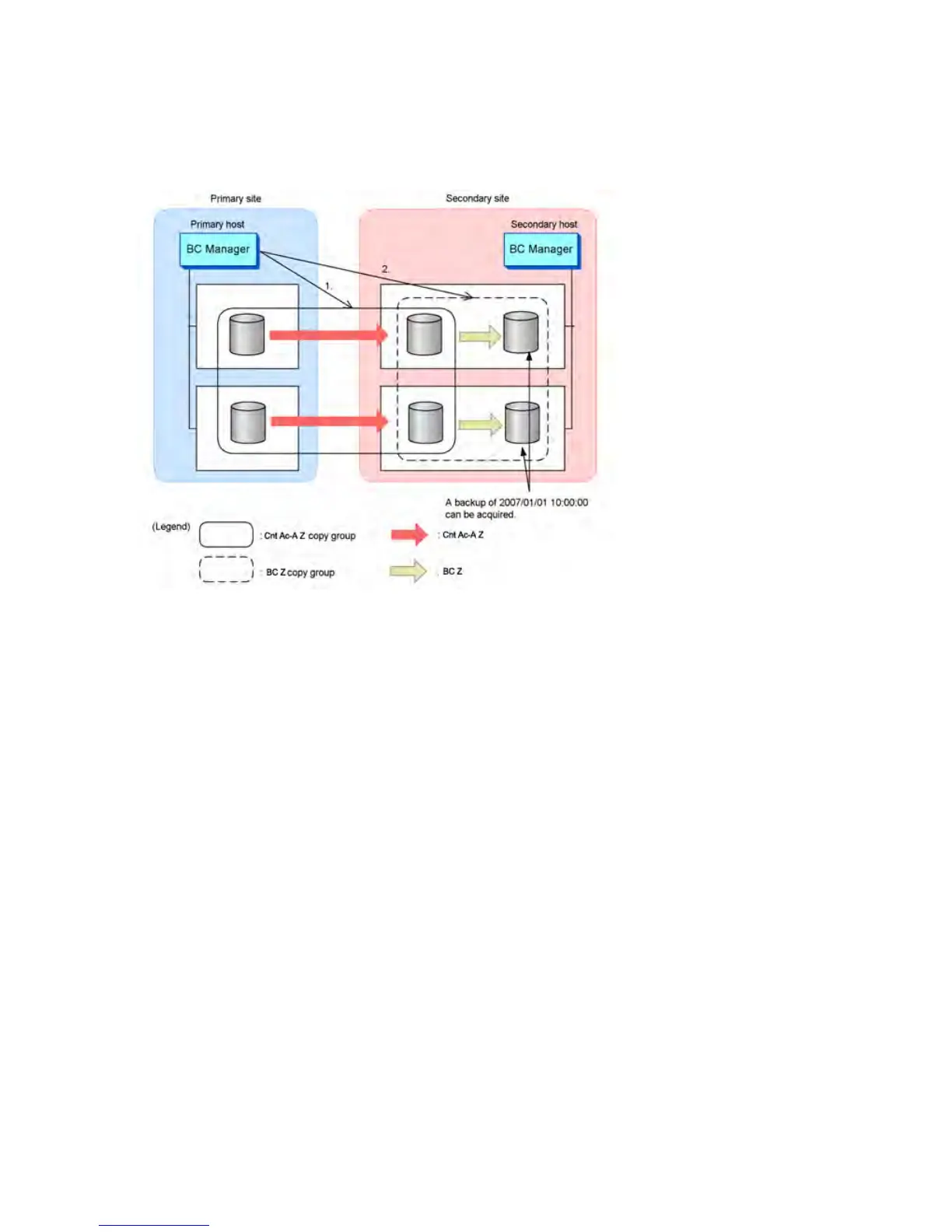
shows an example of performing a backup using the NORMAL ATTIME Suspend function (for
Continuous Access Asynchronous for Mainframe). The numbers in Figure 46 (page 84) correspond
to those in the procedure that follows:
Figure 46 Cnt Ac-A Backup Configuration Example Using the NORMAL ATTIME Suspend Function
Before backup using the NORMAL ATTIME Suspend function, the following is the normal status of
each copy group:
• For Continuous Access Asynchronous for Mainframe copy groups: DUPLEX
• For Business Copy for Mainframe copy groups: SUSPOP
To perform a backup using the NORMAL ATTIME suspend function (for Continuous Access
Asynchronous for Mainframe):
1. Execute the following command to execute the NORMAL ATTIME suspend function for the
Continuous Access Asynchronous for Mainframe copy group: YKSUSPND ATTIME
(20070101:100000:0000:00,LOCAL)
2. After the Continuous Access Asynchronous for Mainframe copy group is suspended, execute
the YKRESYNC command for the Business Copy for Mainframe copy group. A backup of the
Continuous Access Asynchronous for Mainframe P-VOL at 2007/1/1 10:00 can be acquired
in the Business Copy for Mainframe S-VOL.
Performing a Backup Using the NORMAL ATTIME Suspend Function (for BC Z)
Figure 47 (page 85) shows an example of performing a backup using the NORMAL ATTIME
Suspend function (for Business Copy for Mainframe).
84 Understanding Business Continuity Manager functions










 To Next Page