95
7
MEMORY/CALL CHANNELS
1
2
3
4
5
6
7
8
9
10
11
12
13
14
15
16
17
18
19
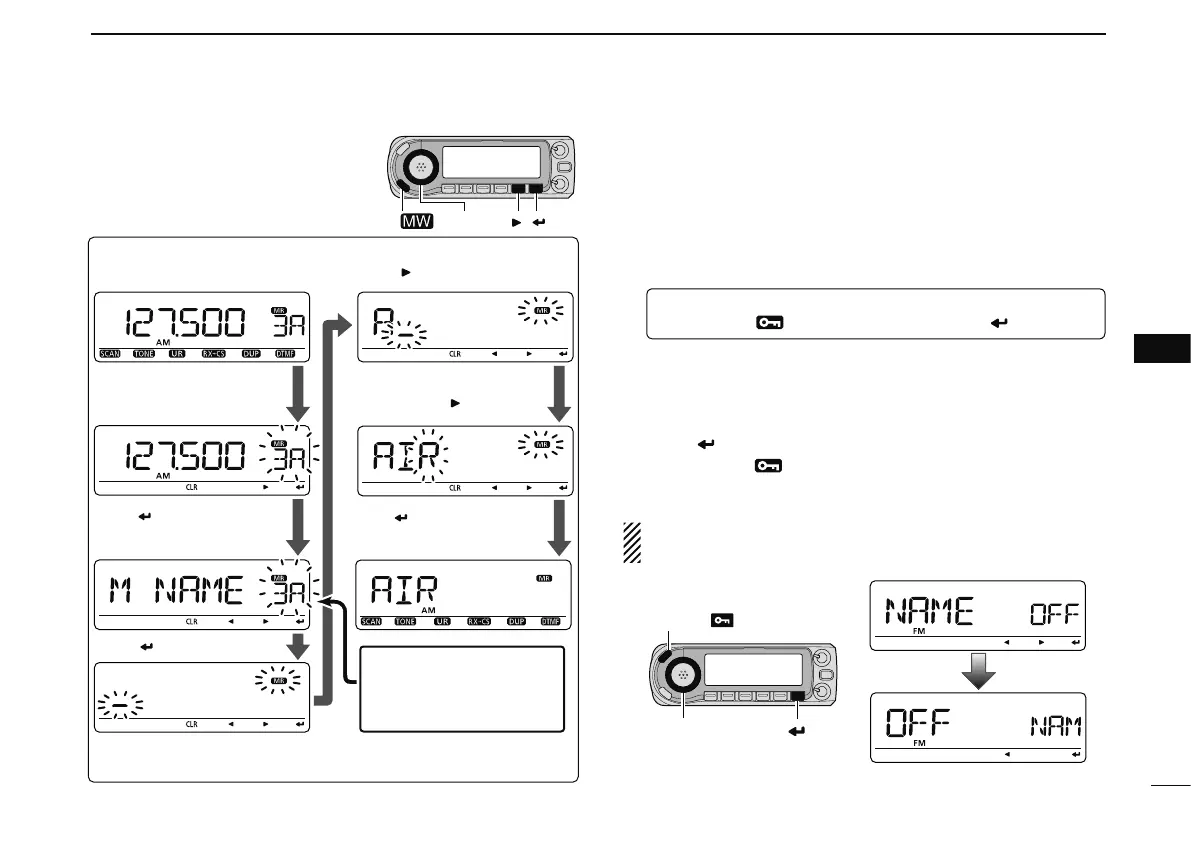
N Selecting memory/bank
name indication
During memory mode operation, either the programmed
memory name or bank name can be displayed.
q
Enter “NAME” in DISP menu.
MENU ¶ SET ¶ DISP ¶ NAME
(p. 131)
(Push [MENU ]), (rotate [DIAL], then push [ ](MONI).)
w Rotate [DIAL] to select the memory display type.
• OFF : Displays the frequency.
• MEMORY : Displays the memory name.
• BANK : Displays the bank name.
e Push
[ ](MONI) to return to DISP menu.
r Push
[MENU ] to return to the previous indication be-
fore entering the DISP menu.
NOTE: The programmed scan name is displayed during
the programmed scan selection.
[DIAL]
[EXAMPLE]:
Programming the memory name
“AIR” into the scan edge channel 3A.
[ ][ ]
[S.MW ]
Push [ ].
During memory mode, rotate
[DIAL] to select 3A.
Push [S.MW] to enter select
memory write mode.
Rotate [DIAL] to enter “A,”
then [ ].
Enter “I” and “R” with
[DIAL] and [ ].
Push [ ], then rotete [DIAL]
to select “M NAME.”
Select “B NAME
*
1
” or “S
NAME
*
2
”
when program-
ming the bank name or the
scan name, respectively.
Push [ ], then push and hold
[MW] for 1 sec. to program.
*
2
S NAME can be set for scan edge channels only.
*
1
B NAME can be set for bank assigned channels only.
[DIAL]
[MENU ]
[ ]



 To Next Page