64
5
DV MODE OPERATION
N Message operation
D TX message programming
TX messages are available for up to 5 channels and each
channel can be programmed with a message of up to 20
characters.
q Enter “TX MSG” in MESSAG (message) screen.
MENU ¶ MESSAG ¶ TX MSG
(Push [MENU ]), (Rotate [DIAL], then push [ ](MONI).)
• TX MSG screen is displayed.
w Rotate [DIAL] to select the desired transmit message
channel.
• TM1 to TM5 and OFF are available.
• Previously message is displayed if programmed.
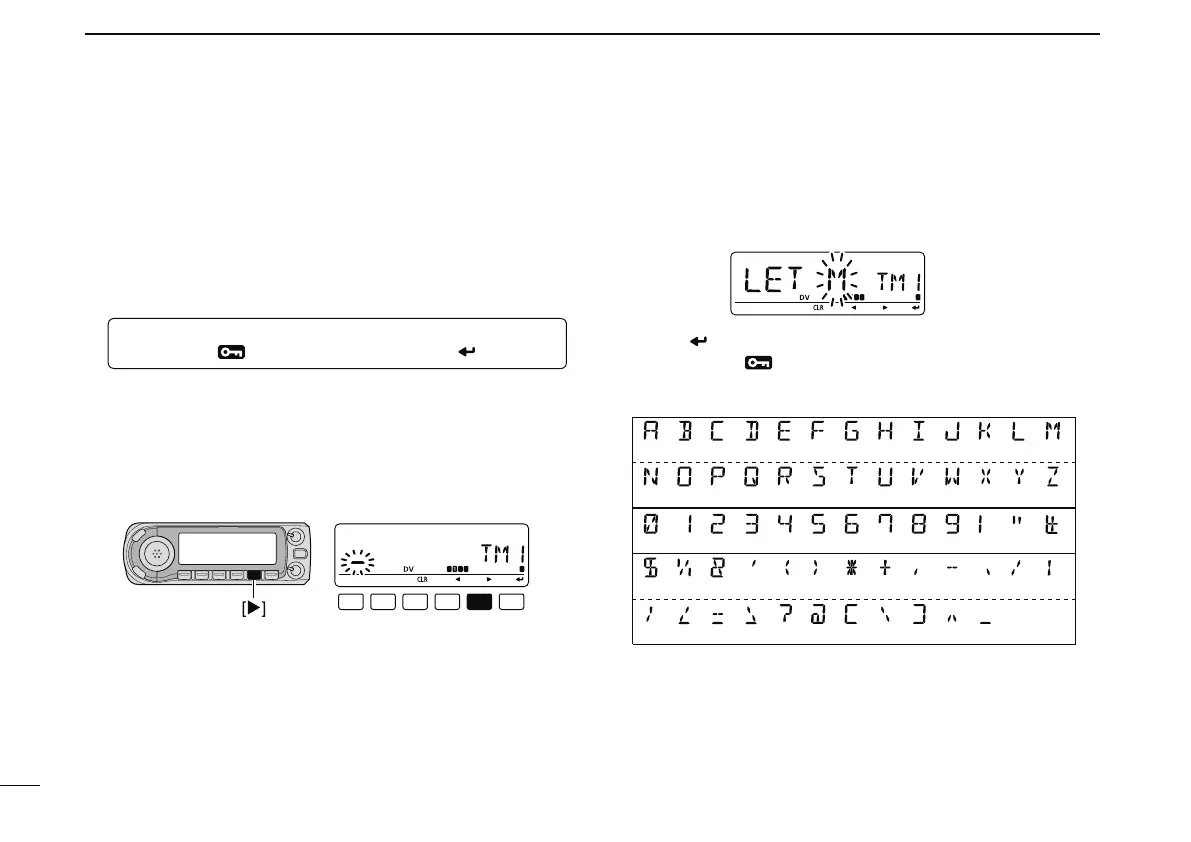
e Push [](LOW) to select the message edit condition.
• The 1st digit of the message blinks.
r Rotate [DIAL] to select the desired character or symbol.
• If an unwanted character is entered, push [](LOW) or [](CS)
to select the character, then push [CLR](DR) to erase the se-
lected character, or push and hold [CLR](DR) for 1 sec. to erase
all characters following the cursor.
• Push [](LOW) to move the cursor right; push [](CS) to move
the cursor left.
t Repeat the step r to enter the desired message.
• Up to 20 character messages can be set.
y Push [ ](MONI) to store the message.
u Push [MENU
] to return to frequency indication.
• Available characters
(A) (B) (C) (D) (E) (F) (G) (H) (
I
) (J) (K) (L) (M)
(N) (O) (P) (Q) (R) (S) (T) (U) (V) (W)
(9) (!) (”)(0) (1) (2) (3) (4) (5) (6) (7) (8)
(:)
($) (%) (&) (
’
)
(
;
)(
<
)(
=
) (>) (?)
(
(
)
(X) (Y) (Z)
(#)
(
+
)
(
/
)
(
)
)(
)(
,
)(
-
)(
.
)
(
\
)
(
@
)(
)
(
]
)(
^
)(
Space
)



 To Next Page