105
8
SCAN OPERATION
N Memory scan
IMPORTANT: To perform memory scan, 2 or more mem-
ory channels MUST be programmed, otherwise the scan
will not start.
q Push [M/CALL] several times to select the memory mode.
w Set the squelch level.
e Push and hold [SCAN](VFO/MHz) for 1 sec. to enter the
scanning type selection.
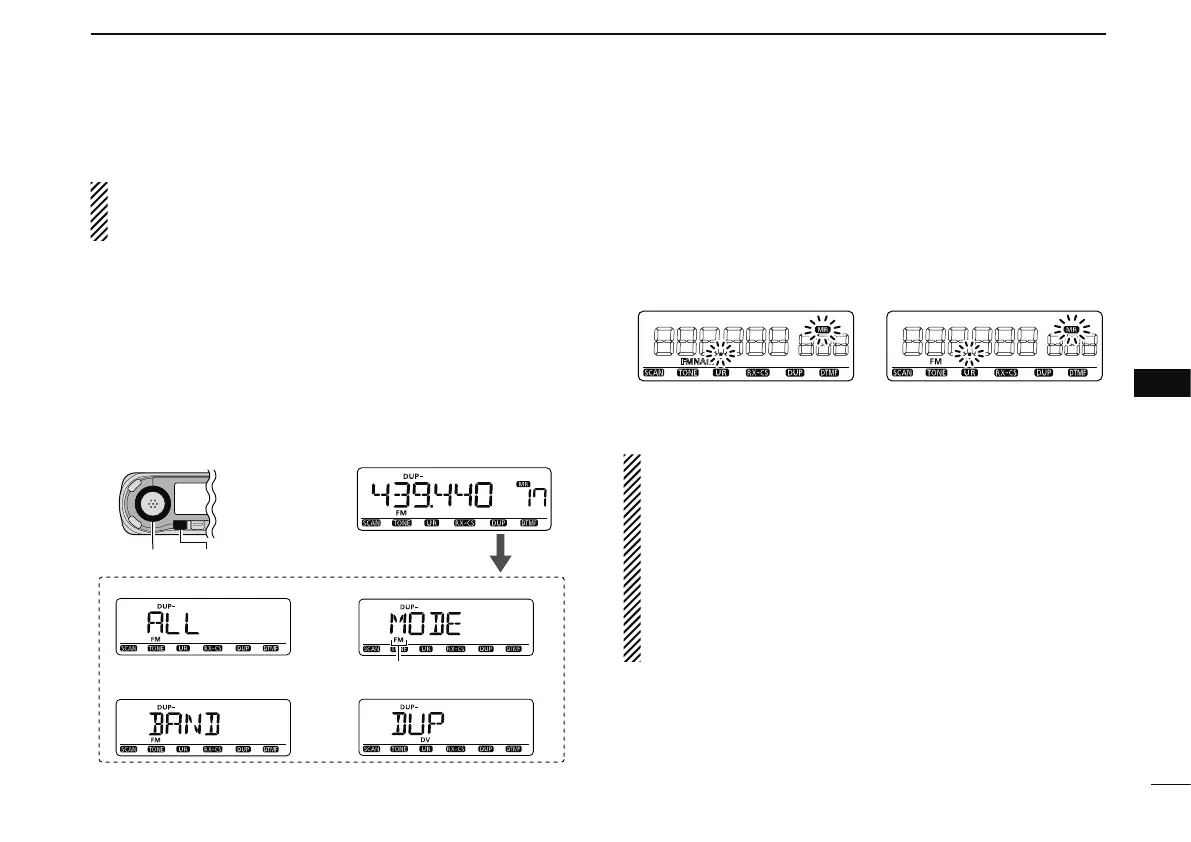
r Rotate [DIAL] to select the desired scanning type.
• “ALL” for all memory scan; “BAND” for band memory scan,
“MODE” for mode scan, “DUP” (appears only when duplex op-
eration is set) for duplex scan, “TONE” (appears only when the
subaudible tone, tone squelch or DTCS squelch is set) for tone
scan.
[DIAL] [SCAN]
All memory scan
Band memory scan
Mode scan
Push and hold [SCAN] for 1 sec.,
then rotate [DIAL].
Duplex scan
Selected mode is displayed.
t Push [SCAN](VFO/MHz) to start the scan.
• Scan pauses when a signal is received.
• Rotate [DIAL] to change the scanning direction. This also
causes the transceiver to resume scanning.
• Push [SCAN](VFO/MHz) to stop the scan.
Band memory scan function: Repeatedly scans all
memory channels programmed with any frequencies of
the band programmed in the memory channel selected for
scanning.
Mode scan function: Repeatedly scans all memory chan-
nels in which the same operating mode as the selected
memory channel has been programmed.
Duplex scan function: Repeatedly scans two frequencies
(transmission/reception) during duplex scan operation.
During memory scan During mode scan
8



 To Next Page