23
3
REPEATER OPERATION
3
N Accessing a repeater
q Set the receive frequency (repeater output frequency).
(pgs. 14, 15)
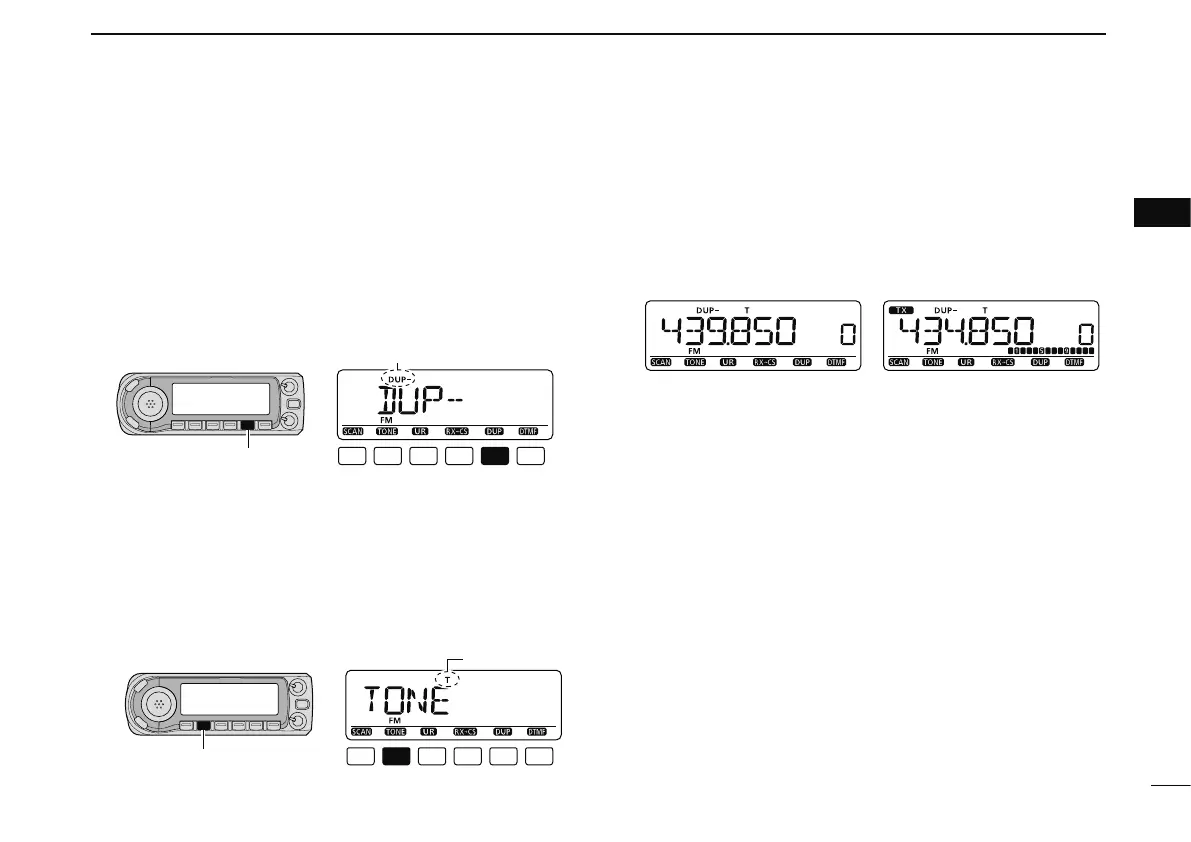
w Push and hold [DUP](LOW) for 1 sec. to enter the duplex
setting condition.
e Rotate [DIAL] to select minus duplex or plus duplex.
• “DUP–” or “DUP” appears to indicate the transmit frequency for
minus shift or plus shift, respectively.
• Push [DUP](LOW) again to return to the frequency indication.
[DUP]
“DUP–” or “DUP” appears
r Push and hold [TONE](M/CALL) for 1 sec. to enter the
tone setting condition.
t
Rotate [DIAL] to turn ON the subaudible tone encoder, accord-
ing to repeater requirements, then push [TONE](M/CALL).
•
“T” appears
• 88.5 Hz is set as the default; refer to p. 25 for tone frequency
settings.
• When the repeater requires a different tone system, see p. 26.
y Push and hold [PTT] to transmit.
• The displayed frequency automatically changes to the transmit
frequency (repeater input frequency).
• If
“OFF” appears, confirm that the frequency offset (p. 27) is set
correctly.
u Release [PTT] to receive.
While receiving While transmitting
i Push [MONI] to check whether the other station’s transmit
signal can be received directly.
o To return to simplex operation, push and hold [DUP](LOW)
then rotate [DIAL], to clear the “DUP–” or “DUP” indicator.
• Push [DUP](LOW) again to return to frequency indication.
!0 To turn OFF the subaudible tone encoder, push and hold
[TONE](M/CALL) then rotate [DIAL] until no tone indicator
(OFF) appears.
• Push [TONE](M/CALL) again to return to frequency indication.



 To Next Page