98
7
MEMORY/CALL CHANNELS
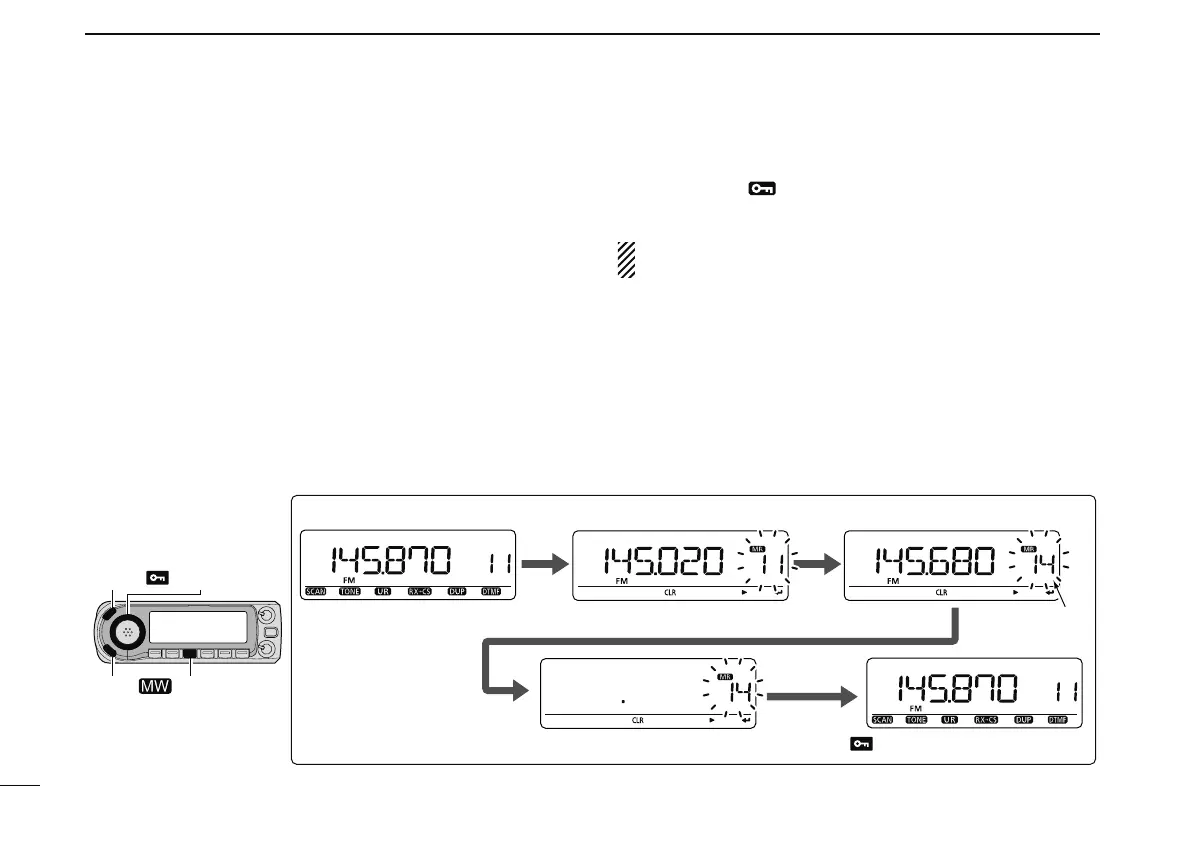
N Memory clearing
Contents of programmed memories can be cleared (erased),
if desired.
q Push [S.MW] to enter the select memory write mode.
• “X” indicator and the memory channel number blink.
• Do not hold [S.MW](MW) for more than 1 sec. in the VFO
mode otherwise the selected memory channel will be
overwritten.
w Rotate [DIAL] to select the desired memory channel to be
cleared.
e Push and hold [CLR](DR) for 1 sec. to clear the contents.
• 3 beeps sound, then the frequency is cleared.
•
“X” indicator and the memory channel number blink continu-
ously.
r Push [MENU ] to the previous indication before enter-
ing the select memory write mode.
NOTE: Be careful!— the contents of cleared memories
CANNOT be recalled.
Push
and
hold
[CLR]
for
1
sec.
to
clear.
[DIAL]
[CLR]
Rotate [DIAL] to select channel 14.
Push [S.MW] to enter select memory write mode.
Channel 14
Push [MENU ].
[EXAMPLE]: Clearing memory channel 14.
[MENU ]
[S.MW ]



 To Next Page