15
2
BASIC OPERATION
1
2
3
4
5
6
7
8
9
10
11
12
13
14
15
16
17
18
19
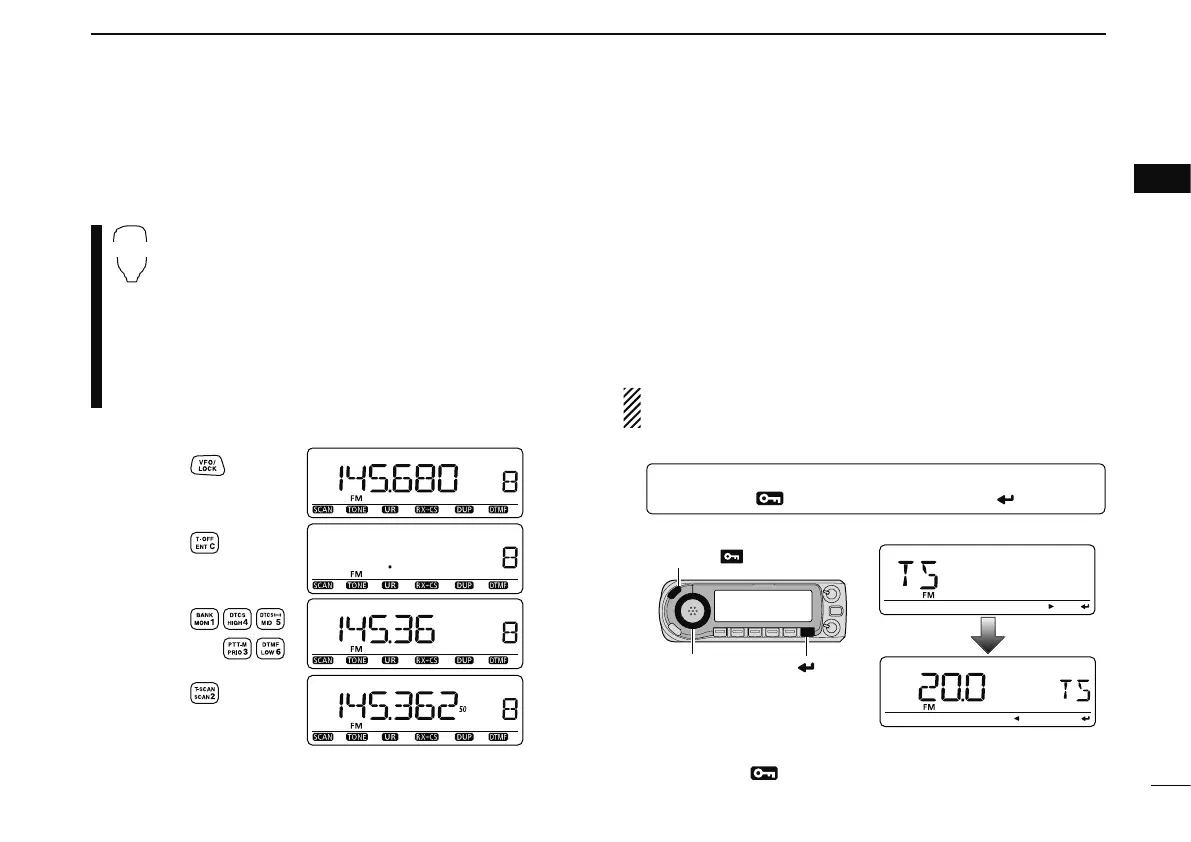
N Using the keypad
The frequency can be set directly via numeral keys on the
microphone.
z Push [VFO/LOCK] to select the VFO mode, if
necessary.
x Push [
ENT C(T-OFF)] to activate the keypad for
digit input.
c Push 6 keys to input a frequency.
• When a digit is mistakenly input, push [ENT C(T-OFF)]
to clear the input, then repeat input from the 1st digit.
• Pushing [CLR A(MW)] clears input digits and retrieves
the frequency.
Push
Push
Push
Push
[EXAMPLE]: Setting frequency to 145.3625 MHz.
N Tuning step selection
Tuning steps are the minimum frequency change increments
when you rotate [DIAL] or push [Y]/[Z] on the microphone.
Independent tuning steps for each frequency band can be
set for your convenience. The following tuning steps are avail-
able.
• 5 kHz* • 6.25 kHz* • 8.33 kHz
†
• 10 kHz • 12.5 kHz
• 15 kHz* • 20 kHz • 25 kHz • 30 kHz • 50 kHz
• 100 kHz • 125 kHz • 200 kHz
*Not selectable in 900 MHz band.
†
Appears for VHF air band only.
NOTE: For convenience, select a tuning step that matches
the frequency intervals of repeaters in your area.
q
Enter “TS” in MENU screen.
MENU ¶ TS
(Push [MENU ]), (Rotate [DIAL], then push [ ](MONI).)
• Push [VFO/MHz] to select the VFO mode, if necessary.
w Rotate [DIAL] to select the desired tuning step.
e Push [MENU
] to exit the set mode.



 To Next Page