HD2 Series Inverter Expansion Cards
-342-
RS485
communication
terminal
RS485 communication port, which can be
set as the master or slave through the Auto
Station. It is differential signal output.
Whether to connect the 120Ω resistor of
RS485 is set through the jumper.
For details about how to use the programmable card, see the HD2 series AutoStation programmable
card manual.
A.7 Communication cards
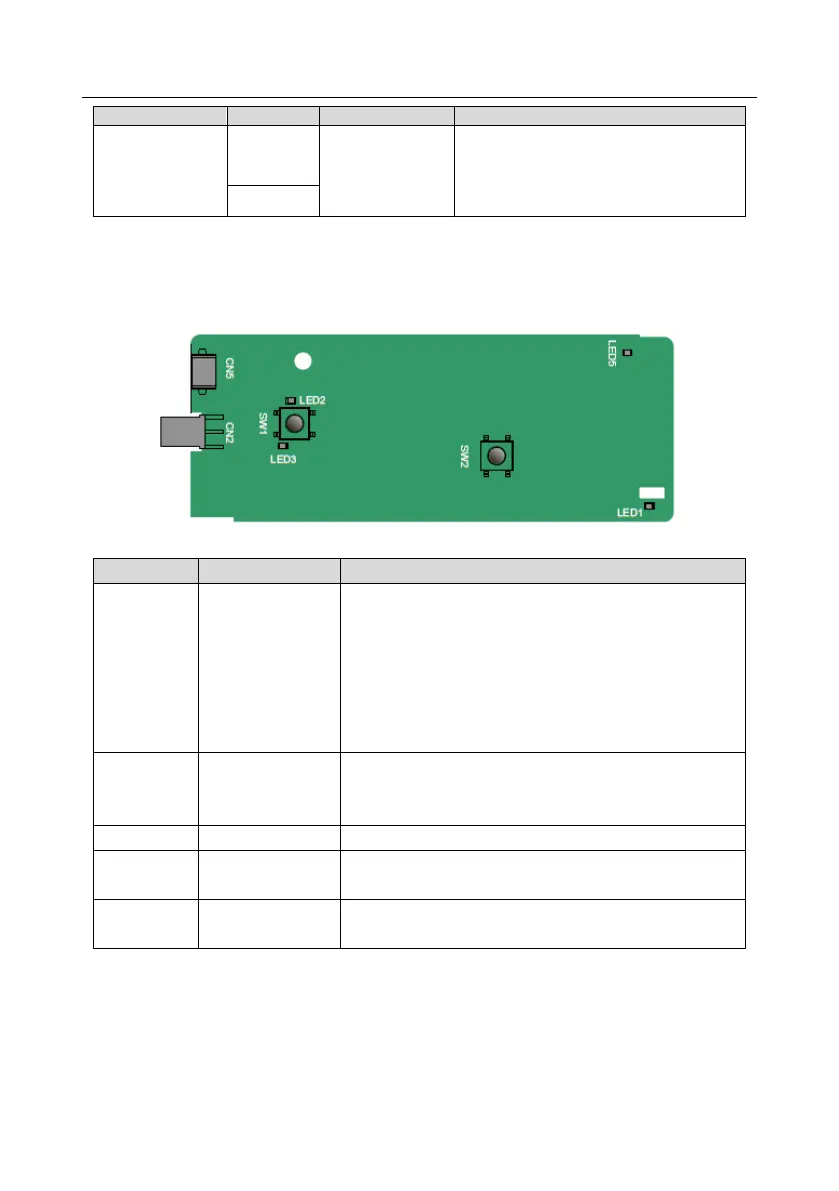
A.7.1 Bluetooth communication card (HD2-E-BTP) and WIFI communication card (HD2-E-WFP)
Definitions of indicators and function buttons
Bluetooth/WIFI
state indicator
On: The expansion card is establishing a connection with
the control board.
Blinking periodically: The expansion card is properly
connected to the control board (the period is 1s, on for
0.5s, and off for the other 0.5s).
Off: The expansion card is disconnected from the control
board.
Bluetooth
communication
state indicator
On: Bluetooth communication is online and data
exchange can be performed.
Off: Bluetooth communication is not in the online state.
On: The control board feeds power to the Bluetooth card.
WIFI factory reset
button
It is used to restore the expansion card to default values
and return to the local monitoring mode.
WIFI hardware
reset button
It is used to restart the expansion card.
The wireless communication card is especially useful for scenarios where you cannot directly use the
keypad to operate the inverter due to the restriction of the installation space. With a mobile phone
APP, you can operate the inverter in a maximum distance of 30 m. You can choose a PCB antenna or
an external sucker antenna. If the inverter is in an open space and is a molded case machine, you
can use a built-in PCB antenna; and if it is a sheetmetal machine and located in a metal cabinet, you
need to use an external sucker antenna.



 To Next Page