HD2 Series Inverter Basic Operation Guidelines
-43-
HD2
16:02:35
Place top
Move up
Delete from the list
16:02:35
Fwd
Local Ready
Stopped-state parameters
Running-state parameters
HD2
16:02:35
P17.00:Set Freq
P17.11:DC Bus Volt
P17.12:HDIB/A/S4/3/2/1
P17.13:RO2/RO1/HDO/Y1
P17.26:Current Oper Time
P17.15:Motor Trq Ref
HD2
Fwd
Local Ready
Fwd
Local Ready
Move down
Restore default
Back Edit OKBack Home Sele
Back Home Sele
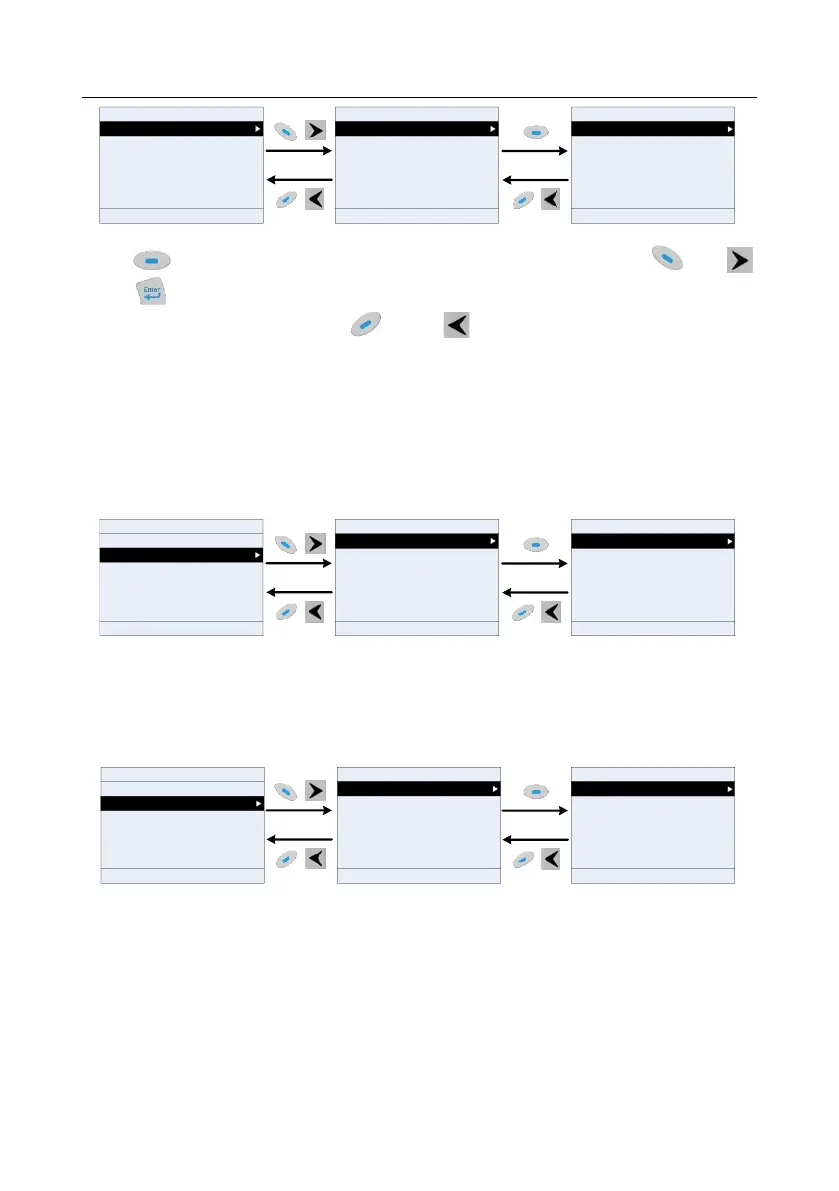
Figure 5-14 List edit diagram 1
Press key to enter edit interface, select the operation needed, and press the key,
key or key to confirm the edit operation and return to the previous menu (parameter list), the
returned list is the list edited. If the key or key is pressed in edit interface without
selectingan edit operation, it will return to the previous menu (parameter list remain unchanged).
Note: For the parameter objects in the list header, move-up operation will be invalid, and the same
principle can be applied to the parameter objects in the list footer; after deleting a certain parameter,
the parameter objects under it will be moved up automatically.
The items in the parameter list in running state can be added as needed (through the menu of user
defined home parameters), and the list can also be edited such as "Move up", "Move down", "Delete
from the list", and "Restore default parameters". The edit function is shown in the interface below.
HD2
16:02:35
Place top
HD2
16:02:35
Stopped-state parameters
Running-state parameters
Fwd
Local Ready
Fwd
Local Ready
Move up
Delete from the list
Move down
Restore default parameters
16:02:35
P17.01:OutpFreq
P17.00:Set Freq
P17.11:DC Bus Volt
P17.03:Outp Volt
P17.04:Outp Cur
P17.05:Motor Speed
Fwd
Local
Ready
HD2
Back Home Sele
Back Edit OK Back Home Sele
Figure 5-15 List edit diagram 2
The parameters of user defined parameter setting can be added, deleted, or adjusted as needed,
such as "Move up", "Move down", "Delete from the list", and "Restore default parameters"; the adding
function can be set in a certain function code in a function group. The edit function is shown in the
figure below.
16:02:35
Grouping parameters
State parameter
Motor parameter autotuning
Parameter copy/Restore default
System setting
Fwd
Local Ready
User defined parameter setting
HD216:02:35
P00.00: Speed Ctrl Run Cmd
P00.02: Comm Cmd Channel
P00.03: Max Output Freq
P00.04: RunFreq Up Limit
P00.05: RunFreq Low Limit
Fwd
Local Ready
P00.01: Run Cmd Channel
16:02:35
Place top
Fwd
Local Ready
Move up
Delete from the list
Move down
Restore default parameters
HD2 HD2
Back Home Sele Back Edit Sele Back Home Sele
Figure 5-16 List edit diagram 3
5.4.3 Adding parameters to the parameter list displayed in stopped/running state
You can choose Menu > State monitoring, choose a submenu, and enter a specific function group
and then a specific function code to add the parameter to the list of parameters displayed in stopped
state or parameters displayed in running state.



 To Next Page